
- Agentforce
Agentforce reads whatever your Salesforce org already contains, and it acts through the automation you’ve already built. That inheritance is the whole readiness problem, in one sentence.
An agent inherits your duplicate contact records, your too-wide permission sets, and that Flow which only works because someone manually overrides it every Tuesday. Then it acts on every one of them, at a speed no human rep in your org can match.
So here’s the question: can this specific Salesforce org support a controlled Agentforce pilot right now, or does something in it need fixing first? That’s what a readiness check answers, and it only means anything once you’ve run it against your own org with your own reports open in front of you.
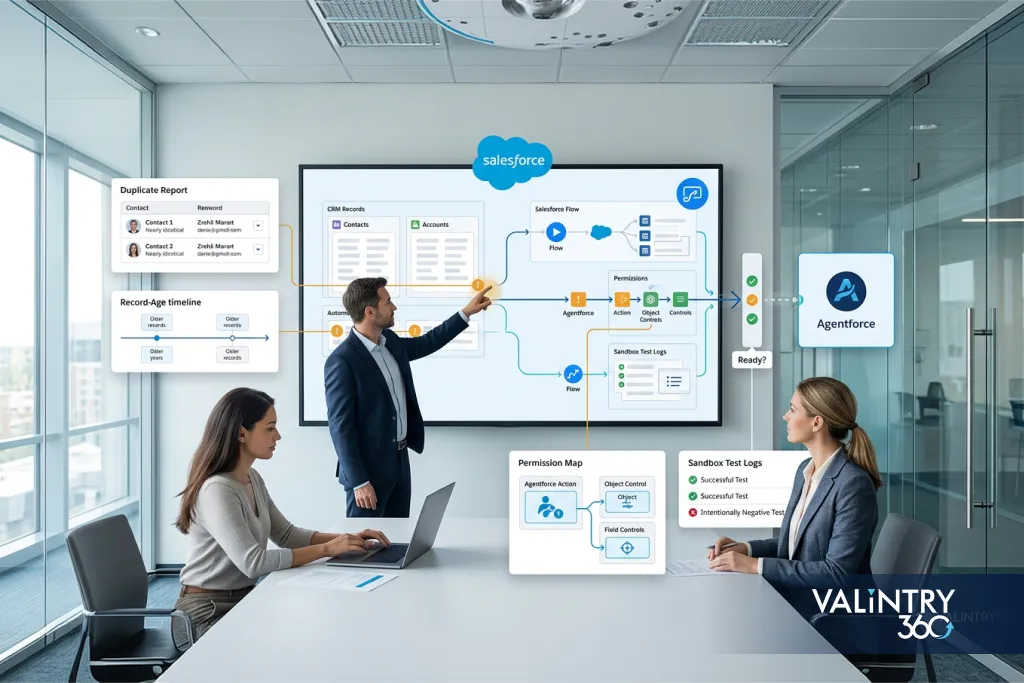
You’ll need specific things out of your org to answer it: duplicate reports, record-age reports, a permission map per action, and sandbox test logs with the negative cases included. That’s the evidence this checklist asks you to collect.
TL;DR
What Agentforce readiness actually checks. Readiness measures whether a specific use case has a clean process boundary, trustworthy data, the right access controls, and tested actions before it touches production. Owning the product is a separate question entirely.
The decision you’re trying to make. Every team runs the same fork: launch a bounded pilot now, or spend a defined stretch fixing data, permissions, or process gaps first. The evidence below is what makes that call defensible when finance asks why you picked one over the other.
The 9 areas to check. Data quality, Knowledge, Data 360, automation, permissions, testing, escalation, cost, and monitoring. Score each one against what you can pull from your own org today, weight it with VALiNTRY360’s model, then use the 30/60/90-day plan to close whatever comes back thin.
What Does Agentforce Readiness Mean for a Salesforce Org?
Agentforce readiness describes whether a Salesforce org has the business process, trusted information, technical components, access controls, testing evidence, and operating ownership a specific agent use case needs. Provisioning is a procurement milestone. Readiness is a release decision, and it comes later.
That distinction matters. Having Agentforce provisioned tells you nothing about whether your Case object has clean data, or whether your permission sets are scoped correctly.
Salesforce Agentforce Readiness, the way we use the term, covers both the licensing bar and the release bar. Most orgs clear the first one long before they clear the second.
Readiness scales with the use case you’ve chosen. A bounded case-deflection pilot needs far less than an agent that touches financial approvals. (Salesforce renamed “topics” to subagents in April 2026, so if you run into older material still using “topics,” it’s describing the same mechanism.)
This is also the same territory our AI readiness consulting work covers under the broader label of Salesforce AI Readiness, just narrowed here to Agentforce specifically instead of AI adoption across the platform.
| Readiness Area | Question the Team Must Answer |
|---|---|
| Use Case | What exact job will the agent perform? |
| Data | Can it trust the records it uses? |
| Knowledge | Are approved answers current and consistent? |
| Actions | Can required Salesforce actions run safely? |
| Access | Can the agent see and change only what its job requires? |
| Operations | Can the team test, observe, stop, and maintain it? |
Each of the 6 rows below turns into a specific artifact you can pull: a report, a map, a log, or a signed-off decision.
Why Salesforce Org Readiness Matters Before an Agentforce Rollout
An agent doesn’t operate in a vacuum. It reads your data and it triggers your automation, so whatever’s already fragile in your org becomes part of what the agent does wrong, at agent speed and agent volume. Picture the risk as a chain: context, then reasoning and action, then downstream process, then production outcome. A weakness at any link changes what comes out the other end.
Poor source information breaks the first link. Stale records, conflicting Knowledge articles, duplicate contacts, and broken object relationships all feed the agent bad context, and it acts on that context with total confidence. Access problems break the second: too little permission and the agent can’t finish the job, too much and it can touch records or run actions well outside what the use case needed.
Automation side effects break the third link. An agent action can trigger a Flow, which calls Apex, which fires a validation rule, which was never tested against agent-speed, agent-frequency execution.
Unclear process boundaries and weak production controls break the last two. Without a defined stop condition, an agent keeps going past where a person would’ve paused. Without session records, a named owner, and a way to deactivate a bad release, the first person who notices the problem is a customer.
If more than 1 or 2 of these chain links look shaky, that points to a wider gap than this one use case, closer to the ground Salesforce consulting work typically covers acros
Agentforce Readiness Checklist at a Glance
Here’s the fast version. If you want a diagnostic you can run this afternoon, before anyone asks you for a full assessment, start with the 12 rows in this table.
| Readiness Check | Evidence to Collect | Warning Sign |
|---|---|---|
| Bounded business use case | Process map and owner | Broad "AI assistant for everything" scope |
| Defined outcome | KPI and baseline | No measurable outcome |
| Reliable Salesforce data | Quality reports | Stale or conflicting records |
| Approved knowledge | Content review | Obsolete or contradictory material |
| Data 360 decision | Architecture decision | Unclear retrieval design |
| Integration readiness | Dependency map | Unstable or undocumented API |
| Agent access | Permission map | Excessive or missing permissions |
| Action readiness | Flow/Apex tests | Hidden automation conflicts |
| Security review | Approved controls | Sensitive information exposed unnecessarily |
| Sandbox testing | Test evidence | Only happy-path testing |
| Human escalation | Tested handoff | Unclear destination or ownership |
| Production operations | Monitoring and cost owner | No named owner after go-live day |
Every row needs a file you can attach: a report, an export, or a screenshot of a permission set. Each row’s evidence requirement is spelled out in the section that covers it.
Start With the Use Case Before Auditing the Org
Before you touch a single permission set, answer one question: does this process actually belong in Agentforce?
Define the job the agent will perform
Get specific about the trigger, the user’s goal, the information the agent needs, the decisions it has to make, which Salesforce and external actions it takes, what a successful result looks like, and when it has to escalate instead of finishing on its own. Salesforce’s own Agentforce planning guidance makes the same point from a different angle: define the business goal before you touch the technical build.
An Agentforce for Service case-deflection pilot and an Agentforce for Sales lead-qualification pilot both need this same exercise. They just land on very different answers.
Set the process boundary
Write down the start condition, the end condition that counts as success, which requests are out of scope entirely, and which actions need confirmation or human approval before they execute. A pilot without a written boundary drifts, usually toward doing more than anyone signed off on.
Decide which execution method fits the process
Agentforce is strong for some things and the wrong tool for others. Agentforce and Flow solve different kinds of problems, so this is about matching the tool to the process in front of you.
| Process Condition | Agentforce | Salesforce Flow or Fixed Automation | Human Approval | Rules-Based Self-Service |
|---|---|---|---|---|
| Natural-language request | Strong fit | Limited | Possible | Limited |
| Fixed deterministic sequence | Possible | Strong fit | Possible | Strong fit |
| High judgment requirement | Controlled use | Weak fit | Strong fit | Weak fit |
| High-impact irreversible action | Guarded | Guarded | Often required | Limited |
| Multi-system information retrieval | Possible with architecture | Possible | Manual | Depends on design |
Read the table by process, then pick the method the process points at. A natural-language request and a fixed 6-step sequence want different tools, and the sequence wants the deterministic one. If the answer keeps coming back “Agentforce, but only for a narrow slice,” that narrow-scope pattern is exactly what an Agentforce Quickstart engagement is scoped around.
Audit Salesforce Data and Knowledge Before Agentforce Uses Them
Salesforce Agentforce Data Readiness is where most readiness conversations start, because an agent is only ever as trustworthy as the records it’s reading.
Audit the records tied to the first use case
The bar here is trustworthy data inside the boundary of the use case you chose, on the specific objects that use case reads and writes. Check duplicate records, missing required fields, stale values, inconsistent picklists, conflicting values across related records, broken object relationships, unclear record ownership, unreliable custom fields, and sensitive free-text entries that shouldn’t be in an agent’s line of sight.
Focus the audit on the records the first agent will actually touch. A messy Opportunity object is irrelevant if your pilot only reads Cases.
Identify the source of truth
When Salesforce, an ERP, billing, and a service platform all hold overlapping information, the agent needs one place it trusts for each fact. Document it with a simple worksheet, one row per data element the agent depends on:
| Data Element | Source System | Owner | Freshness Requirement | Agent Use |
|---|
Fill this in per use case. It’s a small worksheet, but it prevents the agent from grounding an answer in whichever system happened to sync last.
Check Salesforce Knowledge and unstructured content
Knowledge behaves differently from CRM records: the agent repeats an article back to a customer as the answer, close to verbatim. Review outdated articles, conflicting instructions, duplicate documents, missing owners, expired policies, inconsistent terminology, confidential content that shouldn’t be indexed, and whether review dates are actually current.
Evidence the team should collect
| Evidence | What It Tells the Team |
|---|---|
| Duplicate report | Record collision risk |
| Missing-field report | Information gaps |
| Record-age report | Freshness |
| Knowledge inventory | Grounding quality |
| Source ownership list | Accountability |
Skip universal thresholds like “90% complete.” Your data quality bar comes from what this one use case requires, measured on the objects it reads, and verified in your own org before you set the target.
Decide How Data 360, Retrieval, and External Systems Fit
How your architecture reaches information is what you decide in this section, and the use case you’re building decides it for you. Owning Data 360 is one input to that decision, and only one of several.
Map how the agent will actually reach information
Once you know your data and Knowledge are trustworthy (that’s the audit you just ran in the previous section), the question becomes mechanical: how does the agent get to it? Options include direct access to Salesforce records, Agentforce Data Library for indexed content, a custom retriever for specialized retrieval, or middleware and direct API calls into connected enterprise systems. If that last path is where your use case lives, getting that connection reliable is its own project, the kind Salesforce integration consulting work is scoped around, and it needs to happen before an agent depends on it.
Determine the Data 360 dependency
Salesforce requires Data 360 to be set up before an org can use Agentforce Data Libraries, alongside the Lightning Experience requirement that already applies to Agentforce projects generally. Agentforce Data Library specifically can’t run without it, since Data Library uses Data 360 for processing, indexing, and search.
How much Data 360 depth an architecture needs still varies by use case. A native-records-only pilot has a very different dependency than one indexing thousands of PDFs.
One detail worth knowing before you scope anything: newer Agentforce Data Libraries don’t support web search as a source anymore. If a use case needs to search the open web, that’s the Search the Web action for agents, or the web retriever inside Prompt Builder. A Data Library entry won’t reach it.
Check external-data readiness
For anything reaching outside Salesforce, verify authentication, data ownership, API reliability, latency, rate limits, error behavior, data freshness, identity matching between systems, and what happens when the connection fails. This is the layer Agentforce integration services work is scoped around, since a shaky connection here undermines everything built on top of it.
| Data Path | Best Suited For | Readiness Evidence |
|---|---|---|
| Native Salesforce records | CRM context | Access and quality review |
| Agentforce Data Library | Indexed Knowledge/files | Data 360 and retriever setup |
| Custom retriever | Specialized retrieval | Retrieval tests |
| Middleware | Enterprise-system connection | Integration tests |
| Direct API/action | Live transactional work | Credentials and failure handling |
Most orgs end up mixing 2 or 3 of these data paths at once, and each path in that mix needs its own readiness evidence before the agent goes live.
Review Salesforce Architecture, Automation, and Agentforce Actions

This is the bridge between trustworthy data and safe execution. An agent action can be perfectly correct and still leave your org in the wrong state, because of what happens after it fires. Our own breakdown of how Agentforce works goes deeper into the reasoning loop itself if you want the mechanics behind what follows.
Inventory what already runs in the org
Catalog record-triggered Flows, autolaunched Flows, Apex, validation rules, approval logic, scheduled processes, external service calls, and whatever legacy automation is still hanging around. You’re identifying which existing components an Agentforce action might trigger, directly or several steps downstream.
Map each agent action
Trace the path: user request, then subagent, then action, then Flow, Apex, or API, then the Salesforce or external system, then the outcome. For every action in that chain, capture the required inputs, the output, what objects it changes, what downstream automation it touches, external dependencies, the permissions it needs, and what happens when it fails.
Keep deterministic steps deterministic
Where an action’s order has to stay fixed every time, put that sequencing in a Flow or Apex action, where the order is compiled in and the reasoning engine can’t reinterpret it fresh on each run. Salesforce’s own developer guidance on Agentforce Apex actions makes this same point: composite actions enforce order in a way instructions alone can’t guarantee.
Design for the failure cases
Failure behavior is an architecture decision, and it gets made here.
Before this ever reaches a test plan, the architecture itself needs an answer for each of these: What happens if an action executes twice? What happens when an API times out? What happens when required input is missing? What happens when a validation rule rejects the update? Can a partial process leave records in the wrong state?
If the answer to any of these is “we haven’t decided,” that’s a gap the architecture needs to close before testing can even validate it.
Audit Permissions, Security, Privacy, and Governance
Access is the boundary that decides what the agent can do, independent of what it was told to do.
Identify the execution identity
Permission behavior differs by agent type and deployment scenario, and the difference changes the entire permission review you’re about to run.
An employee-facing agent can inherit the currently logged-in user’s own access. A Service agent working an external channel, where there’s no logged-in user to inherit from, may run under a dedicated agent user instead. Know which model your use case runs on before you start mapping permissions, since the two need completely different reviews.
Build a least-privilege map
Salesforce creates the dedicated agent user with minimal access by default, specifically so it’s secure out of the box, and expects admins to expand it deliberately. Check object permissions, field-level security, sharing rules, related-object access, Flow access, Apex access, prompt-template dependencies, external credentials, and write permissions. The agent needs access to every object referenced by the Flow, Apex, or prompt-template actions it actually executes, nothing more.
Review sensitive information
Check whether the agent can encounter personal information, financial information, health information where applicable, contractual data, confidential internal fields, or sensitive free-text entries that were never meant to leave a rep’s screen.
One behavior to design the whole sensitive-data review around: Salesforce turns off data masking in the Einstein Trust Layer for agents, specifically to protect response accuracy. Data sent to external LLM providers is still protected in transit and covered by Salesforce’s zero-data-retention policy. Permissions and field-level security are the controls that keep sensitive fields out of an agent’s answers, so scope access at the field level first, then treat the Trust Layer as a second layer sitting over a permission model that already holds on its own.
Review AI-specific controls
Cover prompt-injection testing, the rest of the Trust Layer controls (grounding, toxicity detection, audit logging), how agent instructions constrain behavior, which actions require approval before they fire, and where audit records actually live.
| Resource/Action | Required Access | Current Access | Owner | Approval Needed |
|---|
Fill this in per action before launch, while you still have time to argue about a scope.
Build the Agentforce Test Plan Before Production
A test plan names the actions to test on their own, the conversations to run end to end, the negative cases to force, and the evidence each stage has to produce before the next one starts. “Test in sandbox” names a location and leaves all 4 of those open.
Start with action-level tests
Verify Flow, Apex, retrieval, integrations, and permission dependencies individually before you ever evaluate a full conversation. If an action fails on its own, it’ll fail inside a conversation too, just harder to diagnose. Our Agentforce testing guide walks through golden datasets and regression prompts in more depth than fits here.
Move to conversation and batch testing
Use Agentforce Builder’s preview and Agentforce Testing Center to check whether the right subagent gets selected, the right action runs, Knowledge retrieval pulls the correct content, and the response matches what you actually expected.
Confirm the failure cases behave the way you designed them
You decided what should happen when an action fires twice, an API times out, or input goes missing. Now force each of those conditions in a sandbox and watch what the agent does: test ambiguous requests, missing information, invalid input, inaccessible records, incorrect permissions, failed APIs, conflicting Knowledge, prompt-injection attempts, repeated actions, unsupported requests, and escalation itself. Positive and negative cases both belong in the set, because an agent that only ever sees clean inputs during testing hasn’t been tested at all.
Build a release ladder
A reasonable sequence: component testing, action testing, conversation testing, security and permission testing, business UAT, then release and rollback validation. Each stage should produce a named artifact: a test run ID, a pass and fail count, or a sign-off with a date on it.
One billing detail to confirm against the current rate card before you budget anything: as of Summer ’26, testing inside Agentforce Testing Center itself doesn’t consume Einstein Requests or Flex Credits. Data 360 queries triggered from Testing Center still do. Check Salesforce’s current rate card before you finalize any cost assumptions, since this is exactly the kind of detail that shifts between releases.
Prepare Human Escalation, Ownership, and Change Control
Readiness includes the people who operate the agent day to day: who takes the escalation, who owns the configuration, and who gets paged when a release goes wrong at 2am.
Define the escalation path before the first escalation happens
A handoff that drops context is worse than no handoff, because the customer repeats themselves to a person who now looks unprepared. Decide what transfers with the escalation: the session transcript, the records the agent touched, the action it attempted, and the reason it stopped.
Document the trigger condition, the receiving team, which queue or person picks it up, what context gets transferred, what happens after hours, and what happens if the handoff itself fails.
Assign operating owners
Business process owner. Owns the business rules and the success measure the pilot is judged against.
Salesforce/Agentforce owner. Owns configuration and every release change.
Data or Knowledge owner. Owns the source content the agent grounds its answers in.
Security/compliance owner. Reviews access and sensitive-data handling.
Support owner. Handles incidents and agent failures when they happen.
Settle change control up front
Who’s allowed to change instructions, Knowledge, actions, permissions, integrations, or which version is active? Write it down before the first change request shows up, and put a name against each row.
Estimate Agentforce Licensing, Consumption, and Operating Cost
Cost readiness means separating what you pay for access from what you pay for usage, since Agentforce mixes both.
Know your pricing model before you estimate anything
Salesforce Foundations itself costs $0, but Agentforce usage on top of it runs on a few separate pricing paths that can’t be mixed in the same org: Flex Credits at $500 per 100,000 credits, Conversations at $2 per 24-hour session, the Agentforce add-on at $125 per user per month, Agentforce Industries add-ons at $150, Agentforce 1 Editions starting at $550 per user per month (which bundles 1 million Flex Credits per org annually), and a standalone Agentforce User License at $5 per user per month that requires Flex Credits separately.
A standard action runs roughly 20 Flex Credits, about $0.10 at public list price. Unused Flex Credits don’t roll over into the next term, so overbuying doesn’t bank you anything.
Re-check Salesforce’s current pricing before you finalize a number, since this moves. Our Agentforce 360 breakdown walks through how these pricing paths interact in more detail, including where Data 360 costs tend to surprise buyers who only priced the license.
Estimate action consumption
A simple planning formula: expected monthly tasks times average actions per task times current credit cost. Then add a buffer for retries and higher-volume weeks, since real usage doesn’t run at the average.
Include the costs around the license
Cost readiness also means Data 360 consumption, integration work, data cleanup, Flow and Apex remediation, the security review, testing itself, ongoing administration, and incident investigation when something breaks. A license fee is the visible line item. Budget the lines sitting underneath it too.
Build a costing worksheet instead of trying to land on one total. There’s no universal implementation price that applies across orgs, and anyone who quotes you one without seeing your use case is guessing.
Prepare Production Monitoring and Incident Response
Production is where you find out whether the pilot worked, which means the monitoring setup has to exist before the first real session lands on it.
Decide what needs watching, grouped into 4 separate areas
Quality: task completion rate, incorrect answers, incorrect actions, and how often escalation fires.
Operations: action failures, latency, integration failures, and repeated attempts.
Usage and cost: sessions, actions, Flex Credit usage, and Data 360 consumption, tracked against the estimate you built in the cost section so the number actually means something.
Business result: the use-case-specific KPI you defined back in the process section, compared against the pre-Agentforce baseline.
Use Salesforce’s own production evidence
Session Tracing, Agent Analytics, Agent Health Monitoring, and Digital Wallet all give you a direct window into what the agent is doing in production. As of a July 2026 update, core observability features including Session Tracing and Agent Analytics stopped consuming Data 360 credits for standard monitoring processing.
Net-new customization still draws on credits: dashboards you build from scratch, external data sources you ingest, and new objects you create at the semantic data model level. Know which side of that line your monitoring setup lands on, and re-check Salesforce’s current documentation before you finalize a cost assumption here.
Define incident ownership before you need it
Who reviews a failed session? Who has the authority to deactivate the affected agent or version? Who fixes the underlying action or Knowledge gap? And what has to happen before that release goes back into testing instead of straight back into production?
Score Readiness, Decide the Release Path, and Build the Remediation Plan
Everything above rolls up into one decision: launch now, or fix something first. VALiNTRY360 publishes a weighted model for exactly this call, with the dimension weights set from assessments run against live orgs.
Use the VALiNTRY360 readiness dimensions
| Dimension | Weight | What It Measures |
|---|---|---|
| Data foundation | 30% | Completeness, duplicate density, and field consistency on the objects an agent will touch, plus current Knowledge content. |
| Automation and process clarity | 25% | No competing Flows, Workflow Rules, or triggers on agent-touched objects; documented stage criteria and ownership for every process an agent enters. |
| Permissions and security | 20% | A least-privilege agent runtime user, scoped integration users, field-level security on sensitive data, Trust Layer, and Shield settings. |
| Integration and Data 360 readiness | 15% | Whether the systems an agent must reach are connected and reliable, available API capacity, and whether the use case requires Data 360. |
| Governance and people | 10% | A named owner, a human escalation path, KPIs tied to the use case, and post-launch monitoring. |
Score against these 5 dimensions and you land on a number from 0 to 100. Below 50, the org isn’t ready.
The 50 to 69 band means foundation work comes first, because a pilot launched at that level will surface its gaps in production instead of in a sandbox. 70 to 84 is pilot-ready, and 85 and above means the org can take a second use case.
Some controls stay mandatory regardless of the score
A high overall score doesn’t excuse skipping specific release gates. Before production, you still need a defined pilot, approved source information, the right permissions in place, passed action tests, a completed security review, a tested escalation path, sandbox test evidence, a named production owner, a cost model, and a documented rollback procedure. For the governance dimension specifically, NIST’s Generative AI risk management profile is a useful independent frame alongside whatever Salesforce-specific evidence you’re already collecting.
Run remediation on a 30/60/90-day path
First 30 days. Document the process, clean the use-case data, review Knowledge, map permissions, and inventory existing automation.
By 60 days. Configure a bounded pilot, test integrations, validate actions, complete the security checks, and build the formal test set.
By 90 days. Run the controlled deployment, inspect sessions as they come in, compare outcomes against the baseline, correct defects, and decide whether a second use case is ready to enter the same assessment. Our Agentforce implementation guide covers what changes once you’re past a single pilot and scaling to more use cases.
When several of these checks come back thin, that’s exactly what the scoring model above is built to surface. A VALiNTRY360 Agentforce Readiness Assessment runs this same scoring model against an actual org and documents the gaps as a remediation plan, the same structure this checklist follows.
Salesforce Readiness Case Studies From VALiNTRY360 Projects

These 5 projects are published in full in the VALiNTRY360 case studies library. Each one lands on something this checklist asks you to verify, and each carries the numbers the client reported once the work had shipped and been running a while.
1. Real California Milk: 500 Annual Data Hours Cut to 4
Real California Milk was running on SugarCRM with staff manually updating and reconciling account and contact records, reports that took days to produce, stakeholders who had stopped trusting the numbers, and no single place to check any of it. VALiNTRY360 migrated Real California Milk to Sales Cloud with an ETL layer built for quarterly imports and reconciliation, alongside MailChimp and Zoom connections for activity capture. Annual labor hours spent manually updating data fell from 500 to 4.
Key takeaway: Data foundation is the dimension this checklist weights most heavily, and this project shows why. An agent grounded in records that staff were reconciling by hand would have inherited every inconsistency the migration removed.
Read the full case study: Real California Milk Salesforce Migration
2. AthenaPsych: 80% of Patients Scheduled on the First Call
AthenaPsych, a New York State mental health provider, faced rising demand against an outdated EMR that capped operational capacity. VALiNTRY360 replaced the EMR outright with a custom Health Cloud platform carrying Salesforce Scheduler, Shield, Experience Cloud, and connections to Vonage and Change Healthcare. In the first 6 months, 80% of patients were scheduled on the first call, 68% completed intake within 7 days, CPT coding errors fell 69% and clinical compliance errors fell 75%.
Key takeaway: Compliance error rates are measurable evidence, which is the kind of number the permissions and governance section asks a team to have in hand before the release gate, with a date attached to it.
Read the full case study: AthenaPsych Salesforce Health Cloud Implementation
3. TrialSpark: 85% Patient Engagement in the First Month
TrialSpark runs clinical trials where enrollment and retention depend on routing cases to the right staff, escalating clinical questions, keeping participants informed across concurrent studies, and holding records that carry a higher regulatory bar than ordinary customer data. VALiNTRY360 built a patient operations platform on Service Cloud with Shield, omni-channel routing, an Experience Cloud community, Salesforce Flow, Marketing Cloud journeys, and AWS Connect telephony on a single patient record. Engagement reached 85% in the first month of a new trial deployment, support ticket resolution time fell 77%, and 20 hours were saved on each new enrollment.
Key takeaway: VALiNTRY360 designed the escalation paths and the named owners into the platform at build time, which is the sequencing the escalation and change control section argues for, and the reason that section sits before the launch work.
Read the full case study: TrialSpark Salesforce Service Cloud Implementation
4. Ravago: $500K in New Revenue in 3 Months
Ravago wanted a direct-to-consumer channel, and its Marketing Cloud instance had been built for B2B distribution. It held neither the segmentation nor the dynamic content the new channel needed, so every campaign went out as a broadcast to a list. VALiNTRY360 reengineered the data architecture and automations, reordered the existing journeys, added anniversary and abandoned cart journeys, and built landing pages, a loyalty program, and SMS, and the new channel recorded $500K in revenue in its first 3 months.
Key takeaway: Auditing what already runs in the org comes before adding anything to it. The existing automation was the constraint, and finding that first is what the architecture and automation inventory is for.
Read the full case study: Ravago Salesforce Marketing Cloud Optimization
5. All American Solar: 16% Quarterly Growth From a Bounded Scope
All American Solar needed a CRM it could maintain without a dedicated administrator, plus unified reporting on sales progress, installation status, ROI, and pipeline by rep. A Sales Cloud Quick Start covered lead and opportunity processes, custom fields across the core objects, record types and roles for access control, bidirectional Gmail synchronization and standard dashboards, with 4 hours of on-site training. The company recorded 16% quarterly growth year over year.
Key takeaway: A deliberately narrow first scope produces usage evidence that sizes the next phase, which is the same argument this checklist makes for scoring one use case rather than the whole org.
Read the full case study: All American Solar Sales Cloud Implementation
FAQs About Agentforce Readiness
What is an Agentforce readiness checklist?
A structured way to verify whether a Salesforce org has the process clarity, data quality, access controls, and testing evidence a specific Agentforce use case needs before production, scoped to that one use case and the specific objects it reads and writes.
How do I know if my Salesforce org is ready for Agentforce?
Score it against a weighted model covering data foundation, process clarity, permissions, integration readiness, and governance. A score of 70 or above generally means you’re pilot-ready. Below 50 means the org isn’t ready, and 50 to 69 means foundation work comes first.
What should an Agentforce readiness assessment cover?
At minimum: the use case and its process boundary, data and Knowledge quality, retrieval architecture, existing automation, permissions, a real test plan, escalation, cost, and production monitoring.
Does Agentforce require Data 360?
It’s a required platform feature for Agentforce projects, and Data Library specifically can’t run without it. How much Data 360 investment your use case needs depends on your retrieval architecture.
What Salesforce data should be reviewed before Agentforce implementation?
Focus on the records the first use case will actually touch: duplicates, missing required fields, stale values, inconsistent picklists, conflicting values, and broken relationships. The bar is trustworthy data inside your use case’s boundary, on the objects that use case reads and writes.
Does Agentforce require Salesforce Knowledge?
It depends on the use case. If yours answers questions, Knowledge content needs the same scrutiny as CRM data: current, non-contradictory, and owned by someone accountable for it.
What permissions does an Agentforce agent need?
The minimum access required by every object referenced in the Flows, Apex, or prompt-template actions it actually executes, built on least privilege, then expanded one object at a time as the actions require it.
Do Agentforce permissions differ between Service and Employee agents?
Yes. It depends on the agent type and how it’s deployed, and the fastest way to tell is to open the agent record and check whether a dedicated agent user is assigned to it. If one is, that user’s permission set is the boundary. If none is, the agent is running on the logged-in user’s own access and the boundary moves with whoever is signed in.
Can Agentforce use Salesforce Flow and Apex actions?
Yes. For any step where execution order has to stay fixed every time, put that sequencing inside a Flow or Apex action, where the order is compiled in and enforced on every run.
Can Agentforce access data from external systems?
Yes, through middleware or direct API calls, but each external path needs its own check: authentication, reliability, latency, and what happens when the connection fails.
How should Agentforce be tested before production?
Start with action-level tests, move to conversation and batch testing through Agentforce Testing Center, then run negative and failure testing (ambiguous input, missing information, failed APIs, prompt-injection attempts) before business UAT and a release/rollback check.
What should an Agentforce pilot measure?
A specific, pre-defined KPI tied to the use case, tracked against a baseline captured before the agent launched, alongside quality signals like task completion and escalation rate.
How much does Agentforce cost?
It depends on the pricing path: Flex Credits at $500 per 100,000 credits, Conversations at $2 per 24-hour session, per-user add-ons from $125 a month, or Agentforce 1 Editions from $550 per user per month. Check current pricing before budgeting.
Who should own Agentforce after launch?
Split ownership deliberately: a business process owner, a Salesforce/Agentforce configuration owner, a data or Knowledge owner, a security and compliance owner, and a support owner for incidents. One person rarely covers all 5 of those well for long.
What should prevent an Agentforce production release?
Any of the mandatory release gates coming back incomplete: an undefined pilot scope, unapproved source information, missing permissions, failed action tests, an incomplete security review, an untested escalation path, missing sandbox evidence, no named production owner, no cost model, or no rollback procedure.
Related Posts
- Agentforce
Agentforce vs Salesforce Flow: Which Should You Use…
Your Salesforce org may already depend on Flow for record updates, approval routing, notifications, scheduled jobs, guided screens, and other repeatable processes. Each path is configured in advance, so the system follows the same rules whenever the same conditions appear.Agentforce…
- Agentforce
Agentforce Implementation Cost in 2026
Salesforce publishes a price for a credit, a conversation, a user license, and a resolved case. Those numbers price the meter.Your project is everything that happens before the meter starts running: defining the process, cleaning the records the agent will…
- Agentforce
Salesforce Consulting vs Implementation vs Managed Services
A company calls a firm and asks for "Salesforce consulting," expecting the team to configure the platform and go live in 6 weeks. Another buys an implementation and assumes the same people will keep fixing things a year later. A…