
Agentforce Integration Services
VALiNTRY360 connects Agentforce to your ERP, CRM, billing and data systems with governed APIs, MuleSoft and MCP, so your AI agents work from live records and take actions you can audit.

What Are Agentforce Integration Services?
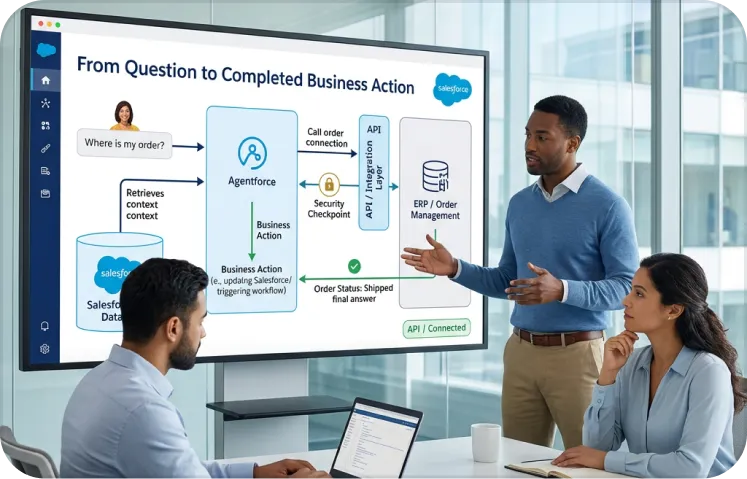
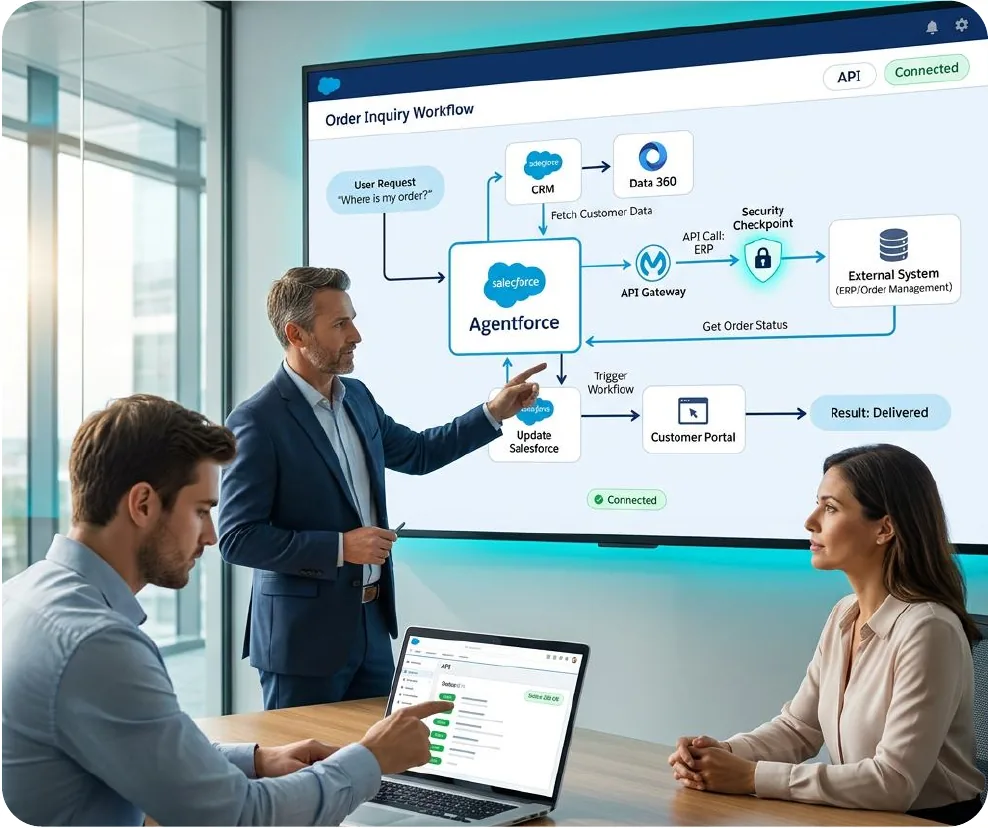
Agentforce integration services connect Salesforce AI agents to ERP, billing, ticketing and data platforms where your business operates. With the right connections, agents can move beyond Salesforce records to check inventory, retrieve pricing, update orders and create support tickets using approved actions. Salesforce supports several integration methods, including Flow, Apex with Named Credentials and External Services, MuleSoft APIs and connectors, MCP servers and Data 360. Choosing the right method requires attention to data access, security, reliability and ongoing governance. At VALiNTRY360, we act as your Agentforce integration partner, mapping systems, designing integration patterns, securing connections and testing agent actions before launch. Our approach builds on our Salesforce integration consulting and AI agent development solutions for secure, scalable business automation.
Our Agentforce Integration Services
We deliver Salesforce Agentforce integration as six connected services. You can start with an assessment, one system or a full program, and each service ends in a deliverable your team can review.
Agentforce Integration Readiness Assessment
We assess the systems your agents need to access, identify available APIs and review data quality before planning integration. Our team maps connected applications, system owners and the fields agents will use. We then evaluate each integration based on business value, technical effort and security risks. You receive a written readiness assessment with prioritized integrations, recommended connection methods and data issues that need attention before implementation.
API and Action Design
We design secure, reusable API actions that allow Agentforce to retrieve information, update records and complete business tasks. Each action has defined inputs, outputs, permissions and error-handling rules. Our team configures agent topics and instructions to trigger the appropriate actions and tests their behavior before deployment. Where existing APIs are available, we use Salesforce API Catalog and Topic Center to support integration without unnecessary development.
MuleSoft Integration for Agentforce
We use MuleSoft Anypoint Platform to connect Agentforce with ERP, CRM, billing and legacy business applications. Our specialists build reusable APIs and leverage existing MuleSoft integrations to reduce duplicate development. We also configure the MuleSoft Agentforce Connector where Mule applications need to invoke agents. Authentication policies, API rate limits and monitoring controls are established to help maintain secure and reliable communication between Salesforce agents and connected enterprise systems.
MCP Server Setup
We configure Model Context Protocol (MCP) servers to provide Agentforce with controlled access to approved external tools and services. Our team builds MCP servers using existing APIs or MuleSoft applications, registers supported servers through API Catalog and configures OAuth 2.0 authentication. We also establish tool allowlists and access permissions based on each agent’s responsibilities, ensuring agents can use only the tools required for their assigned workflows.
Data 360 and Data Unification
We integrate Agentforce with Salesforce Data 360 to bring customer, account and operational information together from connected systems. Our team maps data sources, establishes identity resolution rules and configures ingestion for relevant business records. We also address duplicate records, missing fields and inconsistent data before agents use the information. Each integration is scoped to the agent’s specific requirements, helping improve response accuracy without introducing unnecessary data complexity.
Governance, Testing and Managed Support
We establish security, approval and monitoring controls to help maintain reliable Agentforce integrations after deployment. Our specialists configure least-privilege access, define approval requirements for sensitive actions and test each API action and agent workflow before launch. We also review integration errors, usage patterns and associated costs to identify improvements. Our Agentforce managed services team provides ongoing troubleshooting, optimization and administrative support as your connected systems and business requirements evolve.
Ways to Connect Agentforce to External Systems
No single method fits every action. Most projects combine several, and the right choice depends on the system, the volume and who maintains it.
Method
Best For
How We Implement It
Flow
Admin-built actions on Salesforce data and simple outside calls
We build the action as a Flow, add error handling and expose it to the agent.
Apex with Named Credentials and External Services
Custom logic, tight control and established patterns
We write and test the callout, store credentials securely and map the response.
MuleSoft APIs and Connectors
Enterprise systems, shared APIs and reuse across teams
We design reusable APIs on Anypoint Platform and publish them to Salesforce through API Catalog.
MCP Servers
New agent-driven integrations that other AI clients may also use
We build the server, register it, allowlist tools and test discovery and calls.
Data 360
Unified customer context and grounding
We ingest and unify the source data, then ground agents on it.
Published guidance suggests keeping Apex and REST for high-throughput and batch work, and using MCP for new agent-driven integrations. We apply that rule of thumb and confirm it against your volumes. Our guide to MuleSoft to Salesforce integration covers the API layer in more depth.
Integration Challenges We Solve
Connecting an agent to a system is easy to demo and hard to run. We plan for the points where projects usually break.
01Legacy Systems With No Modern API
Many core systems expose only batch files or old interfaces. An agent cannot reason over a file drop.
Our solution:
We place an API layer in front of the system with MuleSoft or a lightweight service, so the agent calls a clean action. We document what the layer can and cannot do.
02Poor Data Behind a Good Connection
Duplicates, stale fields and mismatched IDs produce confident wrong answers. A fast connection makes the problem worse.
Our solution:
We profile the data before the agent reads it and fix identity and field issues at the source. Our AI readiness services cover profiling and cleanup.
03Agents Given Too Many Tools
Published guidance warns that accuracy falls when an agent has too many tools in context. A catch-all agent picks the wrong one.
Our solution:
We give each agent a short, named list of tools, usually around 20 or fewer, and split broad jobs across agents with clear handoffs.
04Over-Broad Access
A shared service account with full access turns one bad instruction into a data incident.
Our solution:
We use scoped credentials, allowlisted tools and read-only access to start. Each added permission has an owner and a reason.
Agentforce Integration Use Cases
These are the integrations we prioritize because they are concrete, measurable and tied to work your teams repeat. We tailor each one to your systems and policies.
Use Case
What the Agent Does
How We Implement It
Order and Inventory Status
Answers stock and order questions from the ERP.
We expose read-only ERP actions and test answers against live records.
Quote Creation
Builds a quote using live pricing and rules.
We connect pricing, add approval steps and keep a person on exceptions.
Ticket and Case Handoff
Opens, updates or routes a ticket in another tool.
We connect the ticketing system and define which fields sync both ways.
Billing and Account Questions
Answers invoice and payment questions for service teams.
We connect billing read-only first and log every lookup.
Clinical and Payer Lookups
Retrieves coverage or record status for care teams.
We connect through approved interfaces, as described in our Agentforce for Healthcare work.
Back-Office Automation
Runs a multi-step task across several systems with approval at key points.
We orchestrate the steps in MuleSoft or Flow and add checks between them.
For ERP-specific patterns with SAP, Oracle and Dynamics, see our ERP integration with Salesforce service.
What Clients Say About Working With VALiNTRY360
Agentforce integration builds on Salesforce integration work we already deliver. Add a relevant client testimonial here that highlights VALiNTRY360’s integration expertise, responsiveness, delivery quality or ongoing support.
Sean Rose
@seanrose
Really, really liking @reflectnotes so far. It’s just the right amount of simple/fast for a personal note taking app and does most of the hard work of organizing in the background.
Ryan Delk
@delk
Don’t take it from me: @reflectnotes is magic.
Demetria Giles
@drosewritings
Playing around with @reflectnotes. I’m back logging key thoughts, details and soundbites from episodes, books, meetings, articles, etc from the past week. So far, it’s a knowledge worker’s dream come true.
Fabrizio Rinaldi
@linuz90
I’m keeping @reflectnotes open *all* the time, and I’m using both for simple journaling, and long form writing. It’s rare to see a single app work so well for both.
Jeremy McPeak
@jwmcpeak
I just received an invite to @reflectnotes, and holy crap! It is well thought out, and I can see this being my note- taking platform going forward. Well done! I’m looking forward to seeing how the app progresses.
Jonathan Simcoe
@jdsimcoe
All righty. I have to give a massive shout-out to @maccaw for pioneering @reflectnotes. It has already matured to a point where it is a daily driver for me. The speed, focus, and attention to detail (especially perfect bits of structured data) is superb.
Include the client’s name, job title, company and the testimonial where approval is available.
Agentforce Integration Readiness Checklist
Most failed integrations share the same early gaps. Before we build anything, we work through six checks with your team. You can run the first pass yourself.
Systems list.
Name every system an agent must read or write, and who owns each one.
API inventory.
Record which systems have documented APIs, which have only files, and which have nothing.
Data quality.
Test the key fields for duplicates, blanks and mismatched IDs.
Access model.
Decide which identity each connection will use and what that identity may do.
Volume estimate.
Estimate calls per hour at peak, including retries.
Owner and runbook.
Assign a named owner who can fix a failed connection.
A system that fails two or more checks needs prework before it joins the pilot. We report the gaps in the assessment and help you close them in order of value.
How We Choose the Integration Pattern
We choose the pattern one action at a time. A single agent often uses three or four methods, and that is normal. We score each action against five questions.
Question
What We Look For
Why It Matters
Does an API already exist?
A documented, secured interface
Reuse is cheaper and safer than a new build
How often is it called?
Calls per hour at peak
High volume favors proven patterns and caching
Who else needs it?
Other agents, apps or AI clients
Shared tools justify an API or MCP server
How risky is the write?
Read-only, reversible or financial
Risky writes need approval and tighter scope
Who maintains it?
A named team with the skills
An unowned integration breaks within a quarter
Read-only lookups on a stable API are the best place to start. Writes to financial or customer records come after the controls have been tested.
MuleSoft Agent Fabric and Multi-Agent Governance
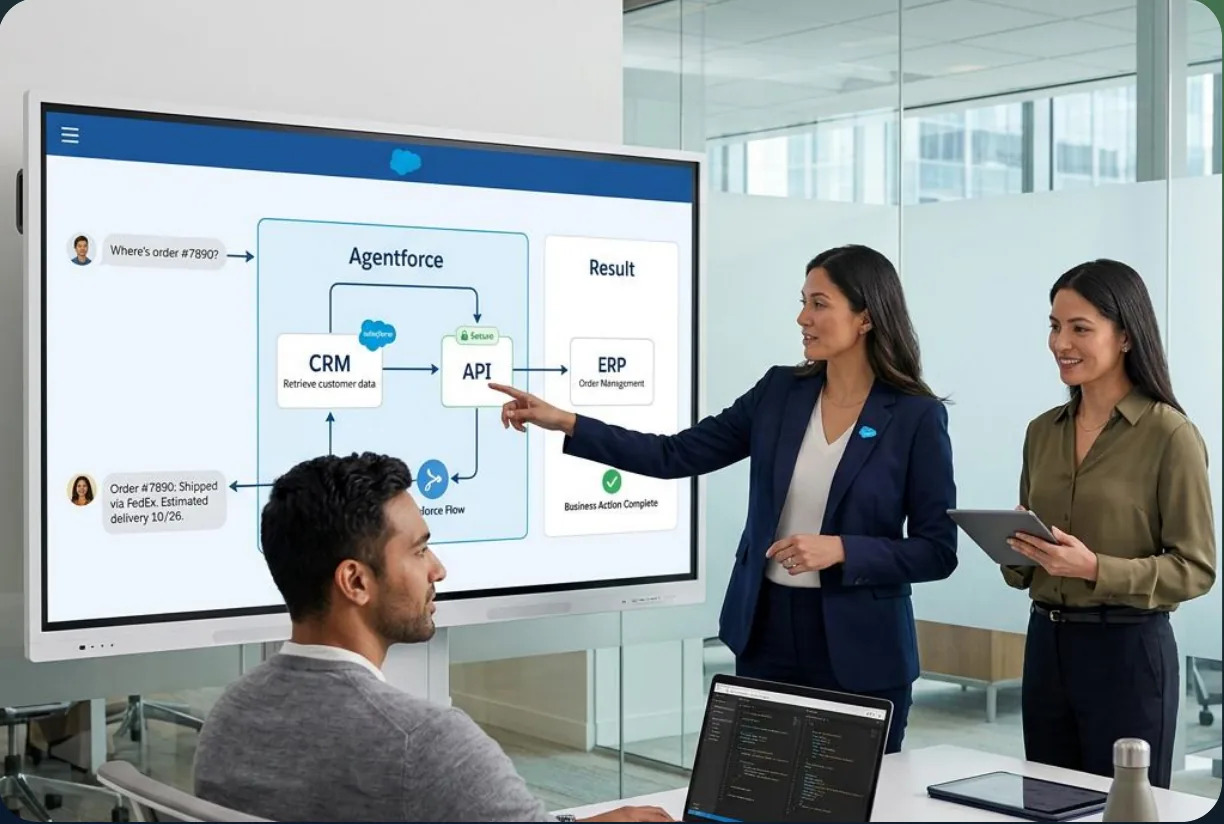
When multiple AI agents operate across your business, MuleSoft Agent Fabric provides a centralized way to manage, coordinate and govern them, including agents built on Agentforce and other platforms. It brings together four key capabilities: Agent Registry catalogs agents, MCP servers and LLM providers; Agent Broker routes requests to the appropriate agent or tool; Agent Visualizer maps connections between agents and tools; and Flex Gateway applies governance policies across agent-to-agent and agent-to-tool interactions. While Agent Fabric may not be necessary for your first agent, it becomes valuable when multiple agents share tools, operate across different vendors or require centralized security and monitoring. Salesforce documentation also identifies current limitations in metrics, with improvements to tracing and cost tracking planned. At VALiNTRY360, we help you identify available capabilities and plan for future requirements.
Our Agentforce Integration Process
Our six-step process moves from assessment to a governed rollout. Each step has set activities, a deliverable and a decision point, so your team knows what happens next.
Step 1: Discover
- We map systems, owners, interfaces and data quality.
- Interviews with IT, operations and security leads
- Inventory of APIs, credentials and constraints
- Written readiness score and ranked integration list
Step 2: Design
- We choose the pattern and define each action.
- Pattern decision for every action
- Action specifications with inputs, outputs and failure behavior
- Security and approval model agreed with you
Step 3: Build
- We create the APIs, servers and connections.
- MuleSoft APIs, MCP servers or Apex callouts
- Authentication with OAuth 2.0 and managed credentials
- Data 360 ingestion where unified context is needed
Step 4: Connect and Guard
- We register the tools and set controls around them.
- Tool registration and allowlisting in Salesforce
- Agent topics and instructions that call the right action
- Approval rules, logging and least-privilege access
Step 5: Test
- We test each action and each agent before launch.
- Unit tests per action and end-to-end agent tests
- Load tests for critical actions
- Adversarial prompts and failure drills
Step 6: Launch and Support
- We go live in phases, then monitor and tune.
- Phased rollout, starting read-only
- Runbooks and handover for your administrators
- Ongoing monitoring through managed support
Timelines depend on the number of systems, the quality of their APIs and your security review. A read-only lookup on an existing API moves much faster than a multi-system write workflow. We give you a dated plan after the assessment.
Agentforce Integration Security and Compliance
Every integration widens what an agent can reach, so the controls matter. Salesforce supports field-level security, sharing rules, the Einstein Trust Layer and tool allowlisting. How you configure them decides how safe the integration is, and your compliance obligations stay yours.
01
Authentication and Credentials
We use OAuth 2.0 with scoped credentials for hosted tools and keep secrets in managed credential stores, not in code. Each connection has its own identity so access can be revoked one at a time.
02
Tool Allowlisting
No tool reaches an agent until an admin approves it. We review each tool for what it reads and writes and expose only what the agent’s job needs.
03
Trust Layer and Data Masking
Agent calls pass through the Einstein Trust Layer, which supports masking and audit logging. We check what data leaves Salesforce, where it goes and which agreements cover it.
04
Human Approval
Actions that move money, change customer records or touch regulated data stay behind a person’s approval until test results support a change.
For a related view of human control in AI automation, see our guide to human-in-the-loop AI sales automation.
Limits and Considerations We Plan Around
Some details in this area change between releases, and parts of the MCP tooling were still new when we wrote this. We confirm each item below against current documentation during the assessment.
Consideration
What to Know
How We Plan For It
Tool count per agent
Published guidance suggests keeping tools to roughly 20 per agent
We design focused agents and split broad jobs
MCP maturity
Native MCP client features were described as early in some guidance
We confirm status and test before relying on a feature
High-throughput workloads
Guidance favors traditional APIs for very high request rates
We use proven patterns for volume and reserve MCP for agent tasks
MuleSoft subscription
MuleSoft servers and Agent Fabric need an Anypoint subscription
We confirm licensing before design
Agent Fabric metrics
Current metrics are limited, with more planned
We add our own monitoring where needed
Testing consumption
Running tests uses credits
We test in a sandbox and plan volume
Deployment method
Agents should be built and changed in each org, not moved by change sets
We script and document each environment build
What Do Agentforce Integration Services Cost?
Agentforce integration costs depend on the systems you connect, the number of actions agents perform and the infrastructure required to support them. Salesforce and MuleSoft pricing varies by edition, usage and contract terms. At VALiNTRY360, we assess your existing licenses, integration requirements and expected workloads before preparing a cost estimate. Here are six factors that influence your investment.
01
Agentforce Licenses and Flex Credits
Salesforce charges for Agentforce licenses and usage based on your agreement. We review existing entitlements, estimate action volumes and forecast credit consumption to help you plan costs.
02
MuleSoft Anypoint Subscription
MuleSoft costs depend on your subscription, integration architecture and API requirements. We evaluate existing MuleSoft capabilities and recommend configurations that support your business without unnecessary infrastructure.
03
Data 360 and Additional Services
Connecting and unifying data may introduce additional Salesforce costs. We assess required data sources, ingestion volumes and identity resolution needs before recommending Data 360 configurations.
04
Third-Party API and Integration Fees
External systems may charge for API access, transactions or additional usage. We review vendor pricing, request limits and integration dependencies to identify potential expenses.
05
VALiNTRY360 Implementation Services
Our service costs depend on integration complexity, the number of connected systems and development requirements. We structure projects into defined phases with clear deliverables and change controls.
06
Ongoing Monitoring and Optimization
Integration maintenance includes error monitoring, API performance reviews, retry management and usage tracking. We help control operating costs by reducing unnecessary calls and optimizing underperforming workflows.
We also help keep integration expenses predictable by caching frequently requested information, limiting unnecessary retries and reviewing usage costs each month. This allows your team to identify expensive workflows, improve efficiency and scale Agentforce integrations based on measurable business value.
Salesforce Integration Case Studies Behind Our Agentforce Work
Successful Agentforce integrations depend on connected enterprise systems, accurate data and reliable automation. These VALiNTRY360 projects demonstrate how our Salesforce integration expertise helps businesses improve operational efficiency and build the foundation for AI-powered workflows.
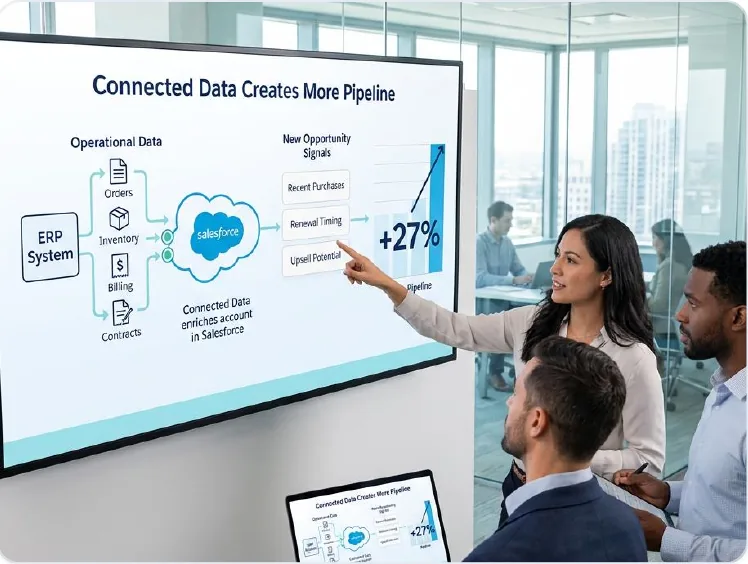
BIC Graphic: 27% Increase in Pipeline Opportunities Through Salesforce ERP Integration
VALiNTRY360 implemented Salesforce Sales Cloud and Service Cloud for BIC Graphic, integrating the company’s existing ERP system to connect sales, customer service and order information. The solution automated business processes, improved customer visibility and reduced average customer service handle time by 7 minutes, while increasing new pipeline opportunities by more than 27%. This project demonstrates our ability to connect enterprise applications and create reliable data flows that support Agentforce integration.

Real California Milk: Reduced Annual Manual Data Work From 500 Hours to 4
VALiNTRY360 migrated Real California Milk from SugarCRM to Salesforce Sales Cloud, implementing ETL automation, scheduled data imports and integrations with MailChimp and Zoom. These connections improved data accuracy, automated account and contact updates, and provided reliable reporting through Salesforce dashboards. The implementation reduced annual manual data maintenance from 500 hours to just 4 hours. This project highlights our expertise in data synchronization, third-party integrations and automated workflows that form the foundation of reliable Agentforce solutions.
Agentforce Integration Services
Agentforce Integrations Built by Certified Experts
An AI agent is only as useful as the systems it can reach. VALiNTRY360's team holds Agentforce Specialist, AI Associate, Data 360 Consultant, and Platform Developer certifications, so we connect Agentforce to your ERP, service tools, and external APIs through secure custom actions and well-governed data access. Your agents can look up orders, update records, and trigger workflows across systems, safely and reliably, with a Salesforce-Branded Partner since 2018.
Salesforce Credential Deck
4 Core Specializations
- CERTIFIEDPlatform Developer
Why Choose VALiNTRY360 for Agentforce Integration Services?
Agentforce sits on integration and data foundations we work in every day. Most rollout risk sits in the connections, the data and the permissions, and that is where we spend our time.
Our team works across Agentforce, MuleSoft, Apex, Flow and Data 360, so you do not need separate vendors for the API layer, the agent and the data. One accountable team means fewer handoffs and a single owner when something changes.
We also tell you when a connection is not worth building. Some systems change too often, expose too little data or add more risk than value. In those cases we recommend a simpler path, such as a scheduled export into Data 360 or a person-in-the-loop step, and we explain the trade-off in plain terms.
01
Pattern chosen per action
We match Flow, Apex, MuleSoft, MCP or Data 360 to each job.
02
Reuse before rebuild
We use your existing APIs and MuleSoft assets where they fit.
03
Governance built in
We set allowlists, approvals and least-privilege access before the pilot begins.
04
Limits checked
We confirm current platform limits and maturity before we design around them.
05
Honest cost modeling
We forecast usage by calls per task and assign an owner for monthly review.
06
Handover and support
We document the setup for your team and stay available through managed support.
100+ Salesforce Certifications Behind Your Agentforce Integration Success
At VALiNTRY360, our certified Salesforce specialists bring expertise backed by 100+ Salesforce certifications across the team. From Agentforce integration and MuleSoft APIs to MCP server setup, Data 360 and workflow automation, our experts help businesses build secure, reliable and scalable integrations. We combine technical knowledge with hands-on implementation experience to connect enterprise systems, improve data accessibility and support AI-powered business processes. Whether you are implementing your first Agentforce integration or expanding across multiple platforms, our specialists provide expert guidance, implementation support and ongoing optimization.
Agentforce Integration Services FAQ by VALiNTRY 360
Agentforce integration services connect Salesforce AI agents to ERP, CRM, billing, ticketing and data systems. They cover API design, MuleSoft, MCP servers, Data 360 and the security controls around each connection, so agents can read live data and take governed actions.
Agentforce can call external systems through Flow, Apex callouts with Named Credentials, External Services, MuleSoft APIs and connectors, and MCP servers. Data 360 can unify data from outside sources. We choose the method for each action based on the system, volume and risk.
No. Flow, Apex and External Services can connect many systems. MuleSoft helps when you need reusable enterprise APIs, shared governance or many integrations. We recommend it where it reduces long-term work and tell you when it is more than you need.
An MCP server exposes tools that an agent can discover and call using Model Context Protocol. An admin registers the server in Salesforce and allowlists specific tools, so agents reach only approved actions. MuleSoft can host servers built from your existing APIs.
MuleSoft Agent Fabric is a platform for discovering, orchestrating and governing AI agents across vendors. It includes Agent Registry, Agent Broker, Agent Visualizer and governance through Flex Gateway. It matters most once several agents share tools or run on different platforms.
Yes, through APIs, MuleSoft connectors or MCP servers, depending on your ERP and its interfaces. We confirm available APIs, security rules and volume during the assessment, and we start with read-only lookups before agents write to the ERP.
We use scoped OAuth credentials, tool allowlists, least-privilege access, the Einstein Trust Layer and approval steps for sensitive actions. We also log every tool call. Compliance still depends on your configuration and agreements, and we document the controls for your reviewers.
Cost includes Agentforce licenses and credits, MuleSoft, Data 360, third-party API fees and implementation services. At US list price a standard action uses 20 Flex Credits, about $0.10. We forecast by calls per task and confirm your contract terms first.
The timeline depends on the number of systems, API quality, data readiness and security review. A read-only lookup on an existing API is the fastest. We scope a first integration after the assessment and give you a dated plan instead of a generic estimate.
A skilled administrator and developer can build a basic connection. A partner helps when the work spans several systems, needs API design, security review, data cleanup and cost forecasting. Those tasks decide whether an integrated agent reaches production.
Yes. Agentforce can retrieve information and update records across connected systems through configured APIs and actions. We establish read and write permissions, validate data transfers and introduce approval steps for sensitive operations to maintain accuracy and control.
No. Agentforce can use real-time API connections or data synchronized at scheduled intervals, depending on business requirements. We assess response times, data freshness and transaction volumes to determine the most suitable integration approach for each workflow.
We configure error handling, monitoring alerts and recovery procedures to manage failed API requests or unavailable systems. Depending on the integration, failed actions can be retried safely, logged for investigation or escalated to a designated administrator.
Yes. Existing Salesforce integrations, MuleSoft APIs and supported external services can often be reused for Agentforce. We assess their compatibility, authentication methods and performance before connecting them to agents, reducing unnecessary development and simplifying ongoing maintenance.
We track API response times, successful transactions, failed requests, retry rates and integration costs. VALiNTRY360 reviews these metrics alongside business outcomes to identify performance issues, optimize connected workflows and measure the value delivered by Agentforce integrations.