
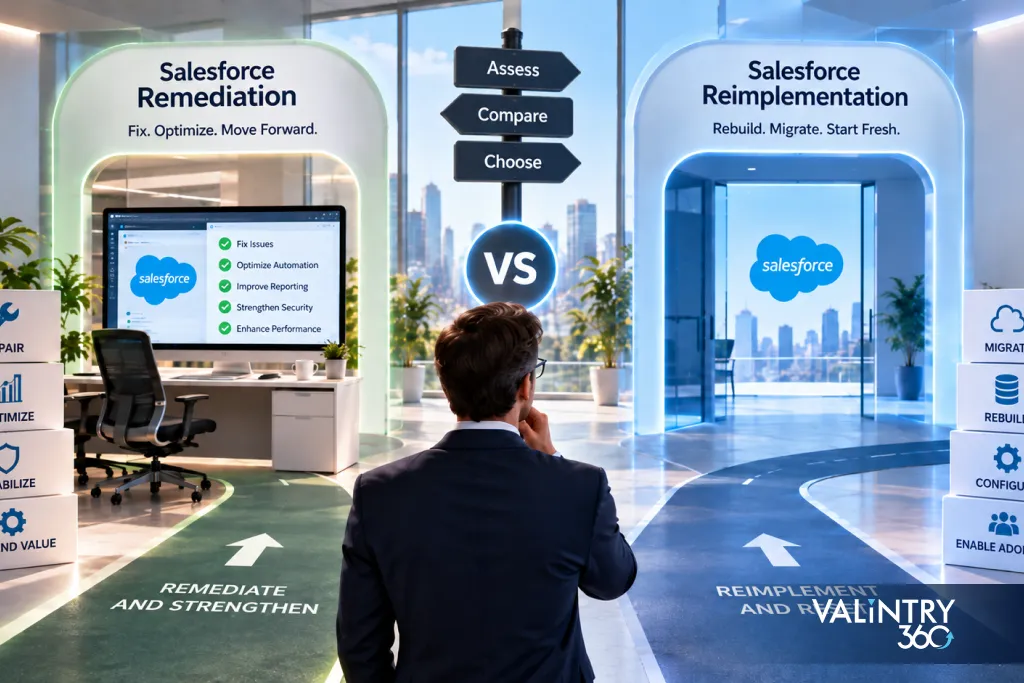
A team starts with a few broken automations, a couple of reporting problems, or permission issues that keep resurfacing. Once the work actually begins, more dependencies appear. Each fix touches something nobody had mapped, and what looked like a short repair list starts looking like a wider architecture review.
At that point leadership needs evidence, not instinct. Repeated fixes are a real signal worth investigating, but they don’t by themselves prove the org needs replacing, and a new org carries its own migration and cutover work that shouldn’t be underestimated either. The decision should start with an audit, not a preference.
VALiNTRY360 works through this exact decision with clients regularly, alongside the broader Salesforce consulting services work that usually surfaces it in the first place. By the end of this guide you’ll be able to compare:
- What remediation, selective rebuild, and reimplementation actually mean
- What an org audit should cover before you choose a path
- How to score the decision using evidence instead of gut feel
- What each path really costs once internal effort is counted
Each of those questions gets its own section below, starting with what the 3 recovery paths actually mean once the marketing language around them gets stripped away.
What Salesforce Remediation, Selective Rebuild, and Reimplementation Mean
These 3 terms get used loosely in the market, so it’s worth defining them precisely before comparing them. Vendors sometimes use “remediation” and “reimplementation” almost interchangeably in early sales conversations, which makes it harder for a buyer to know what they’re actually being sold.
| Recovery path | Main approach | What happens to the current org |
|---|---|---|
| Salesforce Org Remediation | Repair defects, debt, data, access, automation, and delivery practices | Retained |
| Selective rebuild | Redesign one major process or technical domain | Retained |
| Salesforce Reimplementation | Build a new target solution around a redesigned architecture | Replaced or extensively rebuilt |
Salesforce reimplementation means something more specific here than simply “a new project.” It’s designing a target solution first, then rebuilding Salesforce around that design, commonly in a new org because the existing architecture can’t carry the target state without constant exceptions. It commonly includes:
- New org setup
- Metadata recreation
- Security model setup
- Data migration
- Integration work
- Testing
- Training
- Cutover
That list is longer than most reimplementation conversations acknowledge up front, and skipping any item on it is usually what turns a planned 6-month project into a much longer one.
Selective rebuild sits deliberately between the other 2, and it’s easy to skip past in a rushed conversation. It applies when the org is genuinely fine overall but 1 major domain, not the whole foundation, has stopped working. Treating that domain on its own avoids paying for a full rebuild you don’t need.
Keep the definition tied to the decision rather than to how bad the current org feels. A messy org and a structurally unsound one are not the same problem, and they don’t call for the same fix. The rest of this guide exists to help you tell the difference with evidence instead of guessing.
10 Signs a Salesforce Org Needs a Recovery Decision
None of these signs alone proves you need a rebuild. Together, they’re a reasonable trigger to run a formal audit instead of continuing to patch reactively.
- Small changes repeatedly affect unrelated processes. A field update in one area breaks something nobody expected, which usually points to undocumented dependencies rather than bad luck.
- Teams use spreadsheets to complete core Salesforce work. That’s a sign the Salesforce version of the process doesn’t actually fit how the work gets done.
- Reports disagree on basic KPIs. When 2 reports built on the same data tell different stories, trust in the whole system erodes fast.
- Several automation tools control the same process. Flows, older workflow rules, and Apex triggers competing on one object is a common source of unpredictable behavior.
- Integrations fail and ownership is unclear. Nobody knowing who monitors a failed sync is often worse than the failure itself.
- Permission changes regularly cause access problems. A sharing and role model that breaks every time someone adjusts it has usually outgrown its original design.
- Data cleanup problems return. Recurring duplicates after a cleanup project means the root cause was never actually fixed.
- Releases require repeated manual correction. If every deployment needs a follow-up fix, the release process itself is part of the problem.
- Core business processes have changed since the original implementation. A failed Salesforce implementation is sometimes just an implementation that never got updated as the business changed around it.
- Important configuration exists without clear documentation or ownership. Nobody being able to explain why something exists is its own kind of risk.
Any 2 or 3 of these signs showing up together are reason enough to stop patching reactively and start measuring the org properly instead.
Run a Salesforce Org Audit Before Choosing Either Path
A Salesforce Org Audit should cover 8 areas, not just the one causing the most visible pain right now. Auditing only the area everyone’s already complaining about is how a data-model problem gets misdiagnosed as a training problem, or the reverse.
| Audit area | What to examine |
|---|---|
| Business processes | Does Salesforce still match how teams work? |
| Data model | Do objects and relationships fit current requirements? |
| Automation | Are Flows, Apex, and older automation understandable and testable? |
| Data | Are records complete, current, owned, and deduplicated? |
| Integrations | Are interfaces documented and dependable? |
| Security | Do roles, sharing, profiles, permission sets, and connected apps fit current needs? |
| Delivery process | Are source control, testing, release controls, and rollback procedures in place? |
| Adoption | Are users following the intended Salesforce process? |
Each area deserves its own reviewer or review pass rather than 1 person skimming all 8 in an afternoon. Business-process and adoption findings usually come from interviews and direct observation, while data-model, automation, and security findings come from actually working inside the org, and the 2 kinds of evidence rarely surface from the same conversation.
What the Audit Should Produce
Every finding from the audit should carry the same 6 pieces of information, so findings can actually be compared against each other later, area to area, instead of living in 8 disconnected documents:
- Evidence
- Business effect
- Dependency reach
- Repair effort
- Owner
- Recommended action
A finding without evidence is an opinion, and a finding without an owner tends to sit untouched no matter how serious it is. Dependency reach deserves particular attention: a defect that looks minor in isolation can turn out to feed 6 downstream reports and 2 integrations, which changes both its priority and its estimated repair effort considerably.
The output of a full Salesforce Org Audit isn’t a single verdict. It’s a set of findings across all 8 areas, each carrying its own evidence, that the rest of this guide’s scorecard and comparison sections turn into an actual decision.
Compare Remediation, Selective Rebuild, and Reimplementation
Once the audit findings are in hand, lay all 3 paths side by side against the same 9 factors. Reading the table by row, not by column, is what actually helps: a single org rarely lands entirely in 1 column, and the pattern across rows is what points toward the right path.
| Decision factor | Remediation | Selective rebuild | Reimplementation |
|---|---|---|---|
| Core data model | Mostly usable | One area needs redesign | Widespread structural mismatch |
| Business process fit | Mostly current | Major mismatch in a defined area | Several core processes changed |
| Technical debt | Concentrated | Heavy in selected domains | Spread through foundational components |
| Integrations | Mostly usable | Some need redesign | Many depend on the old architecture |
| User impact | Lower | Moderate | Higher |
| Data migration | Limited | Localized | Major workstream |
| Testing scope | Affected areas | Selected process plus dependencies | Broad regression and UAT |
| Cutover | Incremental | Phased | Formal migration and cutover |
| Training | Targeted | Role or process based | Wider retraining |
Selective rebuild is worth calling out on its own, because it gets skipped too often in practice. It’s the right fit when the org still works overall but one major domain, often the data model, the automation layer, or a core Sales Cloud process, has become genuinely difficult to maintain. Treating that domain as its own project avoids both an unnecessary full rebuild and an endless patch job on a part of the org that needs a real redesign.
Most tables like this get used to justify a decision that was already made before the audit started. Used honestly, this one should do the opposite: if your organization’s instinct says “reimplementation” but the row-by-row pattern actually looks like remediation with 1 or 2 domains needing a selective rebuild, the table is the evidence worth trusting over the instinct.
Build a Decision Scorecard From Evidence
Score each factor from 1 to 5 based on what the audit actually found, not on how the last project felt. A 1 means the audit found the factor is fundamentally sound; a 5 means it’s a genuine structural problem that a repair won’t reach.
| Factor | Question |
|---|---|
| Process fit | How much of the current operating model still works in Salesforce? |
| Data-model fit | How much structural change is required? |
| Dependency reach | How many components depend on the areas being changed? |
| Maintainability | Can the current build be understood, tested, and changed safely? |
| Security design | Can access problems be corrected without broad redesign? |
| Integration fit | Can existing interfaces support the target state? |
| Migration burden | What must move if a new org is created? |
| Adoption burden | How much user behavior will change? |
Record Evidence Next to Every Score
A number on its own isn’t defensible, and a scorecard full of numbers with no backup is just as easy to argue with as no scorecard at all. Next to each score, record:
- Score
- Evidence
- Owner
- Uncertainty
- Follow-up question
The uncertainty column matters more than it looks like it should. A score of 4 that the team is confident about should get treated very differently from a score of 4 nobody’s actually sure of yet, and collapsing both into the same number hides that difference from whoever reads the scorecard later.
The total score should guide further investigation. It shouldn’t automatically choose remediation or reimplementation for you. A low score on 1 factor and a high score everywhere else usually points to a selective rebuild, and only a scorecard that shows its evidence makes that kind of nuance visible instead of flattening it into 1 number.
Treat a tied or ambiguous total as a signal to go back and collect more evidence on the factors with the most uncertainty attached, not as a reason to break the tie by preference.
Compare the Full Cost of Remediation and Reimplementation
Cost comparisons in this space tend to focus on the build itself and skip what happens afterward. Salesforce’s own resource and cost optimization guidance puts a number on that gap: maintenance typically consumes 60% to 80% of development capacity for a mature solution, which means the ongoing cost of whichever path you choose usually outweighs the build cost within a couple of years.
| Cost area | Remediation | Reimplementation |
|---|---|---|
| Assessment | Required | Required |
| Architecture | Targeted review | New target-state design |
| Configuration and code | Repair existing assets | Build or recreate |
| Data cleanup | Common | Common before migration |
| Data migration | Limited | Major workstream |
| Integrations | Repair selected interfaces | Reconnect and retest |
| Testing | Focused regression | Broad regression and UAT |
| Training | Targeted | Wider |
| Cutover | Incremental | Formal |
| Parallel operating period | Uncommon | Possible |
| Decommissioning | Limited | Often required |
| Post-launch support | Required | Required |
Include Internal Cost
External spending is only part of the real number, and it’s usually the smaller part once internal time gets counted honestly. Calculate internal cost separately:
- Internal staff hours
- Partner cost
- User testing time
- Training time
- Data preparation
- Integration work
- Release or cutover effort
- Support after change
Internal staff hours in particular get undercounted almost every time, because the people doing the work are also doing their regular jobs at the same time, and that overlap rarely makes it into a project budget. A remediation that looks cheap on the partner invoice can still cost the business real productivity if it quietly consumes a data team’s attention for 2 quarters.
Keep Opportunity Cost Separate
Opportunity cost belongs in the conversation, but it shouldn’t get folded into the same line as direct spending. Delayed releases, postponed AI or Data 360 work, and ongoing manual effort all have a real cost even though none of them show up on an invoice. Avoid universal dollar figures here; the honest version of this section is a worksheet, not a number pulled from someone else’s project.
Building the worksheet yourself, using the audit’s own findings, also does something a vendor’s generic estimate can’t: it shows leadership exactly which line items are driving the total, which makes the number defensible instead of just believable.
What a Salesforce Remediation Program Should Contain
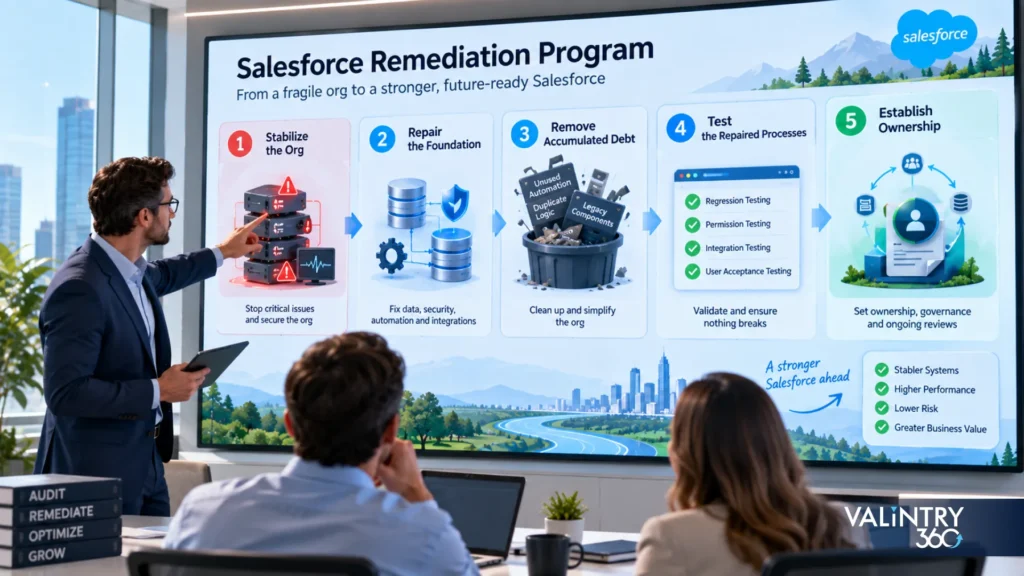
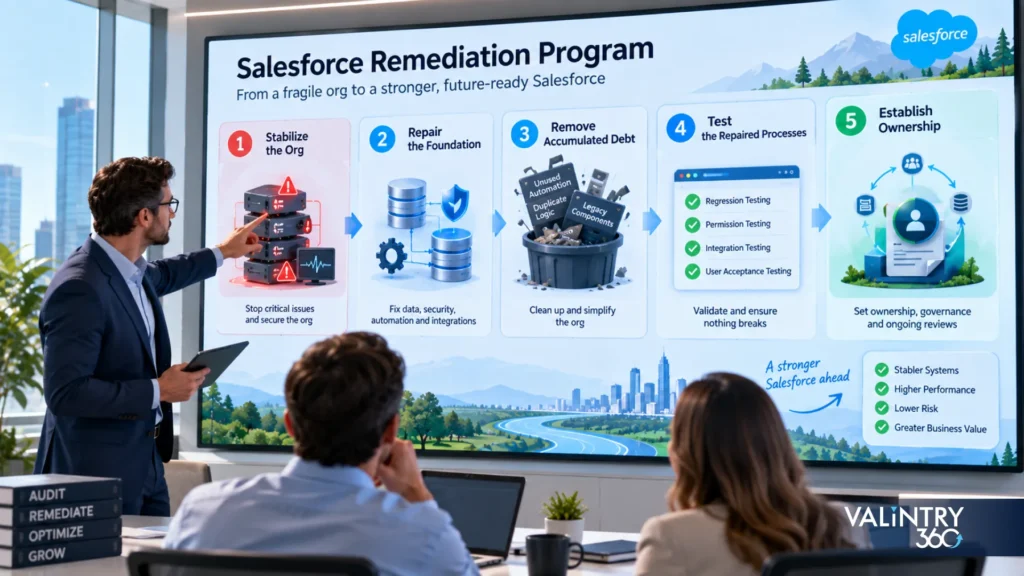
A remediation program works best as a sequence, not a single combined effort. Running all 5 phases at once is how a remediation quietly turns into a chaotic partial rebuild with none of the planning a real rebuild would get. This is the sequence VALiNTRY360 runs on remediation engagements, and it’s built around getting the org stable before anything else competes for attention.
Phase 1: Stabilize the Org
Address production failures and any high-risk access or integration problems first, before anything else starts. Nothing else on this list matters if the org is actively losing data or exposing something it shouldn’t.
Phase 2: Repair the Foundation
Work through data model defects, security gaps, high-risk automation, and core integrations, in that rough order of business impact. This phase is usually where the bulk of the audit’s findings actually get resolved.
Phase 3: Remove Accumulated Debt
Review dead metadata, old automation nobody uses, fragile code, duplicate logic, and documentation gaps. Where the custom build itself is the problem, our Salesforce Customization Services team can rebuild the specific components that need it without touching the rest of the org. This phase is also where most of a remediation’s long-term value comes from, since it’s the difference between a repaired org and an org that stays repaired.
Phase 4: Test the Repaired Processes
Run regression testing, permission testing, integration testing, and user acceptance testing before calling any of it done. Skipping this phase to hit a deadline is how the same defect ends up back on next quarter’s audit.
Phase 5: Establish Ownership
Define an architecture owner, a release process, a recurring technical-debt review, data ownership, and documentation rules, so the same problems don’t quietly rebuild themselves. A remediation program that ends at Phase 4 without this step tends to drift back toward its starting condition within a year or two.
Our Salesforce Remediation Services page covers how we run this kind of program end to end, and our Salesforce Managed Services team is where the ownership from Phase 5 usually lives once the repair work is done.
What a Salesforce Reimplementation Program Should Contain
A reimplementation touches nearly everything at once, the target operating model, the architecture, the data, the integrations, and the people who use all of it, so each phase below carries real weight instead of being a formality to check off.
Phase 1: Define the Target Operating Model
Document the future business process before any building starts. Designing screens before the process is settled is how reimplementations quietly drift back toward the same problems.
Phase 2: Design the Target Salesforce Architecture
Cover objects, relationships, automation, security, integrations, reporting, and which cloud products the target state actually needs. A reimplementation often means redesigning the sales process, the Service Cloud process, or both, so this is where our own Salesforce Implementation Consulting team typically gets involved.
Phase 3: Build the Target Environment
Set up metadata, access, development environments, source control, and a real release process before data or users are anywhere near it. Building this environment properly the first time is what keeps the new org from inheriting the same delivery habits that contributed to the original problem.
Phase 4: Prepare Data
Map source records to target fields, confirm ownership, resolve external IDs, preserve relationships, and settle history requirements before migration begins. This phase routinely takes longer than the technical build itself, because data ownership questions tend to surface disagreements between teams that nobody had actually resolved before.
Phase 5: Migrate and Validate
Load records in dependency order and reconcile totals against the source system rather than assuming the load succeeded because no error appeared. Salesforce’s own data migration best practices cover this same sequence: mapping, dependency order, and validation, which is worth following even when a partner is running the migration for you.
Phase 6: Rebuild or Reconnect Integrations
Test every endpoint against the new IDs, fields, schedules, events, and error handling, not just against the happy path. An integration that worked fine against the old org’s structure can fail silently against the new one if the underlying field mappings changed and nobody retested that specific path.
Phase 7: Run UAT, Training, and Cutover
Define acceptance criteria, a cutover sequence, user preparation, and contingency steps before go-live, not during it. Contingency steps matter even when the team is confident: a documented rollback plan that never gets used costs far less than improvising one during a live cutover.
Phase 8: Stabilize After Go-Live
Monitor data, integrations, adoption, incidents, and performance closely in the weeks immediately after cutover, since this is when problems from earlier phases usually surface.
Data and Integrations Often Decide How Practical Reimplementation Is
These 2 checklists rarely get run early enough. Teams tend to design the target architecture first and only discover the real data and integration burden once building has already started, at which point the answers are much more expensive to act on.
Data Questions
- Which objects must move?
- Which history is legally or operationally required?
- Which external systems store Salesforce IDs?
- Which records can be archived?
- Which duplicates need correction before migration?
- Which system owns each major data domain?
Ownership questions like the last one are where a lot of reimplementation timelines quietly slip. Our Salesforce Data Governance Services page covers how we help clients settle domain ownership before migration starts, rather than discovering the disagreement mid-project. Waiting until the load is already running to resolve a dispute over who owns the Account object is one of the more common, and most avoidable, delays we see.
Integration Questions
- Which systems send data to Salesforce?
- Which systems receive Salesforce data?
- Which external applications store record IDs?
- Which interfaces rely on old fields?
- Which middleware flows need revision?
- How will integrations operate during cutover?
Data and integration work is where an apparently simple reimplementation quietly turns into a much larger program. A clean new org design on paper doesn’t reduce the number of external systems that still need to be reconnected, retested, and cut over without breaking something downstream. That’s especially true when ERP integration sits in the mix, since financial and operational systems rarely tolerate a rough cutover.
Our Salesforce Data Migration Services and Salesforce Integration Services pages go deeper on how we handle both of these when they’re the main driver of program complexity.
Separate Repairable Security Problems From Structural Access Problems

Security findings need their own version of the keep-versus-rebuild question, because it’s easy to let a bad Health Check score drive the entire recovery decision when most of what it’s measuring is actually fixable in place.
Configuration Problems
Old profiles, excess permissions, unused connected apps, old users who should have been deactivated, expired certificates, and poor permission-set management are common findings, and all of them can usually be corrected inside the current org. None of these require touching the underlying architecture, which is exactly why they shouldn’t be allowed to drive a reimplementation decision on their own.
Structural Access Problems
A sharing model that no longer reflects the organization, ownership design that conflicts with how the business is actually structured, major compliance boundaries that have shifted, and business units that now need genuinely different operating models are a different category. These may require wider architecture work, not a configuration pass. Telling the 2 categories apart is the actual audit work; both can produce an equally alarming Health Check score.
Salesforce Security Health Check is a useful input here, since it scores configuration against a baseline. It’s worth being direct about its limits, though: a poor security score on its own doesn’t establish a case for reimplementation. It tells you where to look, not what to build, and someone still has to do the work of sorting each finding into 1 of the 2 categories above.
A low score driven mostly by configuration problems is genuinely good news. It means the fix is a cleanup project measured in weeks, not a redesign measured in months.
User Adoption and Governance Can Change the Recovery Path
Weak adoption gets blamed on the platform more often than it deserves. A lot of what looks like “Salesforce doesn’t work for us” is actually a process, training, or ownership gap that a rebuild wouldn’t fix on its own, since the new org would still need someone to own the same decisions the old one never had an owner for.
| Finding | Likely work |
|---|---|
| Users avoid a suitable process | Adoption and workflow correction |
| Process itself has changed | Business-process redesign |
| Architecture decisions have no owner | Governance reset |
| Releases regularly conflict | Delivery-process repair |
| Training ended after implementation | Role-based training |
| Teams use different business definitions | Data and process governance |
Check the Root Cause Before Rebuilding
A new implementation still needs process ownership, release ownership, training, documentation, data ownership, and real architecture decisions made by someone accountable for them. The same management gap that caused the first set of problems can reappear inside a brand-new org if the operating model around it never actually changes.
This is the argument for including adoption and governance findings in the audit itself, not treating them as a separate, softer conversation that happens after the technical decision is already made. A reimplementation that fixes the architecture but leaves ownership undefined is solving half the problem at full price, and it usually shows up as the same complaints again within a year, just pointed at a newer org.
Governance is also the cheapest item on this entire page to fix relative to the risk it removes. Naming an owner costs nothing beyond the conversation itself, and it’s routinely the single change that keeps a remediation or reimplementation from needing a repeat within 2 or 3 years.
What Current Salesforce Guidance Adds to the Decision
| Salesforce guidance | Decision use |
|---|---|
| #Well-Architected Framework | Assess several architecture quality areas, not just the one causing visible pain |
| #Org Health and Usage | Check operational signals before choosing a path |
| #Technical-debt guidance | Record business impact and repair effort per debt item |
| #Security Health Check | Inspect security configuration against a baseline |
| #DevOps Center | Build source control into whichever path you choose |
| #Org migration guidance | Account for metadata, users, relationships, migration order, and validation |
None of these 6 sources argue for reimplementation as a default position, which is itself worth noticing given how often “just rebuild it” gets treated as the safe recommendation. Salesforce’s own material consistently points toward measuring and repairing first.
Together, this is the strongest argument in the whole guide for auditing before choosing: Salesforce’s own frameworks treat org health as something you measure across several dimensions, not a single verdict you arrive at from gut feel.
Build the Business Case Before Approving Remediation or Reimplementation
By this point you have the evidence: an audit across 8 domains, a 3-path comparison, a decision scorecard, and a real cost worksheet. The business case is where all of it gets organized into something leadership can actually approve, rather than a recommendation they’re being asked to take on faith.
The business case should contain current-state findings, target-state requirements, components to retain, components to retire, areas to rebuild, migration scope, integration impact, security impact, estimated delivery cost, internal resource requirement, user-change impact, cutover risk, and success measures. Leaving any of these out is usually what triggers a second round of questions and delays approval by weeks.
| Decision question | Evidence required |
|---|---|
| What can be repaired safely? | Audit and dependency analysis |
| What should be retained? | Usage, testability, maintenance evidence |
| What requires redesign? | Process and architecture gap |
| What must migrate? | Data inventory |
| What must reconnect? | Integration map |
| What will users need to change? | Adoption assessment |
| How will success be measured? | Baseline metrics |
An independent read on this evidence, done by someone who didn’t build the original org, is often what separates a business case leadership approves from one that gets sent back with more questions. VALiNTRY360 runs exactly that kind of assessment as part of its Salesforce consulting work. For programs that reach beyond Salesforce itself, our Digital Transformation Solutions team scopes the wider change program a business case like this can trigger.
A business case built this way also survives leadership turnover better than an informal recommendation does. When the evidence is written down, a new decision-maker can pick it up 6 months later and still understand why the org chose the path it did.
See This Framework in Practice: VALiNTRY360 Case Studies
None of this is theoretical. VALiNTRY360 has worked both sides of this decision, remediation and reimplementation, for real clients, and the results are documented in detail on our case studies page. These 5 are the closest match to the framework above:
- Real California Milk moved entirely off SugarCRM and into Salesforce, a full reimplementation that cut manual data work from 500 hours a year down to 4.
- AthenaPsych replaced its EMR with Salesforce Health Cloud, the kind of ground-up rebuild reimplementation calls for when the existing system genuinely can’t reach the target state.
- Ravago optimized an existing Marketing Cloud org instead of rebuilding it, closer to the remediation path, and generated $500,000 in new revenue within 3 months.
- BIC Graphic went through a combined Sales Cloud and Service Cloud implementation that cut average handle time by 7 minutes, a working example of what a properly sequenced reimplementation program delivers.
- AdventHealth University built a single, reliable view of every alumnus from the ground up, the kind of target-state outcome a reimplementation is meant to produce.
Related Case Studies
Everything above is the framework. If you want to check out our case studies to see what it looks like in practice, here are 5 from VALiNTRY360’s own client work, each sitting in a different part of the consulting, implementation, and managed-services picture:
- How a Salesforce Quick Start Implementation Drove 16% Quarterly Growth for All American Solar: a straightforward Sales Cloud implementation from a defined scope to go-live.
- How a Salesforce Sales Cloud and Service Cloud Implementation Cut BIC Graphic’s Average Handle Time by 7 Minutes: a larger, multi-cloud implementation with ERP integration, closer to the “adding another cloud” situation covered above.
- How a SugarCRM to Salesforce Migration Cut Real California Milk’s Manual Data Work From 500 Hours a Year to 4: a consulting-led migration and data-architecture rework, the “migrating off another CRM” path.
- How Salesforce Marketing Cloud Optimization Helped Ravago Record $500K in New Revenue in Three Months: an optimization engagement on an existing org, closer to the ongoing, advisory side of managed services than a greenfield build.
- How a Salesforce Implementation for Higher Education Gave AdventHealth University a 360 View of Every Alumnus: an implementation in a different vertical, consolidating legacy records into one Salesforce org.
FAQs About Salesforce Remediation vs Reimplementation
What Is Salesforce Remediation?
Salesforce remediation means repairing the existing production org rather than replacing it: correcting data quality, security, automation, integrations, and delivery practices while keeping the current foundation in place. It’s the right starting point whenever an audit shows the underlying architecture is still sound.
What Is Salesforce Reimplementation?
Salesforce reimplementation means designing a new target solution and rebuilding Salesforce around it, commonly in a new org, because the existing architecture can’t support the target state without constant exceptions. It carries a larger scope than remediation: migration, testing, and retraining all come with it.
What Is the Difference Between Salesforce Remediation and Reimplementation?
Remediation repairs what already exists and keeps the foundation. Reimplementation replaces the foundation with a new target design, which brings a much larger migration, testing, and change-management scope with it. Which one fits depends on audit evidence, not on how the last project felt.
When Should a Salesforce Org Be Remediated?
When the underlying architecture still represents the business, problems are concentrated rather than spread across the whole org, and the audit shows defects with clear, fixable boundaries rather than problems that touch nearly everything.
When Should Salesforce Be Reimplemented?
When the audit finds a widespread structural mismatch between the org and the business, with several core processes affected and no single domain fix that would resolve it on its own.
Does a Failed Salesforce Implementation Always Need a New Org?
No. Audit evidence should decide, not the fact that a project already failed once. Many failed implementations are fixable without a new org, especially when the core data model and architecture are still sound.
What Is a Salesforce Org Audit?
A structured review across business process, data model, automation, data quality, integrations, security, delivery practices, and adoption, producing evidence-backed findings rather than a general impression of how the org feels to use.
How Do You Know Whether Salesforce Technical Debt Can Be Repaired?
Look at dependency reach, how often the same defect has recurred, whether the component is maintainable, and how much effort a repair would genuinely take compared to its business impact. Debt with narrow dependency reach and a clear fix is usually worth repairing in place.
Is Salesforce Remediation Cheaper Than Reimplementation?
Usually, but scope determines the real cost more than the path does. Generic percentage comparisons are unreliable; a cost worksheet built from your own audit findings is worth more than any published rule of thumb.
What Costs Belong in a Salesforce Reimplementation Budget?
Discovery, target-state design, build or metadata recreation, data migration, integration rebuilding, broad testing, training, cutover, and post-launch support all belong as separate line items, along with the internal staff hours the project will consume.
How Long Does Salesforce Remediation Take?
It depends on what the audit finds rather than following a standard timeline. A remediation with a handful of concentrated defects moves much faster than one touching several interdependent domains at once, so treat any fixed-duration quote with some caution.
Does Salesforce Reimplementation Require Data Migration?
Almost always. Target data needs mapping, historical records need a retention decision, relationships need to be reconstructed with new IDs, and the whole load needs validation against the source system before anyone signs off on it.
What Happens to Integrations During Salesforce Reimplementation?
Most interfaces need to be reconnected and retested against the new org’s IDs, field mappings, and authentication, and cut over in a controlled sequence rather than all at once, since a single untested endpoint can quietly break a downstream system.
How Should User Adoption Affect the Decision?
Adoption problems caused by workflow friction or weak training usually point toward remediation and better enablement. Adoption problems caused by a business process that’s fundamentally changed point toward a redesign either way, whichever recovery path you ultimately choose.
Can Salesforce Remediation Prepare an Org for Agentforce or Data 360?
Often, yes. Remediation work that clarifies data ownership, documents automation, and cleans up permission structures directly addresses the same foundational gaps that complicate an AI or Data 360 rollout later.
Related Posts
Best Salesforce Consulting Partners for Healthcare
Search for Salesforce consulting partners for healthcare and you'll get thousands of results. The list barely narrows, because most firms on it will happily take a healthcare logo even without healthcare depth behind it. A case study slide with a…
- Salesforce Consulting Services
Why Salesforce Integrations Fail – and How to…
Introduction: When an Integration Stays Online but the Business Process Breaks A Salesforce integration can pass every technical check and still fail the business that depends on it. The connection authenticates and the API returns success, while records still arrive…
- Salesforce Consulting Services
Why Salesforce Reports Can’t Be Trusted
A VP of Sales opens the pipeline dashboard on Monday and sees $4.2M. RevOps runs the saved pipeline report an hour later and gets $3.8M. Finance walks into the forecast meeting carrying $3.1M.All 3 numbers came out of the same…