
- Salesforce Consulting Services
Experience Cloud, CPQ, and a clean Sales Cloud data model can carry a SaaS company a long way. But the setup that worked when your team was smaller starts to strain once pricing models expand, renewals pile up, product usage data starts driving commercial decisions, and more systems need to talk to each other. None of that shows up as a single breaking point. It shows up as slower reporting, manual reconciliation between Salesforce and billing, and admins who can’t explain why a sharing rule exists anymore.
This guide treats ARR as a planning marker, not a Salesforce rule. What actually drives architecture decisions is your sales motion, pricing complexity, contract structure, number of connected systems, security requirements, geographic footprint, and how much data moves through the platform each day. We’ll walk through the path from a basic CRM setup through revenue architecture, data ownership, system connections, security and scale, deployment practices, cost, and what all of it means for Agentforce readiness.
What Salesforce Architecture Means for a SaaS Company
Salesforce architecture covers more than object schemas and automation rules. It’s the full set of decisions about how data, processes, connected systems, and platform controls work together, and how they hold up as the company grows.
Four layers make up that picture:
- Customer and revenue data. Accounts, contacts, opportunities, products, contracts, renewals, and expansions, and how cleanly they connect to each other.
- Business processes. Lead management, sales, quoting, onboarding, support, renewal, and expansion, mapped as an actual sequence rather than isolated features.
- Connected systems. Billing, ERP, product telemetry, the data warehouse, marketing tools, and identity providers, each with a defined role.
- Platform controls. Permissions, sharing, development practices, deployment pipelines, monitoring, and data lifecycle management.
Salesforce’s own Well-Architected Framework organizes this kind of thinking around five pillars: Trust, Reliability, Operational Excellence, Resource and Cost Optimization, and Fairness. This guide walks through those same ideas applied specifically to SaaS growth patterns, rather than restating the framework in the abstract.
These layers affect each other constantly. A messy revenue-data layer makes business processes unreliable. Weak platform controls make every new connected system riskier to add. A Salesforce consulting services engagement that only looks at one layer, usually the process layer, tends to miss the structural problems sitting underneath it.
Architecture Pressures That Appear as SaaS Companies Grow
ARR alone doesn’t predict architecture pressure. A $20M company selling usage-priced products across several systems can face harder decisions than a $60M company with one product and a simple sales motion. These are the eight pressures that actually matter, and most SaaS companies hit several of them at once rather than one at a time.
- Product and pricing complexity. Tiered plans, add-ons, and usage-based components each add branching logic to your quoting and billing setup.
- More renewals and contract changes. Amendments, co-terming, and mid-cycle upgrades stress a data model built for simple annual contracts.
- Product-led and sales-led motions running together. Self-service signups and enterprise sales cycles need different data and different automation.
- More business systems exchanging customer information. Every new connection is another place where data can drift out of sync.
- Enterprise security requirements. Larger customers bring security reviews that a smaller company never had to pass.
- Higher API and data volume. Integrations that worked fine at low volume start hitting limits and slowing down.
- Geographic or business-unit expansion. New regions and entities raise questions about data residency and org structure.
- More people changing Salesforce. Admins, developers, consultants, and RevOps staff all touching the same org raises the cost of an uncontrolled change.
Recognizing which of these eight are actually active in your company is a better planning exercise than picking a target based on revenue alone. A Salesforce implementation services engagement that starts by mapping which pressures are live tends to scope more accurately than one that starts from an ARR number. That’s the thinking behind the maturity model below.
Salesforce Architecture Maturity Map From $10M to $100M ARR
This is a VALiNTRY360 editorial framework built from documented Salesforce architecture principles and common SaaS operating changes, not a set of thresholds Salesforce publishes itself. According to ChartMogul’s SaaS Go-To-Market Report, which analyzed how 2,500 SaaS companies acquire and convert customers, only 13% of companies ever reach $10M in ARR within 10 years of starting. That scarcity is why $10M works as a meaningful lower bound for this model. It says something real about company maturity, even though it says nothing on its own about Salesforce architecture.
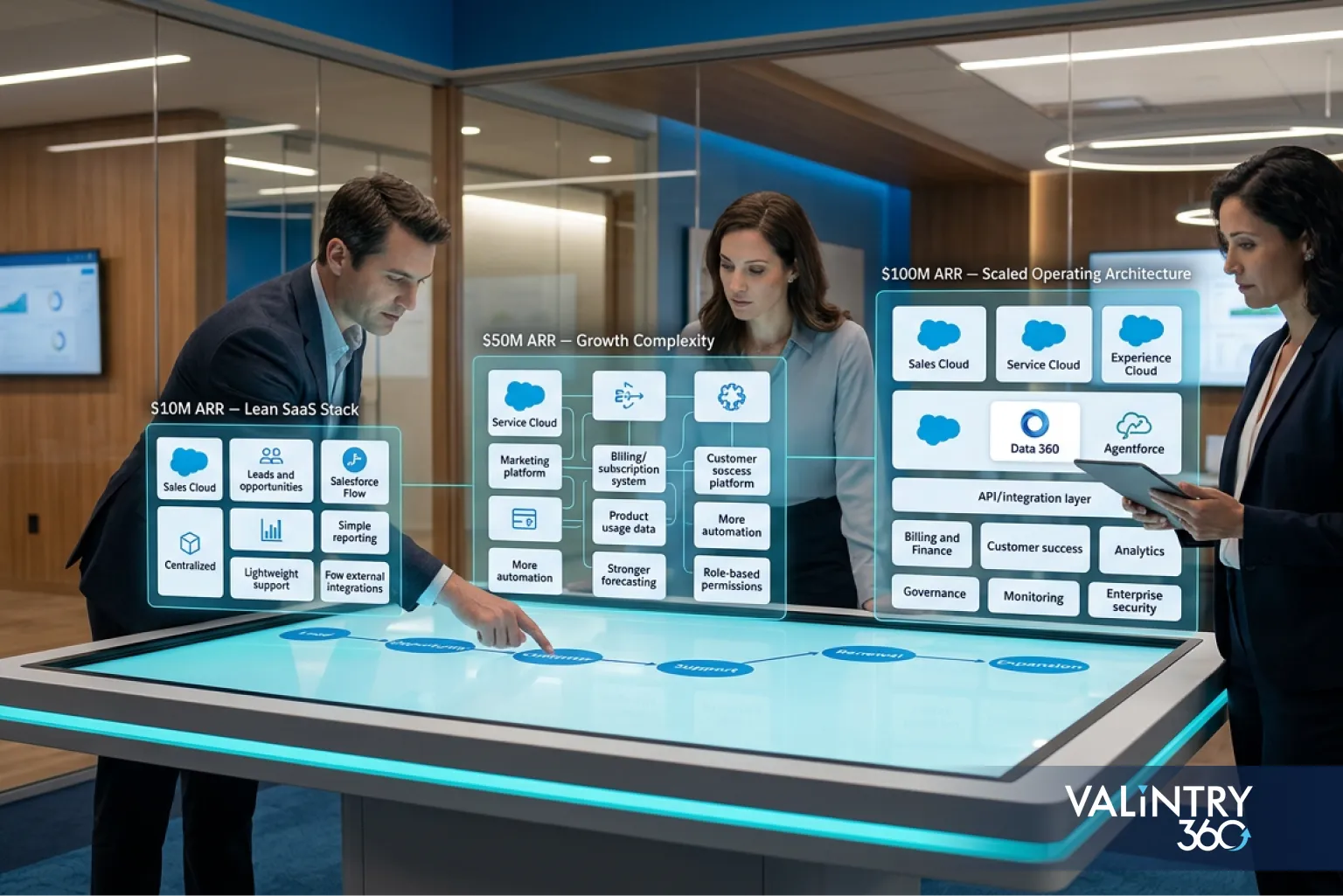
$10M to $25M ARR. The priority is standardizing the basics before they calcify into bad habits. That means defining account and customer records clearly, standardizing opportunity stages, establishing contract and renewal ownership, and removing revenue-critical spreadsheets. Teams at this stage should document their actual systems of record, formalize access through permission sets and sharing rules instead of ad hoc profile changes, introduce a controlled deployment process, and connect the specific billing and product signals that matter most, rather than trying to sync everything.
$25M to $50M ARR. Pricing and packaging usually get more complicated here, and amendments and co-terming start showing up often enough to need real tooling instead of manual workarounds. Product-led and enterprise motions commonly operate side by side, which means more system connections and stronger data governance. This is also where API monitoring and CI/CD stop being optional, customer-success workflows need to be formalized rather than run out of spreadsheets, and product usage data starts feeding directly into commercial decisions. A Data 360 assessment belongs here too, but only against a defined use case, not because of the revenue number itself.
$50M to $100M ARR. International selling, territory complexity, and multiple business units become realistic possibilities, and M&A moves from theoretical to something the architecture needs to be ready for. Data volume and event traffic climb enough that retention and archiving need a real policy. Security controls need to be more formal, revenue-system requirements get more advanced, and a genuine single-org-versus-multi-org review becomes worth having, even if the answer stays “single org.” Governed Agentforce use enters the picture as an architecture question, not just a product decision.
Move between these stages based on what’s actually happening in your operations, not the ARR number on its own. A company can sit at $40M ARR and still be firmly in $10M-to-$25M-style architecture work if the business itself has stayed simple.
Decide Which System Owns Each Customer and Revenue Record
Every SaaS company ends up asking the same question eventually: which system actually owns this record? Without a clear answer, teams build duplicate logic in two places, reports disagree with each other, and nobody trusts either system fully.
Business record | Likely owner | Salesforce’s role |
|---|---|---|
Account and contact | Salesforce | Primary customer record |
Lead and opportunity | Salesforce | Sales execution |
Product catalog | Depends on your revenue stack | Commercial reference |
Quote | Salesforce or a revenue platform | Commercial transaction |
Contract | Salesforce or a contract platform | Contract visibility |
Subscription | Billing or revenue platform | Customer lifecycle context |
Invoice | ERP or billing platform | Finance visibility |
Payment | Billing or finance system | Status reference |
Product usage | Product platform or warehouse | Selected usage signals |
Support case | Service platform | Customer service history |
Financial ledger | ERP | Finance source of truth |
The exact answer varies by company, and that’s fine. What matters is that every important entity has one stated owner and one defined synchronization path back to Salesforce. A Salesforce Sales Cloud implementation that skips this exercise usually ends up with account and contact data owned by three different systems in practice, even if Salesforce was supposed to be the single source of truth on paper.
Build the Revenue Architecture Around the Full SaaS Lifecycle
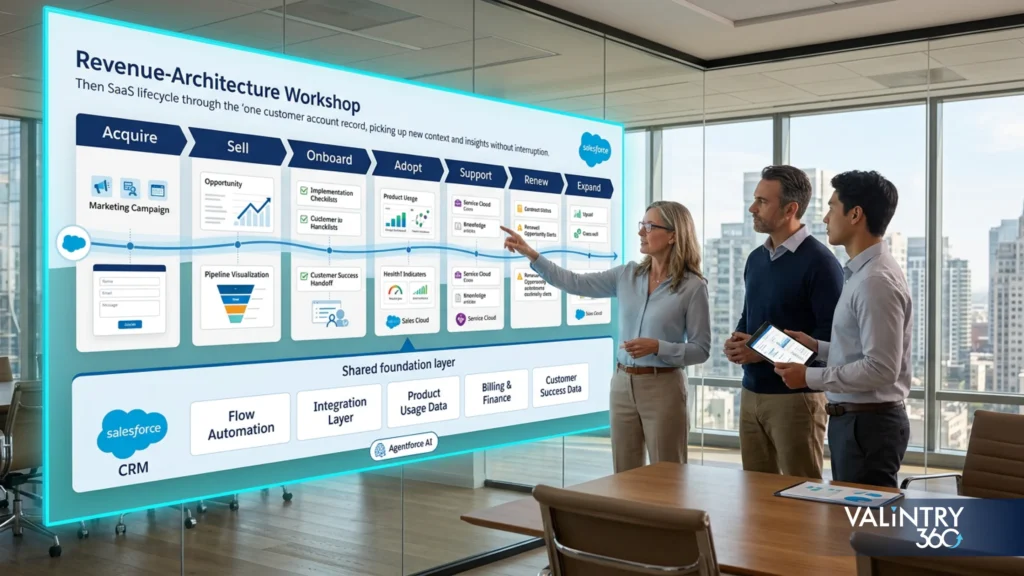
Recurring revenue gives SaaS companies an architecture layer that transactional businesses don’t need to think about as carefully. The full commercial path runs from lead to opportunity to quote to contract to order to subscription to invoice to renewal or expansion, and every handoff along that chain is a place where architecture decisions matter.
Complexity tends to concentrate around a specific set of triggers: bundled products, tiered pricing, usage-based pricing, discounting rules, amendments, co-terming, renewals, expansions, and multi-currency contracts. None of these are exotic on their own, but stacking two or three of them onto a data model designed for simple annual contracts is where things start to break.
Your situation | Architecture direction |
|---|---|
Simple products and contracts | Core Salesforce can usually cover more of the process on its own |
Complicated quoting and subscription changes | Revenue Management is worth a real evaluation |
A billing platform already owns subscriptions and invoices | Salesforce should consume selected commercial records, not duplicate them |
Salesforce’s own help documentation is direct about naming here: “Revenue Cloud is now Revenue Management.” The commercial pricing page still sells it under the Revenue Cloud name, so you’ll run into both labels depending on where you’re looking, but it’s the same underlying product going through a rename. Salesforce’s migration guidance is specific about what changes if you’re moving off Salesforce CPQ and Salesforce Billing: it requires updates to the system architecture that manages your revenue lifecycle, including how you model data, design business processes, and govern that data going forward. That’s not a settings change. It’s Salesforce customization work with its own scope and timeline.
Choose the Right Salesforce Integration Pattern for Each System
Most SaaS architecture diagrams show Salesforce connected to billing, ERP, the product platform, the data warehouse, and support and marketing systems. The diagram is the easy part. The real design work is in how data actually moves between them.
Architecture question | Options to decide between |
|---|---|
Direction | Salesforce to system, system to Salesforce, or both |
Timing | Real time, near real time, or scheduled batch |
Volume | Individual records or large batches |
Pattern | Request-response, event-based, or batch |
Failure handling | Retry, queue, reconciliation, or alert |
Ownership | Which system wins when records conflict |
Monitoring | Who gets notified when synchronization fails |
Salesforce’s own integration patterns guidance points toward REST or GraphQL for request-response work, Bulk API for higher-volume data movement, and Platform Events or Change Data Capture through the Pub/Sub API for event-based integration. Salesforce specifically recommends using the Pub/Sub API for any new publish/subscribe patterns rather than building custom event handlers on top of older APIs.
A few real examples make the pattern choices concrete. An opportunity closing should trigger billing account creation without manual data entry. Product usage data needs a path into Salesforce ahead of renewal conversations, not just at renewal time. Finance status needs to flow back from the ERP so sales and success teams aren’t guessing at payment state. And customer changes, like a plan downgrade or a seat reduction, need to trigger the right downstream events instead of silently going stale in one system. Getting these choices right for every connection is exactly the kind of work a Salesforce Integration Services partner should own end to end, not just diagram.
Decide How Product Usage and Data 360 Should Fit Into Salesforce
SaaS companies generate more customer information outside Salesforce than inside it. Logins, feature usage, seat consumption, workspace creation, API calls, consumption units, activation events, trial activity, and product-qualified signals all live in the product platform first. The question isn’t whether to move all of that into Salesforce. It’s which pieces actually need to be there.
Start with one question: does a Salesforce user need this product information to make a decision or trigger an action?
- Yes, a small, selected signal. Store or expose specific usage fields directly on the account or contact record.
- Yes, but several datasets need to be joined together. This is where a customer-data layer is worth assessing.
- A large raw telemetry stream. Keep the raw event data in the product platform or warehouse, and send only the useful outputs into Salesforce.
- Data needed across Salesforce automation, analytics, or Agentforce. This is the actual test for Salesforce Data 360: a defined use case that needs external customer or product data activated across the platform, not a revenue milestone.
If your company already runs more than one Salesforce org, worth knowing: Data Cloud One is Salesforce’s current approach to unifying Data 360 access across companion orgs through a single hub org, which avoids duplicating profiles and activation work separately in each one. Salesforce also advises keeping the number of Data 360 instances to a minimum, using more than one only where compliance, data residency, or genuine organizational autonomy requires it, per its own Data 360 architecture guidance.
Single Salesforce Org or Multiple Orgs?
Firm size and revenue don’t answer this question. What matters is whether your business actually has requirements that a single, well-designed org can’t meet.
Factor | Single org | Multiple orgs |
|---|---|---|
Administration | Lower duplication of setup work | More coordination overhead |
Reporting | Shared reporting is straightforward | Cross-org reporting takes extra work |
Data sharing | Native platform sharing model | Synchronization may be required |
Deployment | One release environment to manage | Multiple release paths to coordinate |
Identity | Simpler internal identity model | Additional identity work across orgs |
Business autonomy | Shared governance across the business | Greater separation between units |
M&A | Consolidation is usually required | Acquired org can stay separate longer |
Salesforce’s Reliability guidance lists three scenarios that can genuinely justify a second org: regulatory requirements that mandate geographic data isolation, business continuity planning that needs complete independence from a single region, and business units that require real operational autonomy from each other. A fourth case shows up constantly in practice even though Salesforce doesn’t document it directly: acquisitions where merging the acquired company’s org would cost more, in time and disruption, than running two orgs for a while. That’s a business call your team makes, not a platform rule.
Before reaching for a second org for any of these reasons, test whether permission sets, record types, sharing rules, and clean process separation can solve the problem inside one org first. That’s a practical recommendation worth testing before committing to the added coordination overhead of a second org.
Design Security and Sharing Before Data Volume Grows
A public-facing SaaS product changes what “access control” means compared to an internal-only Salesforce deployment. Get this wrong early, and untangling it later gets expensive fast.
Salesforce’s access model runs across four layers: organization, object, field, and record. Design decisions at each layer compound as the org grows:
- Permission sets define what each role can actually do, separate from a static profile.
- Role hierarchy controls how records roll up for visibility and reporting.
- Sharing rules extend access beyond the hierarchy where the business genuinely needs it.
- Territory access matters more once sales or success teams split by region or segment.
- Integration users should be dedicated and API-only. Salesforce recommends one unique integration user per integration, scoped to exactly the data and functionality that connection needs.
- Sensitive fields need field-level security decided deliberately, not left at the default.
- Authentication and API access need regular review as the number of connected systems grows.
Salesforce’s sharing architecture guidance specifically flags implementations with more than two million accounts using teams or Enterprise Territory Management as cases that require careful performance planning. Most SaaS companies in the $10M to $100M range won’t hit that threshold, but the underlying principle still applies well before then: access rules get harder to change once reports, automations, and territories all depend on them.
Prepare Salesforce for Higher Volume and More Frequent Change
A growing SaaS company eventually runs into Salesforce at scale, well past what it looked like as a simple CRM. A few warning signs tend to show up before things actually break:
- Integrations regularly approach their API limits.
- Reports get slower as years of operational data pile up.
- One account or parent record accumulates an unusually large number of related records.
- Batch jobs start missing their processing windows.
- Integration failures require manual cleanup more often than they should.
- Sharing recalculations take noticeably longer after territory or role changes.
- Production changes break processes that seem unrelated.
- Sandbox and production environments quietly drift apart.
Getting ahead of these signs means treating change as a controlled workflow: change request, design review, development, automated testing, release approval, deployment, then monitoring. A Salesforce development services team that operates this way catches problems in a sandbox instead of in production.
Version control, a real sandbox strategy, CI/CD, and automated testing form the backbone of that workflow. Data archiving keeps old operational records from slowing down reports and queries. Ongoing monitoring and clear incident ownership mean failures get caught in hours, not discovered by a customer weeks later. Configuration drift between environments needs regular, active detection rather than an assumption that everything stayed in sync. None of this is exciting work, but a Salesforce managed services partner earns their keep exactly here, by making sure it happens on a schedule instead of only after something breaks.
Salesforce Architecture Audit for a Growing SaaS Company

This is the practical version of everything above, a 15-point checklist you can run against your current org today. It draws together the recurring questions this guide has already raised, so use it as a diagnostic rather than a rehash.
- Is there one agreed definition of a customer across the business?
- Is every major business record assigned a clear system of record?
- Are opportunities tied cleanly to contracts and renewals?
- Can the data model actually support your current product catalog?
- Can it support your current pricing rules, including bundles and usage tiers?
- Are subscription and billing responsibilities documented, not just assumed?
- Are integration direction, timing, and ownership documented for every connection?
- Are integration failures monitored and alerted on?
- Is API consumption tracked against your actual limits?
- Are permissions reviewed on a regular schedule, not just at onboarding?
- Are production deployments controlled through an actual release process?
- Is old operational data retained according to a defined policy?
- Does your current org structure still fit the business you run today?
- Does Data 360 have a defined use case, or would it just be nice to have?
- Can Agentforce actions rely on governed, trusted data and clearly scoped permissions?
If more than a few of these come back uncertain, that’s worth investigating before adding another Salesforce product or another layer of custom logic on top of what’s already there. Salesforce Service Cloud implementation work in particular tends to expose gaps in this list, since support workflows touch nearly every other layer of the architecture at once.
What Salesforce Architecture Costs Between $10M and $100M ARR
Keep two costs separate: what Salesforce charges for licenses, and what it costs to actually design, build, and run the architecture around them. Vendors that quote one number covering both make it hard to know what you’re really paying for.
Salesforce’s current published Sales pricing runs from Starter Suite at $25 per user per month up to Max at $550 per user per month, with Pro Suite, Core, and Advanced in between at $100, $195, and $395 respectively, all billed annually. Revenue Cloud pricing lists Growth at $150 per user per month and Advanced at $200 per user per month, also billed annually. These are useful reference points, not a prediction of what any specific company will pay, since pricing and contract terms vary and are subject to change.
Cost category | What typically sits inside it |
|---|---|
Core licenses | Sales and service user seats |
Revenue products | Quoting and revenue lifecycle tools |
Data products | Data 360 usage and activation |
System connections | APIs, middleware, and custom integration work |
Migration | Cleanup, mapping, loading, and validation |
Development | Apex, Lightning Web Components, automation, and testing |
Release operation | CI/CD tooling, environments, and monitoring |
Ongoing ownership | Admin time, development, architecture, and support |
The real total depends on user count, product mix, transaction volume, the architecture choices made along the way, and how much custom work the setup actually needs. Resist the temptation to benchmark spend against ARR without a real source behind it. A Salesforce implementation partner should be able to walk through every line in that table with you before you sign anything, not just the license number at the top.
How Salesforce Architecture Affects Agentforce Readiness
Agentforce sits on top of whatever architecture you’ve already built, and it inherits every weakness in that foundation. An agent can only act as well as the data, permissions, and system connections it’s given access to.
Six questions are worth asking before you expand Agentforce use inside a growing SaaS org:
- Is the underlying customer data dependable enough for an agent to reason over?
- Can the agent actually reach the product and billing information it needs?
- Are user and integration permissions scoped tightly, not inherited broadly by default?
- Which actions can the agent take on its own?
- Which actions genuinely require human approval before they execute?
- Can your team audit what the agent did, and monitor its consumption over time?
Weak system ownership, loose permissions, and unreliable integrations don’t stay contained to human workflows. They carry directly into agentic ones, often with less visibility than a person would have caught. Agentforce for Sales and broader Salesforce AI solutions work best when they’re layered onto an architecture that was already built with clear ownership and governed access, not used as a way to paper over gaps that were already there.
If your Salesforce architecture hasn’t been reassessed since you were a smaller company, that’s usually the first place to look before adding agentic workflows on top of it. A structured architecture review tends to surface the gaps worth closing first, before the agent inherits them.
Related VALiNTRY360 Case Studies
If you want to see how these architecture decisions play out in real Salesforce engagements, here are five VALiNTRY360 case studies closely related to the ground this guide covers.
- BIC Graphic: One Sales and Service Cloud Record Behind Every Customer Interaction
BIC Graphic ran its consumer products business without a CRM, so sales pipeline visibility, customer service data, and marketing all lived in separate silos. VALiNTRY360 built a Sales Performance System on Sales Cloud and Service Cloud, giving field sales, inside sales, quoting, and support teams one 360-degree customer record, with a full ERP integration connecting Salesforce to their existing enterprise system. Average handle time fell by 7 minutes, and new pipeline opportunities increased by more than 27%.
Key takeaway: A single system of record pays off in both service speed and pipeline growth once sales, service, and ERP data stop living in separate silos.
Read the full case study: BIC Graphic Sales and Service Cloud Case Study
- Real California Milk: Turning 500 Manual Hours Into 4 With Automated Reconciliation
Real California Milk ran on SugarCRM with heavy manual data reconciliation that ate staff time and eroded trust in the numbers leadership saw. VALiNTRY360 migrated the organization to Salesforce Sales Cloud, built an ETL tool with custom automations for quarterly account and contact imports, and connected MailChimp for email tracking and automated lead creation. Annual labor hours spent manually updating data dropped from 500 to 4, and quarterly imports moved from a manual project to an automated scheduled process.
Key takeaway: The reconciliation work a growing company assumes is just part of running Salesforce is often a system-of-record problem with a specific automation fix.
Read the full case study: Real California Milk Salesforce Migration Case Study
- Ravago: Rebuilding Marketing Cloud’s Data Architecture for a New Revenue Channel
Ravago’s existing Marketing Cloud instance was built for B2B distribution and couldn’t segment or run customer journeys for the direct-to-consumer channel it wanted to launch. VALiNTRY360 reengineered the data architecture and automations, rebuilt customer journeys, and added a loyalty program and SMS messaging. The new channel generated $500K in new revenue in its first 3 months.
Key takeaway: A Marketing Cloud instance architected for one business model doesn’t automatically support a new one. The data architecture has to be rebuilt for the new motion, not just reconfigured.
Read the full case study: Ravago Salesforce Marketing Cloud Optimization Case Study
- BIC Graphic: Three Customer Journeys, One Marketing Cloud Foundation
A second BIC Graphic engagement tackled a B2B2C marketing problem: distributors were getting the same generic mass-marketing campaigns as direct customers, and sales and marketing weren’t aligned. VALiNTRY360 built three distinct journeys, internal sales enablement, distributor enablement, and customer retention, on Marketing Cloud’s Email Studio, Contact Builder, Journey Builder, and Automation Studio. New online orders rose 10% within four weeks, and the average distributor sales cycle dropped 44%.
Key takeaway: Segmenting journeys by relationship type, not just by product, is what makes a B2B2C revenue motion actually work in Marketing Cloud.
Read the full case study: BIC Graphic Marketing Cloud Implementation Case Study
- TrialSpark: One Record System Behind Enrollment, Support, and Patient Communication
TrialSpark needed to manage high volumes of clinical trial enrollments and support cases while keeping patients informed through study milestones, without losing participants to fragmented systems. VALiNTRY360 combined Service Cloud with Shield, Omnichannel routing, a patient community, Marketing Cloud journeys, and telephony integration into one unified record system. Patient engagement reached 85% in the first month of a new trial deployment, and time to resolve support tickets fell 77%.
Key takeaway: When enrollment, support, and communication all point back to the same record, response times and participant engagement both improve together.
Read the full case study: TrialSpark Clinical Trial Patient Operations Case Study
Frequently Asked Questions
What does Salesforce architecture mean for a SaaS company?
It’s the full set of decisions about customer and revenue data, business processes, connected systems, and platform controls, and how well those hold up as the company scales.
When should a SaaS company redesign its Salesforce architecture?
When growth pressures like pricing complexity, more system connections, or higher data volume start outpacing what the current setup was built to handle, not on a fixed schedule tied to ARR.
Does a $10M ARR SaaS company need a Salesforce architect?
Not necessarily full time, but the earlier a company gets architectural discipline in place, the less rework it faces later. Complexity, not revenue alone, is the real signal.
What data should Salesforce own in a SaaS tech stack?
Typically accounts, contacts, leads, and opportunities, with other records like invoices and product usage owned elsewhere and connected in deliberately.
Should billing and subscription data live in Salesforce?
Often the billing platform or revenue system owns the actual transaction, with Salesforce holding the customer-facing context it needs for sales and success work.
When does a SaaS company need Salesforce Revenue Management or CPQ?
When quoting, pricing, or subscription changes get complicated enough that spreadsheets and manual workarounds start creating real risk, not at a fixed revenue threshold.
How should Salesforce connect with billing, ERP, product, and warehouse systems?
Through a deliberately chosen integration pattern for each connection, matched to data direction, timing, volume, and failure handling, rather than one generic sync job for everything.
Should a growing SaaS company use one Salesforce org or multiple orgs?
Stay on one org unless a specific, documented requirement like geographic isolation, business continuity, or genuine business-unit autonomy justifies the added complexity.
When does Data 360 make sense for a SaaS company?
When a defined use case needs external customer or product data activated across Salesforce, analytics, automation, or Agentforce, not simply because the company has grown.
How should product-usage data connect to Salesforce?
Send only the specific, decision-relevant signals into Salesforce, and keep raw telemetry in the product platform or warehouse where it belongs.
How do Salesforce API limits affect SaaS architecture?
They shape integration design directly, pushing higher-volume connections toward Bulk API or event-based patterns instead of frequent small synchronous calls.
What Salesforce architecture problems commonly appear as SaaS companies grow?
Unclear system ownership, undocumented integrations, permission sprawl, and deployment processes that were never formalized tend to surface first.
How should SaaS teams manage Salesforce technical debt?
With scheduled reviews, not just reactive fixes, and a real inventory of what’s connected, what owns what, and what hasn’t been revisited in years.
What affects the cost of Salesforce architecture from $10M to $100M ARR?
License mix, user count, integration complexity, data migration needs, custom development, and ongoing operational support all factor in, well beyond the sticker price of any single product.
How does Salesforce architecture affect Agentforce readiness?
Reliable data, tightly scoped permissions, auditable actions, and dependable system connections all directly determine what an agent can safely do inside your org.
Related Posts
- Salesforce Consulting Services
Why Salesforce Integrations Fail – and How to…
Introduction: When an Integration Stays Online but the Business Process Breaks A Salesforce integration can pass every technical check and still fail the business that depends on it. The connection authenticates and the API returns success, while records still arrive…
- Salesforce Consulting Services
Why Salesforce Reports Can’t Be Trusted
A VP of Sales opens the pipeline dashboard on Monday and sees $4.2M. RevOps runs the saved pipeline report an hour later and gets $3.8M. Finance walks into the forecast meeting carrying $3.1M.All 3 numbers came out of the same…
- Salesforce Consulting Services
How to Fix a Failed Salesforce Implementation Without…
Your Salesforce org probably already holds customer history, working automation, integrations, reports, custom code, and months of project effort. That’s exactly why a troubled implementation deserves a recovery decision based on evidence, not a reflex to tear it down.A Salesforce…