
- Agentforce
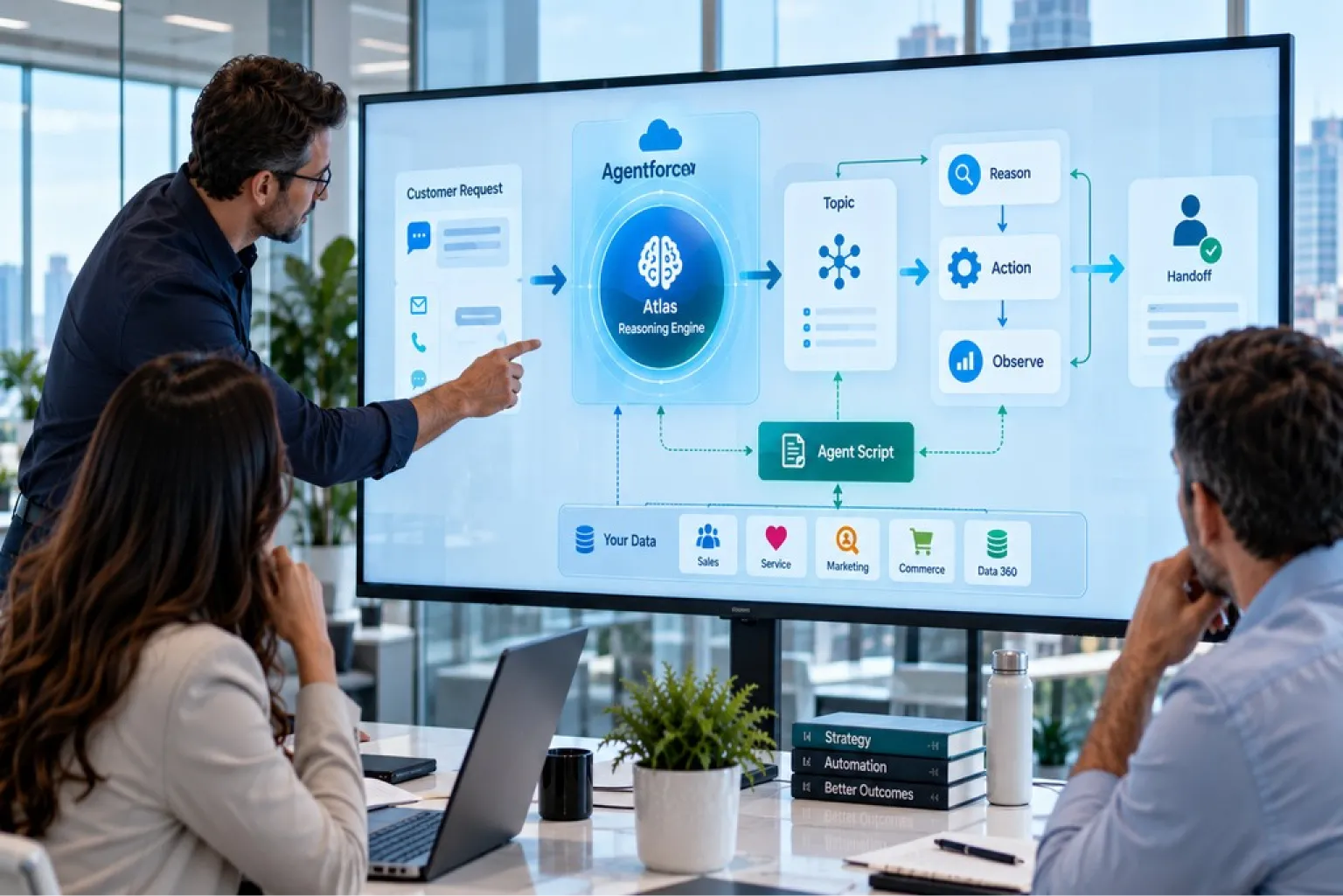
Agentforce works by routing every request through the Atlas Reasoning Engine, which classifies the request into a subagent (formerly called a topic), grounds it in your Salesforce data, then loops through reasoning, acting, and observing until the goal is met or a human takes over. Agent Script sits alongside that loop and forces specific steps to execute as fixed code, so the parts of a process that can’t be left to a language model aren’t.
That’s how Agentforce works, in one paragraph. The rest of this guide unpacks each layer, follows a real customer request from arrival to resolution, shows exactly where the platform calls a language model and what that costs you, and covers the failure modes that only appear once real customers start using it.
It’s written for anyone making decisions about an Agentforce build, not only developers. If you’re evaluating the platform commercially rather than architecturally, start with our guide to Agentforce 360, its components and editions and come back afterwards.
TL;DR: How Agentforce Works in Three Points
Atlas is an engine, not a chatbot brain
The Atlas Reasoning Engine works as a state machine executor, deciding node by node whether a step needs a language model at all. Subagents scope what’s possible, actions define what’s doable, and grounding decides whether the answer is actually true.
Every reasoning loop shows up on your invoice
Under the older model, even simple interactions burned at least three model cycles, and multi-step tasks needed five or more. An agent that loops when it shouldn’t costs real money on every conversation, and no demo will ever reveal that.
Draw the deterministic line deliberately
Hybrid reasoning lets you pin critical steps as code the model cannot override. This guide walks one real request through eight steps, shows the eight points where a model gets called, and covers where agents break once real customers arrive.
What Agentforce Actually Is
Agentforce is the agentic layer of the Salesforce Platform. It lets you build AI agents that don’t just answer questions but take real action, updating records, sending emails, opening cases, checking inventory, then hand off to a person when the situation calls for human judgment.
Chatbot Versus Agent: The Distinction That Matters
A chatbot matches your input against a script somebody wrote in advance and returns the matching reply. Phrase things unexpectedly and you hit a dead end. Every branch was anticipated by a human.
An agent reads the request, works out what you’re trying to accomplish, decides which tools it needs, uses them, checks whether the result solved the problem, and tries something else if it didn’t. Nobody anticipated the specific path. The agent constructed it at runtime.
That distinction explains both the appeal and the risk. An agent handles requests nobody scripted for. It can also do something unexpected, which is precisely why the deterministic control layer covered later in this guide exists.
Topics Are Now Subagents, and the Topic Selector Is Now the Agent Router
If you’ve read anything about Agentforce written before mid-2026, you’ll have encountered the word “topic” constantly. Salesforce’s Agentforce Developer Guide is now explicit that beginning in April 2026, agent topics are called subagents, with no change to functionality.
The same change renamed a second thing, and most guides miss it. The Topic Selector is now the Agent Router. That’s the component deciding which subagent a request belongs to, so if you’re reading a diagram or an error message that says Topic Selector, it’s the Agent Router.
This guide uses both sets of terms, because most people still search for topics, and Salesforce’s own documentation currently contains a mix of the two. When you see either word, the mechanism is identical.
The Building Blocks Every Agentforce Agent Runs On
Four concepts underpin everything else. Nearly every Agentforce problem you will ever debug traces back to one of them being defined badly, so it’s worth getting these right before touching the reasoning engine.
Subagents: The Job Description for the Moment
A subagent is a bounded set of instructions, policies, and permitted actions covering one area of work. “Order status,” “billing dispute,” and “password reset” would each be a subagent.
When a request arrives, the first thing Atlas does is decide which subagent it belongs to. That decision matters more than almost anything else in the build, because the subagent determines which actions are even on the table. Pick the wrong one and the agent is working from the wrong instruction set with the wrong tools, and no amount of good reasoning afterwards rescues it.
Salesforce describes a subagent as the AI’s job description for that moment, which is a useful way to hold it. Scoping them well means drawing boundaries that don’t overlap. Two subagents with fuzzy, overlapping definitions are the single most common cause of misrouting we see in production.
Actions: What the Agent Can Actually Do
An action is a concrete capability the agent can invoke. In practice, that means one of the following:
- Apex methods for custom business logic already written in your org
- Salesforce Flows for declarative automation your admins maintain
- REST API calls reaching systems outside Salesforce entirely
- Prompt templates for generating structured, grounded text
- MCP connections to external tools, governed by the Enterprise MCP Registry
Here’s what most teams get wrong on a first build. Atlas selects actions by reading their descriptions, which means those descriptions are written for the model, not for your colleagues.
An action described as “Account scoring helper” tells Atlas nothing. It sits unused while the agent improvises around it, and the symptom you observe is an agent apparently ignoring a capability you know exists. Compare that to: “Returns the renewal risk score and contract end date for a given account ID. Use when a user asks which accounts are at risk or about renewal timing.” That gives Atlas both the matching signal and the parameters it needs.
Grounding: Where the Answers Come From
Grounding is how your actual Salesforce records get pulled into the agent’s working context at runtime. Atlas retrieves both structured and unstructured data from Data 360, and can also reach internal documents and web sources depending on configuration.
The practical difference is stark. An ungrounded agent says “our return window is typically 30 days.” A grounded agent says “your order shipped on the 14th, so you have until the 13th of next month.” The first is a model guessing from training data. The second is reading your records.
Grounding is also permission-aware. Salesforce calls this secure data retrieval: the prompt is grounded only with data the executing user is entitled to see, so an agent can’t surface records that user couldn’t open manually.
Variables: How the Agent Remembers
Variables store the agent’s state across a conversation, and they exist because relying on a model’s context memory proved unreliable for multi-step work. Salesforce’s architecture documentation is candid about this: without persistent state, an agent had no record of which steps a user had already completed, producing unpredictable looping back through finished steps. Variables fix that with typed, defaulted values the script reads and writes deterministically.
|
Building block |
What it does |
What goes wrong when it’s weak |
|
Subagent (topic) |
Scopes which instructions and actions apply to a request |
The agent routes to the wrong subagent and works from the wrong toolset entirely |
|
Action |
Executes a concrete task inside or outside Salesforce |
Vague descriptions mean Atlas never selects the action and improvises instead |
|
Grounding |
Pulls real, permission-aware records into the reasoning context |
The agent answers confidently from general knowledge rather than your data |
|
Variables |
Hold conversation state deterministically across turns |
The agent loses track of completed steps and loops back through them |
The Atlas Reasoning Engine Explained
Salesforce describes the Atlas Reasoning Engine as the brain behind Agentforce, built on a proprietary system designed to simulate how humans think and plan, using techniques including advanced retrieval augmented generation to determine the best actions for completing a task.
That’s the marketing-facing definition, and it’s accurate as far as it goes. The architecture-facing definition is more useful.
What Atlas Actually Is Under the Hood
Salesforce’s architect documentation describes Atlas as a state machine executor. On each turn it traverses a compiled execution plan based on session state, executes deterministic nodes as code, and triggers model calls only where prompt instructions are present.
That framing corrects a common misconception. Atlas is not a wrapper that passes everything through a language model. It’s an execution engine that decides, node by node, whether a step needs a model at all. Most of what happens in a well-built agent never touches one.
How Atlas Routes a Request: Two Paths
Every incoming user turn goes down one of exactly two paths, and knowing which one explains most of what you’ll observe in a trace.
Path A is deterministic execution, with no model exposure at all. Atlas classifies the intent, finds that a logic instruction matches, and bypasses the model entirely. The compiled script runs top to bottom. Flow, Apex or REST actions are called with deterministic parameters, with no prompt assembly and no model call. The result still passes back through the trust layer with full audit logging. This path behaves like compiled code at runtime.
Path B is model reasoning. Atlas takes this path when it can’t resolve intent from logic instructions alone. It traverses the Agent Graph and evaluates each node. Nodes carrying prompt instructions trigger a model call. Nodes without them execute deterministically. The presence of a prompt instruction is the trigger, and it’s explicit in the script rather than inferred at runtime.
That’s the whole hybrid model in two paragraphs. Salesforce sets it out in full in its architect guide to hybrid reasoning.
The Reason, Act, Observe Loop
Atlas runs a version of the ReAct pattern. It reasons through a step, takes an action, observes what came back, and loops again, continuing until it reaches the goal or determines it can’t. If it lacks what it needs to proceed, it asks a clarifying question mid-task rather than guessing.
This looping is why Agentforce can handle a request like “my order arrived damaged, send a replacement to my work address, and update my card on file” as a single conversation. Three separate outcomes, several actions, one continuous reasoning thread. A single-pass system handles the first clause and loses the rest.
The Four Capabilities That Set Atlas Apart
Proactive Action
Agents don’t only respond to typed input. They can trigger on a CRM data change, an inbound email, or an upcoming meeting, which means an agent can open a case before a customer thinks to contact you. Most teams underuse this, largely because it requires thinking about agents as background processes rather than chat windows.
Dynamic Information Retrieval
Atlas pulls the most relevant structured and unstructured data at the moment it’s needed, from Data 360, internal documents, or web sources, rather than a fixed snapshot loaded at conversation start.
Visible Reasoning
Atlas exposes its thoughts, meaning the reasoning behind why it chose a given action. Salesforce notes that prompting a model to explain its action selection substantially reduces hallucination, with the added benefit of giving admins something concrete to review rather than a black box. You access this in Agentforce Builder.
Human Handoff
When Atlas hits a question it can’t answer or a business rule it can’t cross, it routes to a person. Handoff is a designed outcome rather than a failure state, and configuring it badly, particularly around business hours and escalation availability, is one of the most common launch problems we encounter.
The Three-Stage Execution Pipeline
Understanding what happens between writing an agent and that agent responding to a customer explains a lot of otherwise confusing behaviour. Salesforce’s architect documentation lays out three distinct stages, and the architecture behind them has been generally available since February 2026.
Stage One: Authoring
This is the only layer you interact with directly. You work in Agentforce Builder, which is hosted within Agentforce Studio and has replaced the legacy Setup experience as the primary authoring path. Builder gives you three ways in:
- Conversationally, describing what you want in plain language and letting Agentforce convert it into subagents, actions, and expressions
- Canvas view, where the script is summarised into expandable blocks with shortcut commands
- Script view, editing Agent Script directly with syntax highlighting, autocompletion, and validation
Developers can also pull the script file into a local project with Agentforce DX and work on it in VS Code, bringing agents into normal version control and CI/CD workflows.
Stage Two: Compilation Into an Agent Graph
The Salesforce compiler transforms your Agent Script into an Agent Graph, a serialized execution plan optimised for machine execution rather than human readability. You don’t debug at this layer and can’t access it directly. Salesforce made that separation deliberately: keeping authoring and execution apart lets the platform enforce deterministic behaviour independently of how the script was written.
Salesforce’s engineering team has written up the design thinking behind Agent Graph and guided determinism if you want the layer below this one.
Stage Three: Runtime Execution
Atlas reads the Agent Graph, traverses it based on session state, and decides at each node whether to execute deterministically or invoke a language model. Guard clauses and conditional routing are enforced here explicitly rather than inferred.
|
Stage |
What happens |
Can you access it? |
|
Authoring |
You write Agent Script in Builder, in Canvas or Script view, or via Agentforce DX |
Yes, this is your working layer |
|
Compilation |
The compiler turns your script into an Agent Graph execution plan |
No, and you don’t debug here |
|
Runtime |
Atlas traverses the graph, executing nodes as code or via an LLM call |
Indirectly, through observability tooling |
A Real Request From Arrival to Resolution
Concepts land better against a real interaction. Here’s a customer messaging a retailer’s support agent:
“My order came in damaged and I need a replacement, but send it to my office this time.”
Every component covered so far appears in the sequence below.
Step 1. Observe
Atlas reads the incoming message together with session state: the conversation so far, the active subagent if one is set, and anything already grounded into context. On a first message, state is close to empty. On a fifth, it carries everything before it, which is why variables matter.
Step 2. Classify the Subagent
Before anything else, Atlas decides which subagent this belongs to. Here it lands on returns and replacements rather than general order enquiries, because the request involves a damaged item rather than a status check. That classification immediately narrows which actions are available.
Step 3. Run Pre-Flight Checks
Before the model sees anything, the before_reasoning block executes deterministically. This is where authentication and entitlement checks belong, along with fetching context records and setting session variables. The customer is verified as the account holder here, as code, not as a suggestion the model might follow.
Step 4. Ground the Request in Real Data
Atlas retrieves the customer’s account record, recent orders, the specific order, the addresses on file, and the policy content on damaged goods. It is now reasoning about a specific order rather than about returns in the abstract.
Step 5. Plan and Select the First Action
Atlas works out that this request has three parts: verify eligibility for replacement, create the replacement, and change the delivery address. It selects the eligibility check first, because the other two depend on its result, then matches on the action built for it.
Step 6. Act, Observe, and Loop
The eligibility action runs and returns a result. Atlas observes it. Eligible, so it continues. Not eligible, and the plan changes on the spot. Atlas then cycles back through reason, act, observe for the replacement order creation, and again for the address change. Each pass is a fresh decision informed by what the previous action returned, which is why a mid-conversation surprise like an out-of-stock item doesn’t derail the interaction.
Step 7. Hit a Deterministic Gate
Before the address change commits, a gate fires. Changing a delivery address on an in-flight order above a certain value requires identity verification. The execute action is not visible to the model at all until a verification variable flips to true. This isn’t an instruction the model can reason around, and the next section explains why that distinction is architectural rather than cosmetic.
Step 8. Respond or Hand Off
If verification passes, Atlas confirms all three outcomes in one natural language response. If it fails, or the customer raises something outside this subagent’s scope, Atlas hands the conversation to a human with full context attached, so the person picking it up isn’t starting cold.
Eight steps, one customer message, several passes through the loop. The full reasoning trace is logged, so if the resolution looks wrong afterwards, an admin can see exactly which step went sideways.
Where the Language Model Actually Gets Called
This section is the one most worth reading twice, because it connects directly to what an agent costs to run.
The Eight Trigger Points
Salesforce documents eight points in the execution lifecycle where a language model is invoked:
- Subagent classification, deciding which subagent matches the request, though a short-circuit path can bypass the full call when classification is unambiguous
- Agent reasoning, deciding what action to take next, which always goes through the model
- Response generation, assembling the final reply from a hydrated prompt
- Groundedness validation, confirming the output is actually grounded in retrieved data
- Action simulation, emulating responses in the Preview and Simulate environment rather than executing live
- Structured output generation, where a response must conform to a defined schema
- Localization, handling language formatting
- Progress indicator generation, producing transient messaging where no pre-authored default exists
What Stays Deterministic
Equally important is what never involves a model:
- Graph traversal and state transitions
- The before_reasoning and after_reasoning lifecycle blocks, provided they contain only action nodes
- Math, data fetching, validation, and conditional logic
- Any action executing a Flow, Apex, or REST API directly
- Any node without prompt instructions attached
Why Cycle Count Is a Budget Line, Not a Technical Detail
In the earlier Agentforce model, every interaction paid the full model cost. Salesforce’s documentation states that even simple conversational scenarios required a minimum of three cycles: subagent selection, action selection, and response generation. Multi-step tasks extended to five or more.
The scale makes this concrete. Salesforce reported 7 billion cumulative Agentic Work Units delivered across Agentforce and Slack as of its second-quarter results, including 3.2 billion in that quarter alone. An Agentic Work Unit is one discrete task accomplished by an agent, a measure Salesforce introduced in February 2026 to count delivered work rather than raw tokens consumed.
If you’re on consumption-based Flex Credits pricing, every unnecessary cycle is money. An agent that loops five times to answer a one-action question costs roughly five times what it should, on every conversation, forever. This is the clearest example of an architectural decision showing up directly on an invoice, and it’s why subagent scoping and consumption planning aren’t separate conversations.
The arithmetic behind that sits outside this guide. If you need it, our Agentforce rate card breakdown prices every action type, and our guide to avoiding Flex Credit runaway covers the design decisions that drive consumption up.
Hybrid Reasoning: Where Agent Script Overrides Atlas
Everything described so far is how Agentforce works when Atlas is left to decide. That flexibility is the entire point, and it’s also the problem when a step absolutely must happen every single time.
The Problem Hybrid Reasoning Solves
Salesforce is unusually direct about the earlier purely probabilistic model’s limitations. Because every decision depended on real-time reasoning, minor variations in input, system prompt, or model version produced different action selections on identical requests. A workflow that passed in staging could behave differently in production, with no reliable way to reproduce an execution path for debugging or audit.
For many interactions that variability is fine. For a loan approval, an inventory transfer, or a patient triage process, it isn’t. As Salesforce’s architects put it, “the agent decided” is not a defensible answer in a compliance review.
The workaround most teams reached for was defensive prompt engineering, stacking ALWAYS and NEVER clauses into instructions. That approach is fragile, untestable, and close to impossible to audit.
What Agent Script Is
Agent Script is a declarative, domain-specific language defining everything about how an agent behaves: its configuration, business logic, and prompting. Salesforce open sourced it at TDX 2026, and the language specification, grammar, parser and compiler are public at github.com/salesforce/agentscript.
The resulting model is called hybrid reasoning, and it has been generally available since February 2026. It combines probabilistic model reasoning with deterministic rules-based execution inside the same engine. The syntax makes the boundary visible: conditional logic follows one marker, natural language prompts follow another, and both can sit in the same instruction block.
Deterministic Logic Versus Prompt Instructions
Deterministic logic instructions define conditions and action sequences that execute as code with no model involvement. Salesforce’s documentation is unambiguous: when instructions are deterministic, the agent follows a defined execution path regardless of how the user phrases their input. The model cannot override them.
Prompt instructions are natural language guidance the model interprets at runtime. Use them where the range of possible inputs is too broad to anticipate with conditional logic, or where response quality depends on interpreting context.
The critical distinction, and the one that catches experienced Salesforce people out: writing a prompt instruction telling the model to “always run” an action is a suggestion. Placing that same call in a deterministic block is code. The first may or may not happen depending on context. The second happens without exception.
The 6 Levels of Agentic Control
Salesforce publishes a framework for this, and almost nobody writing about Agentforce uses it. It defines six levels of agentic control, running from the least constrained agent to the most. Read it as a ladder you climb only as far as the workload requires.
|
Level |
What it adds |
When you need it |
|
1 |
Reasoning with an instruction-free subagent and prompt-based action selection |
Exploratory agents and low-stakes informational queries, where flexibility is worth more than precision |
|
2 |
Instructions |
The agent needs to behave consistently in tone, scope, or approach across varied inputs |
|
3 |
Grounding |
Answers must come from your records rather than the model’s training data |
|
4 |
Variables |
Multi-step processes where the agent has to remember what has already happened |
|
5 |
Deterministic actions |
Specific steps must execute the same way every time, regardless of phrasing |
|
6 |
Deterministic control with Agent Script |
Auditability, reproducibility and enforced sequence. Finance, healthcare, insurance and anything you’d defend in a compliance review |
Most production agents sit at four or five and reach for six only on the handful of steps that genuinely need it. Climbing to level six everywhere costs you the flexibility that made an agent worth building. Salesforce sets out the full framework in its guide to the 6 levels of determinism.
The Three Execution Blocks
Every subagent defines three execution zones, and knowing which is which prevents a whole category of bug.
|
Block |
When it runs |
Model involvement |
|
before_reasoning |
At the start of every parse, before the model sees anything |
None |
|
reasoning |
During deterministic resolution, prior to any model calls |
Mixed |
|
after_reasoning |
After reasoning completes and the model has responded |
None, with one important caveat |
A parse, not a user turn, is the unit of execution here. Atlas initiates a parse on first entry into a subagent, after every completed tool call, and on every new user turn within the same subagent. One user message can therefore trigger several parses, which has four practical consequences:
- Initialisation actions in before_reasoning run more than once per user turn in multi-action flows
- Counter variables incremented there reflect parse count, not turn count
- Actions with side effects, external API calls or record writes, shouldn’t live in before_reasoning unless re-execution on every parse is acceptable
- Transitions should never sit in before_reasoning. A transition instruction there fires unconditionally on every parse, which creates a loop rather than a handoff.
As Salesforce puts it, before_reasoning is not a constructor. It’s a pre-flight check running on every parse. If you need something to happen once per session, guard it explicitly with a variable.
There’s also a caveat on after_reasoning that produces a genuinely confusing bug. When an action is marked is_displayable, the platform exits the reasoning loop as soon as the model surfaces that output, so after_reasoning never executes. Logic that must run reliably should move into the before_reasoning block of the next subagent instead.
Where to Put Logic: A Placement Decision Table
This is the question every Agent Script build runs into within its first week, and the answer is more mechanical than it looks.
|
Scenario |
Where it goes |
|
Must run before the model sees any context |
before_reasoning |
|
Must run on every parse, including re-entry on a new user turn |
before_reasoning |
|
Depends on action output from this turn |
A conditional block inside reasoning |
|
Requires a deterministic subagent transition based on outcome |
after_reasoning, unless a displayable action is in the flow |
|
Requires orchestration when a downstream action uses is_displayable |
before_reasoning of the next subagent |
|
Requires judgment or interpretation of user context |
reasoning, with prompt instructions |
The underlying rule is the one from the previous section, applied consistently. A prompt instruction telling the model to always do something is a suggestion. A run directive in before_reasoning is code.
Conditional Action Availability: Gating What the Model Can See
This is the mechanism behind step 7 of the walkthrough, and it’s the most powerful control in the toolkit.
Agent Script can expose or hide actions from the model based on runtime variable state. The clause is available when. When the condition evaluates to false, the action is removed from the tool list presented to the model entirely. Any false value, including null, zero, or an empty string, suppresses it.
This is not a prompt instruction saying “don’t call this yet.” It’s a hard platform-level gate. The model cannot call an action it cannot see, and no amount of conversational pressure gets around it.
One design rule follows, and we enforce it on every build: never let the model set the gate variable. Give every gating variable a deterministic code path that sets it before the associated action becomes relevant. If the model controls the gate, you’ve reintroduced exactly the variability the gate existed to prevent.
The Action Loop Problem
Worth naming explicitly because it’s a common and expensive bug. An action loop happens when the model calls the same action repeatedly without reaching a terminal state. It needs two conditions at once: the availability condition stays satisfied after the action runs, and the reasoning instructions don’t explicitly tell the model to stop.
The platform does not automatically suppress an action after it’s been called. If the gate stays open and the instructions are ambiguous, the model calls it again on every parse indefinitely, burning credits throughout.
Two reliable fixes: close the gate variable as part of the action’s post-execution logic, or use a separate has_run boolean that closes after first execution. Both give the gate a deterministic closed state, which is what the platform needs to suppress the action.
Deciding Where to Draw the Boundary
Salesforce calls this the most consequential architectural decision you make when building a production agent, and we’d agree. Their stated default is to push logic to code and reserve the model for what genuinely requires it.
|
Use deterministic logic for |
Use model reasoning for |
|
Input validation and sanitisation |
Natural language understanding and intent detection |
|
Business rule enforcement |
Generating conversational, empathetic responses |
|
Sequential process orchestration |
Handling ambiguous or unexpected inputs |
|
State management and context preservation |
Providing explanations and clarifications |
|
Guard clauses preventing invalid operations |
Adapting tone and messaging to user context |
Get the boundary wrong in one direction and you have an agent that occasionally does something it shouldn’t and can’t produce a defensible audit trail. Wrong in the other and you’ve rebuilt a rigid decision tree with a language model bolted to the front, which costs more and does less than the automation you already had.
Our working rule: anything with financial, legal, or compliance weight goes deterministic. Refunds above a threshold, account deletions, identity verification, regulatory disclosures, anything you’d need to defend in an audit. Everything else stays with Atlas.
How the Einstein Trust Layer Fits In
Every generative call in Agentforce passes through the Einstein Trust Layer, which is easiest to understand as five things happening in sequence rather than as one feature.
What Happens to a Prompt
- Secure data retrieval grounds the prompt only with data the executing user has permission to access
- Dynamic grounding injects live, permission-aware records and knowledge into the prompt at runtime
- Data masking replaces detected sensitive data with placeholder tokens before the prompt leaves the Salesforce boundary, identified both by pattern matching and by field-level classification
- Prompt defense applies system policies limiting hallucination and unintended output
- Zero data retention means Salesforce’s contracts with external model providers forbid storing the request or using it for training, so the prompt is deleted after the response returns
On the way back, placeholders are swapped for real values inside your trust boundary, responses are scored by a toxicity classifier before display, and the exchange is logged to an audit trail living in your org rather than at the model provider. Salesforce’s Einstein Trust Layer documentation covers the full request and response journey.
What the Trust Layer Does Not Do
Worth stating plainly, because it gets oversold. The Trust Layer reduces a wide range of risks. It does not eliminate hallucination: a response that is grounded, masked, and toxicity-clean can still be factually wrong. It also isn’t a content review tool, so it won’t tell you whether an answer is on-brand or compliant with your internal policy. That remains a design and testing problem, which is the subject of the next section.
Where Agentforce Breaks in Production
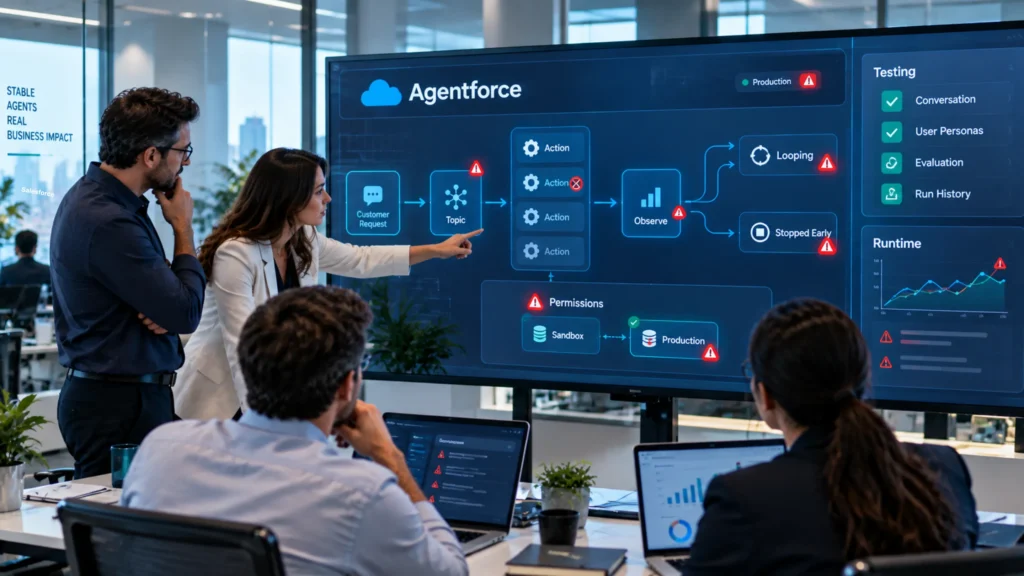
Knowing how Agentforce works is most useful when it tells you where to look once something goes wrong. Four failure modes account for the bulk of what we see.
Subagent Misclassification
Salesforce’s own admin guidance names choosing the wrong topic and choosing the wrong action as the two most common failures in live deployments. Both trace back to how clearly the work was described and how tightly the subagent was scoped. The usual culprit is overlapping subagents with fuzzy boundaries. If a human reading your subagent descriptions would hesitate about which one a request belongs to, the model will too.
Actions That Never Get Selected
An action can be perfectly built and still sit unused because its description gave Atlas nothing to match against. The symptom is an agent that appears to ignore a capability you know exists, and the fix is almost always rewriting the description rather than touching the action itself.
Looping Too Long or Stopping Too Early
An agent calling five actions to answer a one-action question is burning budget on every conversation. One that stops before finishing leaves the customer with a half-resolved case. Both trace back to subagent scope and action clarity, and both are invisible until you’re looking at real conversation volume.
The Sandbox to Production Permission Gap
A well-documented issue involves Agent User permission errors where an agent works perfectly in a sandbox and then fails once live. Some Data Library custom retrievers show as ready to use and pass in the Retriever Playground, then fail at runtime with a permissions error. The lesson is straightforward: test in a sandbox that mirrors production permissions, not just production data. A sandbox with looser permissions will happily pass an agent that cannot function in your real org.
Permission and access design is where most of these converge, which is why our Salesforce data governance services team treats it as part of the agent build rather than a compliance step bolted on afterwards.
Testing and Observing an Agent
Because agent output is non-deterministic in the places you’ve deliberately left it that way, testing works differently here than for conventional Salesforce development.
Agentforce Testing Center
Testing Center has been folded into Agentforce Studio as a dedicated tab alongside Agent Builder and Observability, rather than living separately in Setup. Salesforce has since added conversation-level testing simulating full conversations with user personas, custom evaluations for your own metrics, and run history for comparing performance over time.
A useful test suite covers more than the happy path. Build separate cases for ambiguous phrasing, missing data, prompt injection attempts, mid-conversation topic switching, duplicate execution, and integration failure. Each case should specify the expected subagent, allowed actions, answer criteria, and stop condition.
Observability After Launch
Testing Center handles pre-deployment. A separate set of tools covers what happens once real customers arrive:
- Plan Tracer troubleshoots individual utterances, showing how the agent identified the subagent and executed actions
- Agent Analytics tracks usage patterns, fallback frequency, and response accuracy over time
- Utterance Analysis shows how specific inputs were interpreted, which is how you find misclassification patterns
- Command Center provides unified visibility across all production agents as a single source of truth
One prerequisite that catches teams out: these depend on Data 360. Salesforce answers the question “does Agentforce need Data 360” with “the short answer, yes,” because the Data 360 architecture powers Agent Analytics and Digital Wallet, and its infrastructure handles indexing, unstructured search, feedback logs and audit trails. Its Agentforce guide to context engineering sets out which features are provisioned by default and which are optional extensions. Without it provisioned, you’ll be running agents you can’t properly measure.
The Gap Testing Center Doesn’t Cover
This distinction is worth understanding before you build a test plan around the tooling alone. Testing Center evaluates whether your agent picked the right subagent, the right action, and produced the right response against ground truth. It does not evaluate what happens inside your org after that action fires.
Your org has to survive that action executing at volume, alongside years of automation predating the agent entirely. An agent can behave exactly as designed and still leave your org in a bad state because the Flow it triggered interacted badly with a trigger written in 2019. Both questions need answers, and most teams are only asking the first. A Salesforce health check is the usual way to answer the second before an agent goes anywhere near production.
What Changed in 2026: Long-Horizon and Job-Ready Agents
Everything above describes an agent resolving a request inside a conversation. On 11 September 2026, Salesforce extended that model in two directions, and both change what you should be designing for.
Long-horizon runtime
Agents can now pursue a goal across days and weeks rather than completing a single task or interaction. The reason-act-observe loop described earlier still runs, but the session it runs inside is no longer bounded by a conversation.
That changes how Agentforce works at the session level, and it has a direct consequence for everything in this guide. Variables stop being conversation state and become process state. Gate conditions have to hold across days rather than turns. And the action loop problem gets considerably more expensive, because a loop that runs unnoticed for a week costs a great deal more than one that runs for a minute. If you’re building anything long-horizon, the placement decision table above matters more, not less.
Job-ready agents
Salesforce also introduced a portfolio of named agents built for specific jobs across sales, service, commerce, employee experience and the back office. Each ships with the skills, actions and data models its job requires, connected to Customer 360, and each can be tailored to how a given company works.
The practical read: the build decision is no longer “from scratch or from a template.” It’s whether a job-ready agent covers enough of your process that customising one beats designing subagent boundaries yourself. For a standard service or inbound sales workflow it often will. For anything with unusual routing, regulated steps or heavy integration, the architecture work in this guide still applies, because you’ll be extending the agent rather than using it as shipped.
Salesforce reported 7 billion Agentic Work Units delivered across Agentforce and Slack alongside that announcement, which is the clearest available signal that these patterns are running at production scale rather than in pilots.
Building Agentforce Agents With a Certified Salesforce Partner
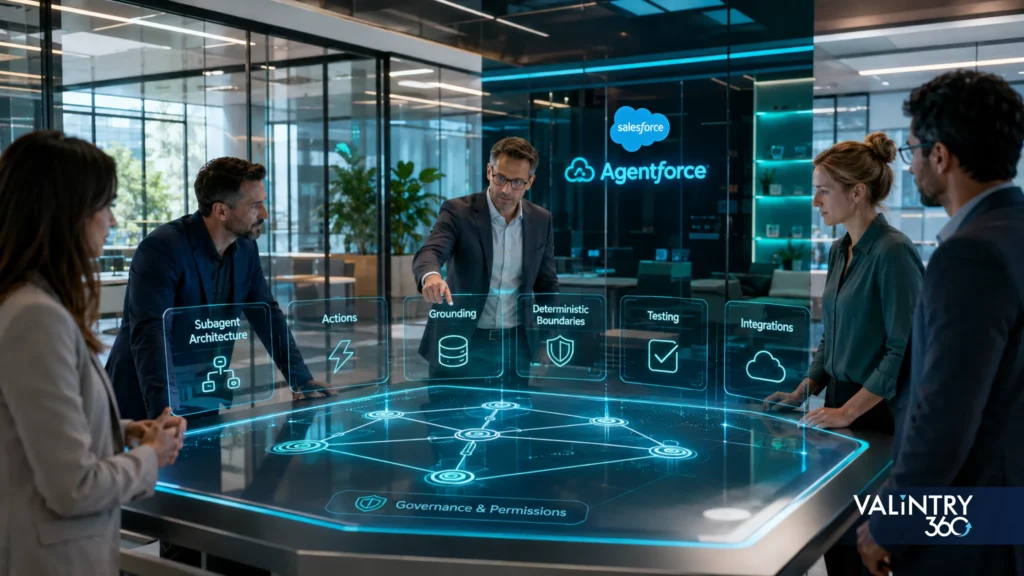
Almost everything that determines whether an Agentforce agent works well is decided before anyone writes a prompt. How you carve up subagents, how you describe actions, what you ground on, where you place the deterministic boundary, and how you gate sensitive actions.
VALiNTRY360 is a certified Salesforce partner, so we’re involved on both sides of an Agentforce project: the licensing conversation and the build itself.
On licensing, that matters more than it sounds. As this guide has covered, reasoning cycles cost money, and an agent that loops more than it needs to costs real money on every conversation for as long as it runs. We can look at your projected volumes and tell you which pricing model fits, flag separately billed dependencies like Data 360 before they land late in a quote, and structure scope across your existing Salesforce commitments rather than evaluating Agentforce in isolation.
On the build, we design the subagent architecture, write action descriptions for the model rather than for humans, place the deterministic boundary deliberately, and test against production permissions rather than just production data. You can see how we approach Agentforce consulting and implementation, along with our work on Agentforce for Service, Agentforce for Sales, headless agents, and Agentforce integration services where agents reach systems beyond Salesforce.
What This Looks Like in Practice: VALiNTRY360 Case Studies
Architecture is easy to describe and harder to get right the first time. What a method is worth shows up in delivery.
Our Salesforce case studies cover the work behind the patterns in this guide: subagent boundaries drawn from a real process map rather than a whiteboard, action descriptions written and rewritten until the router picked them reliably, and deterministic gates placed on the steps that would have failed an audit.
The constraints are worth reading as much as the outcomes. Across every build we’ve run, the projects that shipped on time are the ones where the subagent structure was settled before development started, because a topic structure reworked after launch costs several times what it costs to get right at the outset.
If you’re scoping a build and want a second opinion on the subagent architecture before committing, talk to our team. That conversation costs far less than rebuilding a topic structure after launch.
Key Takeaways
- Atlas is a state machine executor, not a language model wrapper. It decides node by node whether a step needs a model at all.
- Every user turn goes down one of two paths: deterministic execution with no model exposure, or model reasoning through the Agent Graph.
- Subagents decide what’s possible, actions decide what’s doable, grounding decides whether the answer is true, variables decide what the agent remembers.
- Every request passes through authoring, compilation into an Agent Graph, and runtime execution. You only touch the first stage.
- There are eight points where a model gets called, and each costs latency, money, and variability.
- Where you place the deterministic boundary is the most consequential decision in the build. Salesforce’s six levels of agentic control give you a ladder for deciding how far to climb.
- Gate sensitive actions with available when, not prompt instructions, and never let the model set the gate variable.
- The Trust Layer handles masking, grounding, toxicity, and audit, but does not eliminate hallucination.
- Testing Center tests the agent. Your org still needs its own regression testing beyond the action call.
- Long-horizon agents turn conversation state into process state, which raises the cost of every mistake in this list.
The quality of an Agentforce build is mostly the quality of those first definitions. Get the subagent boundaries and action descriptions right and the reasoning engine does its job well. Get them wrong and no amount of prompt tuning afterwards fixes it.
FAQs About How Agentforce Works
1. How does Agentforce work step by step?
A request arrives and the Agent Router classifies it into a subagent, which sets the actions available. The before_reasoning block runs deterministic pre-flight checks. Atlas grounds the request in your Salesforce records. It then loops through reasoning, acting and observing until the goal is met, with any gated action staying invisible to the model until its condition is true. If it cannot proceed, it hands off to a person with full context.
2. What is the difference between Agentforce and Einstein Bots?
They share no authoring objects, so moving between them is a full rebuild rather than an upgrade. Einstein Bots follow scripted decision trees, while Agentforce agents reason about requests and select actions at runtime.
3. What is the Agent Router in Agentforce?
The Agent Router is the component that decides which subagent an incoming request belongs to. It was called the Topic Selector until April 2026, when Salesforce renamed it alongside the topics-to-subagents change. Functionality is unchanged, so older documentation describing the Topic Selector still applies.
4. How many subagents should one Agentforce agent have?
There is no fixed number. What matters is that boundaries do not overlap. If a person reading two subagent descriptions would hesitate about which fits a request, the classifier will struggle too, and the wrong pick locks the agent into the wrong toolset for the rest of the interaction.
5. Is Agentforce deterministic?
Partly, and by design. Since hybrid reasoning went generally available in February 2026, Atlas routes each turn down either a deterministic path that runs as compiled code with no model call, or a reasoning path where nodes carrying prompt instructions invoke the model. Agent Script is how you decide which steps land on which path.
6. Does Agentforce work without Data 360?
Salesforce’s own answer is a short yes, it needs it. The Data 360 architecture powers Agent Analytics and Digital Wallet, and its infrastructure handles indexing, unstructured data search, feedback logs and audit trails. Agents can run without it, but you lose grounding quality and you cannot properly measure what they are doing.
7. Can an agent switch subagents mid-conversation?
Yes. Transitions can be deterministic, driven by variable state, or exposed to the model as a tool so it decides when to switch. Which approach you choose depends on how critical the routing is. Never place a transition in before_reasoning, because it will fire on every parse and loop.
8. Is Agent Script required for production agents?
No, but it is strongly advisable for anything with financial, legal, or compliance weight. Without it you rely on prompt instructions, which are suggestions the model may or may not follow consistently.
9. How do you stop an Agentforce action loop?
Give the gate a deterministic closed state. Either set the available when variable to a closed value as part of the action’s post-execution logic, or add a separate has_run boolean that closes after first execution. The platform does not suppress an action automatically after it runs, so if the gate stays open and the instructions are ambiguous, the model calls it again on every parse.
10. How do you debug an agent that gave a wrong answer?
Start with Plan Tracer to see which subagent was chosen and which actions ran. The reasoning trace shows where the path diverged, which usually points at scope or description problems.
11. What is an agentic work unit?
It is one discrete task accomplished by an AI agent, a platform-level metric Salesforce introduced in February 2026 spanning Agentforce and Slack. It counts delivered work rather than raw token consumption. Salesforce reported 7 billion cumulative Agentic Work Units as of its second-quarter results, including 3.2 billion in that quarter.
12. Can Agentforce agents work across multiple days?
Yes, since Salesforce introduced a long-horizon runtime on 11 September 2026. Agents can pursue a goal over days and weeks rather than resolving a single interaction. The practical consequence is that variables become process state rather than conversation state, and an unnoticed action loop gets considerably more expensive.
13. Does the reasoning trace get stored for auditing?
Yes. The Einstein Trust Layer logs prompts, responses, grounding sources, and filter decisions to an audit trail held in your own org rather than at the external model provider.
14. Should we test agents in a full sandbox or a developer sandbox?
Use whichever mirrors production permissions, not just production data. A sandbox with looser permissions will pass an agent that then fails at runtime with access errors once deployed.
15. How long does it take to build a working Agentforce agent?
It depends far more on data readiness and subagent design than on build effort. Teams with grounded, clean data and tightly scoped subagents move considerably faster than those without.
Related Posts
- Agentforce
Agentforce vs Salesforce Flow: Which Should You Use…
Your Salesforce org may already depend on Flow for record updates, approval routing, notifications, scheduled jobs, guided screens, and other repeatable processes. Each path is configured in advance, so the system follows the same rules whenever the same conditions appear.Agentforce…
- Agentforce
Agentforce Readiness Checklist: Is Your Salesforce Org Ready?
Agentforce reads whatever your Salesforce org already contains, and it acts through the automation you've already built. That inheritance is the whole readiness problem, in one sentence.An agent inherits your duplicate contact records, your too-wide permission sets, and that Flow…
- Agentforce
Agentforce Implementation Cost in 2026
Salesforce publishes a price for a credit, a conversation, a user license, and a resolved case. Those numbers price the meter.Your project is everything that happens before the meter starts running: defining the process, cleaning the records the agent will…