

- Agentforce
If you’re searching for how to reduce Agentforce costs, the short answer is that the bill is decided in the workflow, not the contract. Agentforce cost optimization starts the moment an agent is designed, not when the first invoice lands. Here’s the thing most teams miss: a Salesforce agent doesn’t spend money because it exists. It spends money when it interprets intent, retrieves context, calls a tool, writes back to a record, repeats a failed step, hands off to a person, or runs through a monitored usage type. That’s why Flex Credits behaves less like a license and more like a metered operating layer sitting inside your workflow.
The public numbers are clear enough for planning. Salesforce’s Agentforce pricing page lists Flex Credits at $500 per 100,000, conversations at $2 each, and Digital Wallet for tracking usage. Those numbers help. They don’t protect you from runaway costs, because the risk isn’t in the price. It’s in the work.
Salesforce’s own pricing example puts a service case at three actions, and Forrester’s audited year-one figures reconcile to 3.3 per case. That’s the baseline. Add authentication, entitlement checks, integration writes, escalation logic and logging, and a routine support interaction climbs to 5–8 actions before it’s done. We show the Forrester arithmetic in full on our total-cost page. The gap between 3 and 8 is where most bills surprise people.
So Agentforce cost optimization is a design problem, a governance problem and a managed-operations problem all at once. You can estimate usage billing from a rate card. The real bill depends on actions per interaction, failed actions, repeated retrieval, voice, data quality, testing volume, adoption, and whether anyone actually owns the number. If you want the broader Agentforce pricing planning picture first, start there. This page is about what happens after you’ve bought.
TL;DR: How to Reduce Agentforce Costs in Five Points
Flex Credit runaway is usually a workflow problem. It happens when you model one average interaction instead of the actual sequence of actions inside each outcome. Credits look predictable at the quote stage and turn into bill shock when real users create messy, repeated or unsupported flows.
Digital Wallet shows you the bill. It doesn’t stop it. Salesforce says so plainly. Agentforce cost control still needs an owner, action limits, retry reviews and monthly analysis by agent, intent, channel, action type and outcome.
The 5–8 action interaction is your first warning sign. A simple answer might need two actions. A realistic support interaction needs five to eight, and complex ones go past that. That’s where usage billing starts surprising teams.
Runaway comes from small patterns repeated at volume. Failed tool calls, broad retrieval, voice actions, testing traffic, seasonal spikes, employee overuse. Each looks harmless alone. At scale they create consumption finance didn’t approve and operations didn’t notice in time.
The goal is cost per outcome, not lowest credit burn. Ask whether credits produce resolved cases, faster handle time, fewer escalations, cleaner records or better seller productivity. A cheap agent that creates rework isn’t optimised. An expensive one that saves measurable time might be.
The Direct Answer: Flex Credit Runaway Is Preventable, But Not Automatic
|
Cost Risk |
What It Looks Like In Agentforce |
Why It Surprises Buyers |
First Control |
|
Action depth creep |
A support flow grows from 3 actions to 8 actions after real data and escalations are added. |
The estimate used demo behavior, not production behavior. |
Measure actions per support interaction before launch. |
|
Retry and failure loops |
The agent calls the same tool again after weak data, incomplete input, or ambiguous intent. |
Failed attempts may still create operational cost and review effort. |
Track failed actions and repeated retrieval separately. |
|
Voice and channel mix |
Voice, chat, portal, email, and Slack use different patterns and action depth. |
One blended average hides expensive channels. |
Model every high-volume channel separately. |
|
Governance gaps |
Agents get broad tool access and retrieve more context than needed. |
Flex Credit usage monitoring starts after spend has already grown. |
Restrict action menus and source access by use case. |
|
Ownership gaps |
IT watches configuration, finance watches the invoice, and no one owns cost per outcome. |
Agentforce cost overrun becomes visible too late. |
Assign a business owner for every agent and wallet view. |
So yes, Agentforce cost optimization is possible. It works when the operating team treats credits as a live consumption system rather than a pool that gets topped up. Knowing Flex Credits exist isn’t enough. You need to know which agents are consuming them, why, and whether that consumption is tied to an outcome anyone cares about.
The hard part isn’t the formula. It’s instrumentation. Runaway costs appear when the usage model is hidden inside the agent design. Cost control begins when every agent has a work unit, an action budget, a data boundary, a failure review and a wallet owner.
Why Do Agentforce Bills Surprise Teams Before They Notice?
Usage billing is attractive because it lets you scale AI without buying every capability as a fixed seat. The catch is that consumption pricing moves with behaviour, not with the budget spreadsheet. A service agent doesn’t ask whether finance planned for five actions or nine. It follows its instructions, retrieves what it can, repeats when context is weak, and calls the tools it’s been allowed to use.
Salesforce Help explains that usage types convert into Flex Credits through the multipliers on the rate card, and that metered usage shows up in Digital Wallet. That’s set out in the Agentforce usage and billing guidance. It matters because the wallet gives you visibility. But visibility isn’t prevention, and the difference is worth stating precisely.
Digital Wallet Shows You the Bill. It Does Not Stop It.
This is the fact the rest of this page rests on, so here it is straight from Salesforce. Digital Wallet doesn’t block or throttle any service. It doesn’t turn functionality off when consumption hits 100%. It doesn’t stop users accessing features. If you exceed your entitlement, there’s no penalty rate, and usage carries on billing at your contracted rate, monthly in arrears.
Read that last part twice. Arrears billing means the month you overspend looks like a success in the dashboard, and the correction arrives on the next invoice. That’s the shape of Agentforce bill shock: not a single bad decision, but a good-looking month followed by a bill that explains it.
So alerts and a named owner are the only real controls you’ve got. Nothing else in the platform stops at your entitlement. Prevention has to come from a design standard that keeps credit consumption inside the workflow’s value, and from a person who reads the wallet before finance does.
Gartner’s forecast that more than 40% of agentic AI projects will be cancelled by the end of 2027, with escalating costs named first among the reasons, should be read as a budgeting warning rather than a technology one. Runaway is rarely one massive mistake. It’s the accumulation of small, unmanaged consumption behaviours nobody was watching.
The 9 Ways Agentforce Bills Surprise You
1. You Model Conversations, But the Bill Follows Actions
The first overrun happens when you estimate conversation volume and ignore what happens inside each one. A customer starts one conversation. The agent authenticates them, pulls the account, checks entitlement, reads a policy, updates a case, creates a follow-up task and logs the result. That single interaction just burned 5–8 actions. Agentforce cost optimization needs an action map, not a conversation forecast.
The Token Ceiling That Does Not Exist
One thing to clear up here, because a widely-read guide gets it wrong. You’ll see claims that a standard action carries a 10,000-token ceiling and that anything longer bills as multiple actions. Salesforce’s billing documentation says the opposite: every standard action meters as one action regardless of tokens. The 2,000-token chunking rule applies to prompts, not actions. If you’ve been optimising prompts to stay under a ceiling that doesn’t exist, you’ve been solving the wrong problem. The actions-per-interaction count is the number that moves your bill.
2. Retrieval Repeats Because the Knowledge Base Is Weak
Repeated retrieval is one of the most common causes of runaway costs, and it’s almost always a content problem wearing a technology costume. When knowledge articles are duplicated, stale, regional or badly titled, the agent retrieves too much context, or retrieves again after an answer fails. That increases credit consumption and erodes trust at the same time.
Cost control starts with source authority. The agent should know which repository wins, which document is retired, and which answer needs a human. That’s why Data 360 services belong in the cost conversation whenever an agent depends on governed customer, product, policy or case context.
3. Tool Access Is Broader Than the Use Case Needs
An agent with too many tools gets expensive fast. Broad access looks flexible in a demo. In production it encourages unnecessary calls. If a password-reset agent can reach account history, entitlement, support history, billing, shipping and order tools, the flow gets deeper than the problem requires.
Agentforce cost control improves when each agent has a precise action menu. The smallest effective toolset is usually cheaper, safer and easier to test than a large one. That’s not a compromise. It’s the design.
4. Failed Actions Are Treated as Errors, Not Spend
Failed actions get tracked as technical defects. They’re also cost signals, and almost nobody reads them that way. An agent calls an API with missing information, hits a permission boundary, retries a lookup, or hands off after partial work. Even when the customer outcome never completes, the process still generated testing, monitoring, support effort and, often, credit consumption.
Usage monitoring should separate successful actions from failed ones, so you can see where the bill is rising without any value attached to it.
5. Voice Uses a Different Cost Shape
Voice changes the unit economics because voice interactions tend to include transcription, summaries, routing, verification and follow-up. The rate card puts a Voice action at 30 credits against 20 for standard, but the bigger issue is behaviour. A five-minute chat and a five-minute call don’t produce the same action path.
Model voice separately from chat, portal, email and Slack. Blending them is how bill shock happens, because the expensive channel disappears inside the average.
6. Testing Traffic Burns More Than Expected
Testing is required. It shouldn’t be invisible. Teams run more prompts, retries, edge cases, role tests and regression checks than the original budget assumed. That’s healthy from a trust standpoint and it still lands on the invoice.
Here’s the rate: a standard action costs 16 credits in a sandbox against 20 in production, so development runs at 80% of live rates and draws from the same pool. The Flex Credits Rate Card applies that sandbox multiplier to scratch orgs as well. Our Agentforce testing guide covers what a thorough test pass includes, and the cost model should include all of it.
7. Employee Agents Become Daily Habits
Employee-facing agents create steady consumption because people use them all day. A service rep summarises cases, drafts responses, retrieves policies, checks entitlements and updates records on repeat. A sales manager asks for pipeline analysis, opportunity risk and account next steps every morning. Consumption follows adoption.
That’s good only when the adoption improves work. For employee agents, compare heavy, regular and light users rather than multiplying one average across the whole company. The heavy users are where the value is, and where the runaway is.
8. Seasonal Spikes Break the Average Month
Averages hide seasonality. Retail, healthcare, insurance, education, travel and public sector workflows spike around renewals, enrolment windows, holidays, claims periods, campaigns and outages. Price the agent from an average month and the peak creates an overrun.
McKinsey’s State of AI survey shows most organisations still moving from experimentation toward scale. That maturity gap is exactly why peak usage should be read off real wallet data during the first quarter rather than modelled in advance. If you need the forecasting method for before launch, our guide to what a Flex Credit actually buys and how to forecast it covers it. This page is about what you do once the data exists.
9. Cost Is Not Tied to Outcomes
The last surprise is strategic. Teams track credits consumed but not cost per resolved case, cost per qualified lead, cost per completed employee request, or cost per successful handoff. Without outcome measurement, Agentforce cost optimization collapses into credit minimisation, which is a different and worse goal.
Stanford HAI’s AI Index reports organisational AI adoption at 78% in 2024, with generative AI in at least one business function at 71%. High adoption makes measurement more urgent, not less.
10. Long-Horizon Agents Turn a Loop Into a Week
This one arrived after the nine above were written, and it changes the shape of the problem. On 11 September 2026, Salesforce introduced a long-horizon runtime that lets agents pursue a goal across days and weeks instead of resolving a single interaction.
Everything on this page assumed a runaway plays out inside a conversation and gets caught within a review cycle. A long-horizon agent with an open gate and ambiguous stop instructions can call the same action on every parse for a week before anyone looks. The action loop problem, which we cover in our guide to how Agentforce actually works, just got considerably more expensive. If you’re deploying anything long-horizon, the action budget and the failed-action review below aren’t nice-to-haves. They’re the only thing between you and a very quiet, very large invoice.
How to Reduce Agentforce Costs: 12 Flex Credit Controls to Put in Place Before You Scale

People asking how to reduce Agentforce costs usually want a setting to change. There isn’t one. Agentforce cost optimization in practice comes down to a short list of controls that most teams skip because none of them is individually urgent. Together they’re the difference between a wallet you understand and one that surprises you.
If you only do three of these, do 1, 6 and 10: an action budget, a failed-action review and a named owner. Those three catch most of the nine surprises above. The rest sharpen the picture, but Agentforce cost optimization without those three is a dashboard without a driver.
1. Create an Action Budget for Every Agent
Every production agent should have a planned action budget: how many actions a normal request should need, how many a complex one may need, and when the agent should stop and escalate. This is the practical centre of AI agent cost optimization, because it turns Flex Credits into a controlled operating model rather than a vague pool. When an agent exceeds its budget, inspect intent, data quality, tool choice and fallback behaviour, in that order.
2. Separate Simple, Routine and Complex Intents
One blended average is the fastest route to bill shock. A two-action order-status request shouldn’t sit in the same average as an eight-action support issue or a twenty-action regulated workflow. Separate them, then review usage by intent family rather than by total wallet draw. The source of a runaway gets obvious the moment you do this.
3. Use Digital Wallet as a Review Tool, Not a Receipt
Don’t check the wallet only after finance asks where the credits went. Make it part of a regular operating review: credits by agent, channel, use case, action type and business owner. Wallet data becomes useful when it sits next to success metrics, failed-action data and user behaviour. On its own it shows spend but not cause.
4. Track Actions per Support Interaction
Make this a weekly or monthly metric for service agents. It tells you whether workflows are getting deeper, cleaner or messier. If an agent moves from five actions to eight without better resolution quality, the workflow needs a look. It’s also the number that decides whether Flex Credits or conversation pricing suits you, because action depth is the real cost driver on both.
5. Put Limits on Retrievers and Source Access
Over-retrieval raises cost and lowers answer quality at the same time. Agents shouldn’t retrieve every available document just because the source is connected. Define approved sources, authority rules, retired content, regional rules and fallback behaviour. Our Salesforce data governance services treat this as a cost boundary as much as a compliance one, because that’s what it is.
6. Review Failed Actions Separately From Failed Conversations
A failed conversation can contain several successful actions and several failed ones. Looking only at the final outcome hides the internal spend pattern. Monitoring should tell you whether failures come from missing data, permission problems, API errors, unclear prompts or unsupported requests. When failed actions drop, Agentforce cost control improves even if total usage grows.
7. Build a Testing Wallet for Launch and Regression
Testing needs its own budget. Pre-launch tests, edge cases, role-based tests, prompt revisions and regression checks all create real usage at 80% of production rates. Keep them apart from production assumptions. A testing wallet shows how much spend is tied to safe deployment, and it stops the first production month from looking like a surprise when the testing phase already showed you the action depth.
8. Monitor Voice as a Separate Channel
Voice-heavy workflows need their own cost model and their own wallet review. Voice adds transcription, summary, intent classification, routing and follow-up. That doesn’t make voice a bad use case. It means you compare voice cost per outcome against your current call-centre cost, not against chat action averages.
9. Read the Peak Month Off Your Own Wallet Data
Every model should include a normal month, a peak month and a stress month. Before launch those are estimates. After launch they’re measurements, and the measurements are what matter. Once you’ve got a quarter of wallet data, find the peak and check whether it was volume, depth or both. If a peak month creates a runaway, you can cap actions, route low-value requests differently, or reserve deep flows for the highest-value cases.
10. Assign One Owner to Cost per Outcome
Agentforce cost control fails when ownership is split across IT, finance and operations with nobody accountable. Every agent gets a business owner who tracks cost per resolved case, per lead, per update or per employee request, and who can explain to finance whether higher consumption bought higher value. If you can’t name that person today, that’s the first thing to fix.
11. Review Governance Before Expanding Tool Access
New actions shouldn’t be added casually. Every new tool expands what the agent can do and what it can consume. Deloitte’s agentic AI research found only 21% of surveyed organisations had a mature governance model in place. For Agentforce, governance decides which actions are approved, reversible, logged and worth the spend.
12. Use Managed Reviews After Launch
Agentforce cost optimization isn’t finished at go-live. Agent behaviour changes when users change, data changes, policies change and workflows expand. Our Agentforce managed services and Salesforce managed support services exist because ongoing reviews catch credit drift, failed actions, prompt changes, data issues and usage spikes before they become a recurring overrun.
The Cost-Control Operating Model
|
Control layer |
What to monitor |
Review rhythm |
Cost question |
|
Usage |
Credits by agent, channel, usage type and owner |
Weekly during launch, monthly after |
Which agent is consuming more than expected? |
|
Workflow |
Actions per interaction, retries, escalations, failed actions |
Monthly |
Is extra consumption producing a better outcome? |
|
Data |
Source quality, retrieval misses, duplicates, retired content, permissions |
Monthly or after source changes |
Is weak data making the agent work harder? |
|
Governance |
Approved actions, human review, rollback, audit logs |
Release cycle |
Are new actions worth the risk and cost? |
|
Value |
Cost per resolved case, qualified lead, completed task or handoff |
Monthly and renewal |
Is the credit spent tied to business value? |
Notice the review rhythms, because they’re the part people drop first. Weekly during launch is not overkill. It’s the only window where a configuration mistake is cheap to catch. After a quarter of stable data, monthly is fine, and the renewal cycle is where the value row gets its real test.
This is what Agentforce cost optimization looks like as a management practice rather than a slogan. It isn’t only about lowering the bill. It’s about seeing where the bill comes from and deciding, on evidence, whether that spend belongs in the workflow.
The FinOps Foundation’s State of FinOps report notes that AI spend is becoming part of mainstream cost and value management, with the same needs for usage visibility, forecasting and value tracking. The same logic applies to Flex Credits. You need allocation, forecasting, optimisation and value tracking, and you need them as a rhythm rather than a one-off.
Illustrative Case: How Action Monitoring Caught a Runaway Early
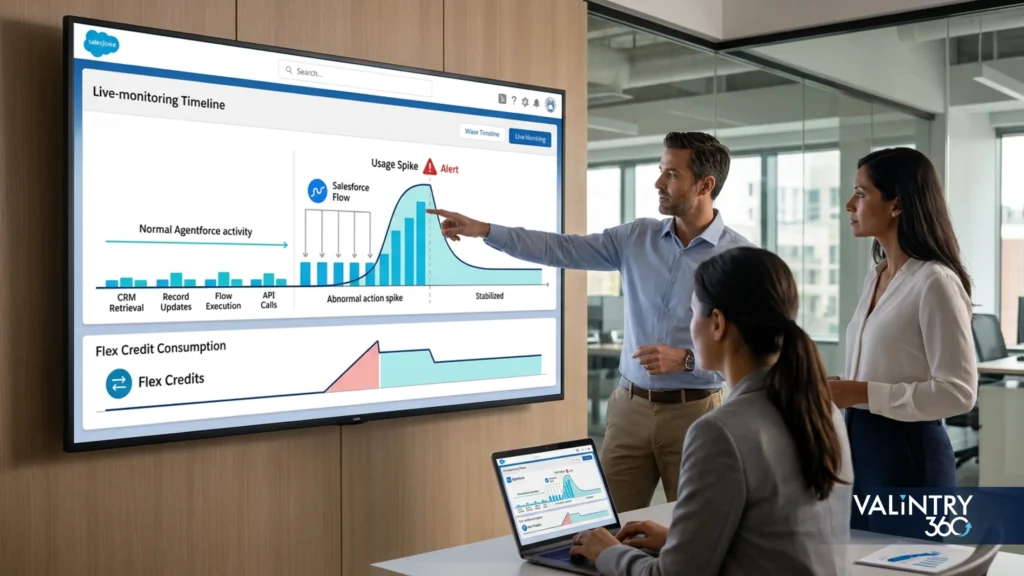
What follows is an illustrative composite built from the patterns we see across service deployments, not a single named engagement. The numbers are constructed to show the method.
When a Simple Agent Became More Expensive Than Expected
A service team planned an Agentforce support agent for roughly 30,000 monthly interactions. The forecast looked manageable because they expected each interaction to need three standard actions: identify the customer, retrieve the knowledge, answer. That’s the baseline Salesforce’s own example uses, and it’s a reasonable place to start.
The problem was that the forecast measured conversation volume without measuring workflow depth. Once realistic testing began, production-style interactions needed authentication, account lookup, case-history retrieval, entitlement checks, knowledge retrieval, record updates, escalation logic and logging. The typical interaction moved to 5–8 actions. Complex cases went past that. The expected credit consumption roughly doubled before a single customer touched the agent.
The Cost Drivers
The team reviewed the workflow instead of just raising the usage budget. Five patterns explained most of the gap.
- Repeated retrieval. Duplicate and weak knowledge content made the agent retrieve more context than it needed.
- Failed actions. Permission gaps and incomplete inputs triggered unsuccessful lookups and extra processing.
- Deeper workflows. Escalations and record updates added actions the original estimate never counted.
- Channel differences. Voice and chat were being treated as one blended pattern.
- Testing volume. Edge cases, retries and regression checks weren’t separated from production assumptions.
The issue was never the price of a credit. It was how the agent did its work.
Rebuilding the Cost Model
|
Control area |
Before review |
After review |
|
Cost model |
Conversations only |
Actions per interaction |
|
Simple requests |
One blended average |
Defined action budget |
|
Complex cases |
Same forecast as routine work |
Higher budget with escalation rules |
|
Failed actions |
Treated as technical errors |
Tracked as consumption signals |
|
Channel usage |
Chat and voice blended |
Separate channel forecasts |
|
Wallet review |
Periodic visibility |
Regular operational review |
|
Cost metric |
Total credit consumption |
Cost per business outcome |
What Changed
The team stopped asking “how many conversations will the agent handle?” and started asking “how many actions does each outcome require, and is that consumption producing enough value?” That one shift made the model actionable. A two-action status request could be optimised differently from an eight-action service workflow. Voice got its own forecast. Failed actions became something to investigate. New tools got reviewed for consumption impact as well as business value.
The Business Lesson
Flex Credits weren’t inherently expensive. Unmodelled agent behaviour made a reasonable forecast unreliable. Agentforce cost optimization became a workflow discipline: define the work unit, set action boundaries, monitor consumption, review failures and repeated retrieval, separate channels, and connect every credit to an outcome. Runaway starts inside the workflow, not on the invoice.
How Governance Keeps Cost Control From Becoming Guesswork?
Governance isn’t only a risk topic. It’s a cost topic, and treating it as one is what separates teams that control spend from teams that explain it afterwards. The NIST AI Risk Management Framework organises AI risk around four functions: govern, map, measure, manage. That sequence maps cleanly onto Agentforce cost control. Govern who owns the agent. Map the workflow and the data. Measure actions, failures and value. Manage changes before behaviour drifts.
Keep the governance model practical. It should say who can approve new actions, which sources the agent can retrieve from, what usage threshold triggers a review, what gets logged, when a human must approve an answer, and how wallet usage gets explained. A governance model that doesn’t touch spend won’t stop a runaway. A spend model that doesn’t touch governance won’t stop risky over-automation.
What Not to Do When the Bill Starts Rising
Don’t cut Flex Credits blindly. Lowering the wallet hides the real issue and degrades service. Find which agents, intents, channels and actions changed first.
Don’t blame adoption before checking action design. Higher usage is healthy if it produces lower handle time or better deflection.
Don’t hold every workflow to the same action budget. A password reset and a regulated service case shouldn’t share a cost target.
Don’t wait for renewal. The renewal conversation should summarise months of wallet reviews, not reveal the first serious cost analysis. And remember the credits themselves don’t roll over: anything unused at the Order End Date is gone, so over-buying is a runaway too, just a quieter one.
Don’t assume the lowest credit burn is the best result. A workflow that spends more but removes expensive manual rework is stronger than a cheaper one that leaves humans to clean up. Our Agentforce consultant roadmap and governance checklist treats Agentforce cost control as part of the lifecycle rather than a one-time task, because that’s the only way it holds.
A Reusable Monthly Review Worksheet
|
Monthly review field |
How to read it |
Warning sign |
Action to take |
|
Credits used by agent |
Compare actual with forecast by agent and owner |
One agent takes a rising share without better outcomes |
Review prompts, actions and source access |
|
Actions per outcome |
Divide actions by resolved cases, completed tasks or qualified leads |
Depth rises while success stays flat |
Tune the workflow, remove unnecessary steps |
|
Failed and repeated actions |
Count retries, permission failures, tool errors, repeated retrieval |
Failures climb after a release or data change |
Fix data, permissions, API handling or fallback logic |
|
Channel mix |
Compare chat, voice, portal, Slack and email separately |
Voice or employee usage beats the blended forecast |
Separate forecast and threshold per channel |
|
Cost per business result |
Tie spend to handle time, deflection, cycle time, rework or revenue |
Credits grow, outcome value doesn’t |
Pause expansion until the use case is redesigned |
This worksheet keeps Agentforce cost optimization grounded in operations. The wallet shouldn’t be a finance-only dashboard. The point is to give service, sales, operations, IT and finance the same language for the same number.
Working With a Certified Salesforce Partner on Agentforce Cost Optimization
We’re a certified Salesforce partner, which means we hold the current rate cards, we can read your Digital Wallet against your contract and your active consumption cards, and we’ve run the monthly review above on live deployments rather than describing it.
Three things that matters for.
The controls get built before launch rather than retrofitted. Action budgets, source boundaries, testing wallets and owner assignment are cheap to set up in week one and expensive to impose on a live agent that’s already learned bad habits. Our Agentforce consulting and implementation work starts with the action map, because that’s where the bill is decided.
The review has an owner with time for it. Most runaways aren’t caught late because the data was hidden. They’re caught late because the person who was supposed to look had a full workload already. A managed review puts a name and a calendar slot against the wallet.
The number gets tied to an outcome before it gets tied to a budget. Cost per resolved case, per qualified lead, per completed request. That’s the figure a finance team can defend at renewal, and it’s the one that decides whether more consumption is good news or bad.
One more thing worth saying plainly. Agentforce cost optimization is not a reason to delay a deployment. It’s the reason a deployment survives its first renewal. The teams that get in trouble are the ones that launch without the controls, not the ones that launch with them.
We don’t compete on rate. We compete on whether your credits produce outcomes you can point to.
What This Looks Like in Practice: VALiNTRY360 Case Studies
Cost control is easy to describe and harder to hold to when adoption is climbing and the wallet looks healthy.
Our Salesforce case studies cover the delivery work behind the controls on this page: service deployments where action budgets were set per intent before go-live, knowledge sources cleaned so retrieval stopped repeating, and monthly reviews that caught a failed-action spike the week after a release instead of the quarter after.
If you’ve got an agent live and a wallet you don’t fully understand, talk to our team. Half an hour with your Digital Wallet data usually tells us which of the nine surprises above you’re looking at, and it costs considerably less than the next invoice.
Where Agentforce Cost Optimization Actually Lives
Flex Credits aren’t the problem. Unmodelled agent behaviour is the problem. Credits are useful because they let you buy consumption, pilot carefully and scale the workflows that prove value. They get risky when you estimate volume, ignore action depth, and review spend after the bill arrives.
Agentforce cost optimization works when every agent has an action budget, a data boundary, a tool boundary, a testing allowance, a wallet review and a cost-per-outcome metric. Runaway usually starts when those are missing. Bill shock usually ends when the team can explain why credits were consumed and what they bought.
So if the question is how to reduce Agentforce costs, the answer is to manage usage billing as a living operating model. Start with a forecast. Launch with limits. Monitor consumption by agent and intent. Review failed actions and repeated retrieval. Tie every credit pool to an outcome. Then expand only when the business case shows the extra spend is buying service, productivity, revenue or capacity you can measure.
Frequently Asked Questions
How do I reduce Agentforce costs?
Start with the three controls that catch most runaways: an action budget per agent, a separate review of failed actions, and a named owner for cost per outcome. Then narrow tool access, clean the knowledge sources the agent retrieves from, and model voice separately. Most reductions come from cutting actions the agent didn’t need to take, not from buying fewer credits.
What is Agentforce cost optimization?
Agentforce cost optimization is the practice of controlling usage billing by managing actions, Flex Credits, Digital Wallet visibility, workflow design, data quality, governance and cost per outcome. It focuses on why credits are consumed, not only how many.
Why is my Agentforce bill so high?
Almost always because the agent is doing more work per interaction than the forecast assumed. The usual causes are action depth that grew after launch, repeated retrieval from a weak knowledge base, failed actions that still consume effort, broad tool access, voice usage blended into chat averages, and testing traffic counted as production. Check actions per interaction first.
Does Digital Wallet stop usage when credits run out?
No. Salesforce states that Digital Wallet doesn’t block or throttle any service, doesn’t turn functionality off at 100% consumption, and doesn’t restrict access. Usage continues past your entitlement and bills at your contracted rate in arrears, with no penalty. Alerts and a named owner are the only real controls.
How many actions does an Agentforce support interaction take?
Salesforce’s own pricing example uses three actions per case, and Forrester’s audited year-one figures reconcile to 3.3. That’s the baseline. Add authentication, entitlement checks, integration writes, escalation logic and logging, and a realistic production interaction lands at five to eight. The gap between three and eight is where most bills surprise people.
Do failed Agentforce actions cost credits?
They can, and they always cost something. A failed action may still consume credits depending on the usage type, and it always creates testing, monitoring and support effort. Track failed actions separately from failed conversations so you can see where spend is rising with no value attached.
What is an Agentforce action budget?
A planned limit on how many actions a normal request should need, how many a complex one may need, and when the agent should stop and escalate. It’s the single most effective Agentforce cost optimization control because it turns Flex Credits into a bounded operating model. When an agent exceeds its budget, inspect intent, data quality, tool choice and fallback behaviour, in that order.
Should voice be modelled separately from chat?
Yes. A Voice action costs 30 Flex Credits against 20 for standard, and voice interactions add transcription, summary, routing and follow-up. A five-minute call and a five-minute chat don’t produce the same action path. Blending them is how the expensive channel disappears inside the average.
Does testing in a sandbox consume Flex Credits?
Yes. A standard action costs 16 credits in a sandbox against 20 in production, so testing runs at 80% of live rates and draws from the same pool. The rate card applies the sandbox multiplier to scratch orgs as well. Build a separate testing wallet so launch and regression usage don’t distort the production forecast.
Do unused Agentforce credits expire?
Yes. The Flex Credits Rate Card states that credits must be used before the Order End Date on your Order Form and that no rollover is permitted. Over-buying is a runaway in the other direction: money spent on capacity that expires unused.
How often should Agentforce usage be reviewed?
Weekly during launch, monthly after stabilisation. Compare forecast credits with actual, identify failed or repeated actions, and check whether spend is improving outcomes. The first quarter is where a configuration mistake is cheapest to catch.
How does data quality affect Agentforce cost?
Poor data increases retrieval, retries, failed actions and human rework. Clean, governed data reduces avoidable consumption and makes answers more reliable. Data quality is a trust control and a spend control at the same time.
Is the lowest credit usage always the best result?
No. Low usage isn’t useful if the agent creates rework or poor outcomes. Optimise cost per business result: resolved case, completed task, qualified lead or reduced manual effort. A workflow that spends more but removes expensive manual work is stronger than a cheaper one that leaves humans to clean up.
What is the best metric for Agentforce cost optimization?
Cost per business outcome. Cost per resolved case, per qualified lead, per completed employee request, per successful handoff, or per avoided manual task. Total credits consumed tells you spend. Cost per outcome tells you whether the spend was worth it.
Do long-horizon agents change cost control?
Yes. Since 11 September 2026, Agentforce agents can pursue a goal across days and weeks rather than a single interaction. An action loop that would have been caught within a review cycle can now run for a week before anyone looks. The action budget and the failed-action review stop being nice-to-haves and become the only controls between you and a very quiet, very large invoice.
Related Posts
- Agentforce
Agentforce vs Salesforce Flow: Which Should You Use…
Your Salesforce org may already depend on Flow for record updates, approval routing, notifications, scheduled jobs, guided screens, and other repeatable processes. Each path is configured in advance, so the system follows the same rules whenever the same conditions appear.Agentforce…
- Agentforce
Agentforce Readiness Checklist: Is Your Salesforce Org Ready?
Agentforce reads whatever your Salesforce org already contains, and it acts through the automation you've already built. That inheritance is the whole readiness problem, in one sentence.An agent inherits your duplicate contact records, your too-wide permission sets, and that Flow…
- Agentforce
Agentforce Implementation Cost in 2026
Salesforce publishes a price for a credit, a conversation, a user license, and a resolved case. Those numbers price the meter.Your project is everything that happens before the meter starts running: defining the process, cleaning the records the agent will…