
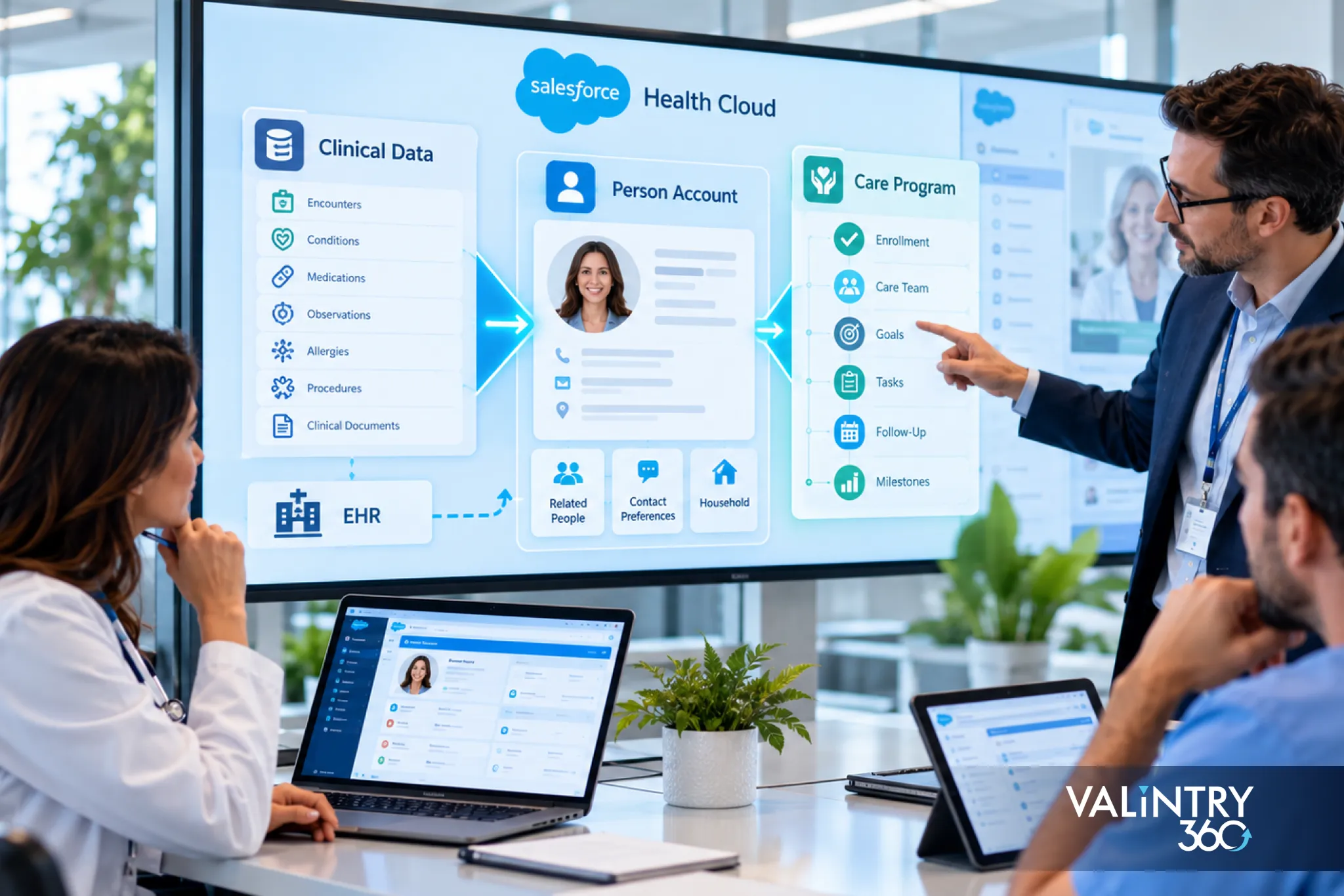
Have you ever wondered why patients are stored as person accounts in Salesforce, how care programs connect to clinical records, or where diagnoses and medications actually belong? These questions often come up when you’re working with Salesforce Health Cloud. The Health Cloud data model helps organize this information, but understanding how its different objects work together is what makes patient data easier to manage and use.
In this guide, we’ll walk you through the four main layers of the Health Cloud data model, including person accounts, care programs, clinical records, and care plans. You’ll also learn how FHIR R4 supports data exchange, how EHR integrations connect patient information, and which decisions your team should make before implementation. We’ll use a practical patient example to show how everything fits together.
TL;DR
- What it is. The Health Cloud data model links Salesforce objects for people, programs, clinical records and care plans. Person accounts hold patients and members, care programs group enrollees, and the clinical data model stores encounters, conditions and medications in a form aligned with FHIR R4.
- What to settle first. Decide how you model people, which care plan model you use, and whether your EHR integration targets the newer clinical objects. Person accounts can’t be turned off once enabled, so test in a sandbox first.
- How to get it right. Give every data type one source of truth, pick a matching rule for patients, and plan access before data loads. The 7 decisions near the end of this guide cover each of these.
What Is the Health Cloud Data Model?
The Health Cloud data model is the set of standard and custom objects and fields that Salesforce provides for healthcare work. It gives you places to store people, programs, care plans and clinical records, plus the links between them. Providers, payers and life sciences teams each use a different slice of it, and all of them run on the Salesforce platform you already use, so the same reports, flows and security rules apply.
The model also has areas for claims, utilization management and social determinants of health, which this guide leaves for another day. Teams often call the combined view of 1 patient across all of it Patient 360. Our guide to Salesforce consulting for healthcare covers implementation support, including Health Cloud planning and compliance, so this guide stays focused on the underlying data model.
The 4 Layers of the Health Cloud Data Model
For this guide, we group the core Health Cloud data model into 4 connected layers. Reading these areas layer by layer is faster than memorizing object names.
Layer | Question it answers | Main objects |
|---|---|---|
People | Who is this person or organization? | Person account, business account, Healthcare Provider, Healthcare Facility |
Programs | Which offerings is this patient enrolled in? | CareProgram, CareProgramEnrollee, CareProgramProduct |
Clinical records | What happened clinically? | ClinicalEncounter, HealthCondition, MedicationRequest, CareObservation |
Care plans | What is being done for this patient? | CarePlan, or Case with problems, goals and tasks |
A single patient touches all 4 layers, and the worked example later in this guide shows how. The next sections follow this order, and the patient-focused layers connect through the person account, which is why it comes first.
Why Health Cloud Person Accounts Come First
A person account stores information about one specific person by combining account and contact fields in a single record. Its page layouts can show account and contact fields together, along with related lists. In the database it’s stored as an account and a contact, which is worth remembering when you build reports and integrations. Health Cloud person accounts are available in Lightning Experience in Enterprise and Unlimited editions with Health Cloud or Health Cloud for Life Sciences.
Salesforce’s guidance on patients is direct: always model your patients or members as person accounts. The practical reason is flexibility. A person account makes it easy to change or add roles, so a caregiver who later becomes a patient doesn’t need a new record. Patient-focused workflows across the Health Cloud data model depend on consistent person records, so this is the first decision to settle.
Who Is Modeled as What: Patients, Caregivers, Providers and Facilities
Health Cloud supports 2 ways to model people, the person account model and the traditional account-contact model, and Salesforce recommends person accounts over contacts. Use business accounts for organizations and person accounts for people. Salesforce sets out the mapping on its Types of People in Health Cloud page, summarized here.
Who | How Health Cloud models them |
|---|---|
Patients and members | Person account |
Caregivers and family members | Person account is recommended, which makes later role changes easy |
Individual providers | Person account or contact, plus a Healthcare Provider record |
Provider organizations | Business account, plus a Healthcare Provider record |
Branches and sites | Business account, plus a Healthcare Facility record |
Providers need 1 extra record. The Healthcare Provider object describes what a provider does, and it points to the person account or contact behind it. Facilities and branches use a Healthcare Facility record that references a business account.
How to Turn On Person Accounts Without Regrets
Turning on Health Cloud person accounts is a one-way step, so treat it as a design decision. Salesforce’s setup documentation states that after Person Accounts is enabled, it can’t be disabled. Work through these steps in order.
- Create a sandbox first. Salesforce recommends previewing how person accounts affect your org.
- Check 3 prerequisites. The account object needs at least 1 record type, profiles that can read accounts need read access to contacts, and org-wide sharing must be either Contact controlled by parent or both Account and Contact private.
- Enable person accounts in Setup. Salesforce then creates a person account record type automatically.
- If your org uses the legacy Health Cloud managed package, update its Use Person Accounts custom setting for patients and members. Salesforce’s custom setting page explains that step. Newer implementations without the managed package can skip it.
- Assign the person account record types and page layouts to profiles.
Test with realistic patient and caregiver records before you load real data. Changes after a load are far harder to make.
Health Cloud Care Programs: What They Are and What They Aren’t
A care program is a set of activities, such as therapy, financial assistance, education, wellness or fitness, that an employer or insurer offers to participants. In Salesforce it’s the CareProgram object, and Health Cloud care programs can be tied to products, providers and campaigns. A diabetes coaching program offered by an employer is a typical example.
A care plan is a different thing. It belongs to 1 patient and lists that person’s problems, goals and tasks. A program is 1 offering with many enrollees, and a plan is 1 patient’s work list. Both live in the Health Cloud data model, and they answer different questions, so keep them apart in your design from the first workshop.
The Care Program Objects and How They Connect
Salesforce documents this part of the model in its Care Program Management reference, available in API version 46.0 and later. These are the objects you’ll meet most.
Object | What it represents |
|---|---|
CareProgram | A set of activities offered to participants |
CareProgramEnrollee | A participant enrolled in a care program |
CareProgramEligibilityRule | Links a program to its enrollment eligibility criteria |
EnrollmentEligibilityCriteria | Defines patient eligibility for one or more programs |
CareProgramGoal | A business or clinical goal tied to a program |
CareProgramTeamMember | A person who delivers program services, such as a care coordinator |
CareProgramProduct | Connects a program to a product, a provider or both |
CareProgramEnrolleeProduct | Connects an enrollee to a program product, a provider or both |
CareProgramProvider | A business account that is the service provider for a program product |
CareProgramCampaign | Connects a program to one or more campaigns |
CareProgramEnrollmentCard | A membership card holding a membership number or enrollment code |
Read the table from the program outward. The eligibility objects decide who can join, the enrollee object records who joined, and the product and provider objects describe what the program delivers and who delivers it.
How Enrollment and Eligibility Work
Enrollment starts with eligibility. A CareProgramEligibilityRule links a program to EnrollmentEligibilityCriteria, which define who qualifies. When a patient qualifies, a CareProgramEnrollee record ties that patient’s person account to the program. Keep the eligibility logic in the criteria records so your team can see why a patient qualified.
Delivery has its own objects. A CareProgramTeamMember represents the person who delivers program services, such as a program manager or care coordinator, and a CareProgramGoal records a business or clinical goal. For bulk enrollment, Salesforce provides the Care Program Enrollments API, described as a way to enroll multiple patients in a care program. A CareProgramEnrollmentCard holds a membership number or enrollment code when a program uses them.
Clinical Data in Health Cloud: 2 Models, 1 Direction
Health Cloud has stored clinical data in 2 ways. The older packaged EHR data model uses custom objects in the managed package, such as EhrCondition__c, and holds data replicated from EHR or other clinical systems with read-only access. The newer clinical data model uses standard objects, such as HealthCondition. Salesforce’s clinical data guidance describes both.
Salesforce says the packaged EHR model is succeeded by the standard objects. Starting with the Spring ’23 release, new customers can’t create records in the packaged EHR objects that have standard counterparts, and future development is focused on the standard clinical objects. Existing customers can keep using packaged EHR records while planning migration. Any Health Cloud data model you design today should target the standard clinical objects, and Salesforce recommends building integrations on them too. If your org already holds data in the packaged objects, plan how it moves.
What the Health Cloud Clinical Data Model Contains
The Health Cloud clinical data model groups records by clinical area. Salesforce lists every object in its clinical data model reference, and this table puts the main ones in plain language.
Clinical area | Main objects |
|---|---|
Visits | ClinicalEncounter, ClinicalEncounterDiagnosis, ClinicalEncounterProvider, ClinicalEncounterFacility |
Conditions and problems | HealthCondition |
Medications | Medication, MedicationRequest, MedicationStatement, MedicationDispense, MedicationAdministration, PatientMedicationDosage |
Tests and results | CareObservation, DiagnosticSummary, Specimen |
Immunizations and procedures | PatientImmunization, PatientMedicalProcedure, ClinicalServiceRequest |
Allergies and reactions | AllergyIntolerance, PatientHealthReaction |
Alerts and risks | ClinicalAlert, ClinicalDetectedIssue, HealthRiskEvaluation |
Providers and facilities | HealthcareProvider, HealthcareFacility, HealthcarePractitionerFacility, CarePerformer |
Codes and identifiers | CodeSet, CodeSetBundle, Identifier |
Two practical details help. Some of these Health Cloud objects need the FHIR-Aligned Clinical Data Model org preference turned on in FHIR R4 Support Settings, while others such as CareObservation, CodeSet and Medication don’t. And the records link to each other, so a medication request connects the patient, the encounter, the provider, the condition and the medication. CodeSet and CodeSetBundle store the codes your clinical records use, so load them before the records that need them.
Where FHIR R4 Fits In
FHIR is the HL7 standard for exchanging health data. Salesforce says the objects in the clinical data model are built to align with FHIR R4, specifically FHIR v4.0.1. The object reference also says the model supports many HL7 v2.3 message types, which matters if your hospital still sends older interface messages.
Aligned means the model follows the standard closely. A FHIR CarePlan lines up with the CarePlan object, for example, and a FHIR EpisodeOfCare with CareEpisode. Each Salesforce object still has its own fields and rules, so map field by field. Salesforce publishes a developer guide titled Mapping FHIR R4 to Salesforce Standard Objects, and it’s the place to start. A short routine keeps the work orderly.
- List the FHIR resources your EHR sends.
- Match each one to a Salesforce object using the mapping guide.
- Note every field with no home, and decide whether it needs a custom field.
- Test with real messages from your EHR before you build the full interface.
Care Plans: The 2 Models You’ll Run Into
Health Cloud care plans come in 2 forms. The longer-standing form uses the Case object as the care plan, with Problem, Goal and Task objects and Case Team Members for the care team. The newer Integrated Care Management model uses dedicated objects such as CarePlan, CarePlanActivity, CarePlanTemplate, GoalDefinition, GoalAssignment and CareTask, and Salesforce says it is aligned with both USCDI and FHIR.
The newer model also includes CareEpisode for a period of services, CareGap for a gap in a patient’s care, and ClinicalMeasure for the definitions that identify those gaps. A ProblemDefinition creates HealthCondition records that serve as problems in care plans, so plans and clinical records connect directly. Salesforce lists every object in its Integrated Care Management reference. Ask your admin which model your org uses before you design anything.
Which Object Do You Use? A Quick Reference
Use this table to pick among Health Cloud objects without opening the object reference each time.
If you need to store | Use |
|---|---|
A patient or member | Person account |
A caregiver or family member | Person account |
A clinic or provider organization | Business account plus a Healthcare Provider record |
A site or branch | Business account plus a Healthcare Facility record |
A set of services an employer or insurer offers | CareProgram |
A patient’s participation in a program | CareProgramEnrollee |
A visit | ClinicalEncounter |
A diagnosis or condition | HealthCondition |
A prescription | MedicationRequest |
A test result | CareObservation |
A medication history entry | MedicationStatement |
A care plan | CarePlan, or Case in the longer-standing model |
A goal that is part of a care plan | GoalAssignment |
A healthcare-related task | CareTask |
A patient’s period of receiving services from a provider | CareEpisode |
A gap in a patient’s care | CareGap |
For anything the table doesn’t cover, check the object reference for the layer in question, because each layer’s reference lists its objects together.
Beyond the Core: Other Areas of the Model
Salesforce also provides data models for specialist work. This guide covers the core, but you may meet the areas below as your project grows. Salesforce’s overview of its healthcare data models lists the roles that typically use each one.
Area | Who typically uses it |
|---|---|
Claims | Payer member services, agent care managers and utilization management nurses |
Utilization Management | Provider care coordinators and providers, plus payer call center staff, nurses and medical directors |
Social Determinants | Payer call center staff, case managers and care coordinators, plus provider physicians |
Home Health Care | Provider schedulers, caregivers and clinical managers, plus payer authorization units |
Provider Network Management | Payer provider relations, network, credentialing and contracting staff |
Remote Monitoring and Device Registration | Provider care coordinators and caregivers, plus MedTech field care managers |
Benefits Verification | Providers, payers and patients, plus life sciences case managers |
These areas build on the same person account layer, so the decisions in this guide carry over to them.
How Health Cloud EHR Integration Fits the Model

In most implementations, the EHR remains the clinical system of record, while Health Cloud connects patient relationships and care coordination around it. Health Cloud EHR integration works best when each side has a clear job, so settle which system owns each data type before any interface is designed. Standard clinical objects are the recommended target for new integrations; older orgs may still have packaged EHR records.
We recommend 3 written agreements before build starts: the source of truth for each data type, the rule that matches an EHR patient to a person account, and how often each feed refreshes. This is where Salesforce integration services work gets tested, because an interface can only be as clear as these rules.
In What Order Should You Load Data?
Order matters when you load data into the Health Cloud data model, because Health Cloud objects reference each other and a record can only point to records that already exist. This is the sequence we recommend.
- Business accounts, then Healthcare Provider and Healthcare Facility records.
- Person accounts for patients, caregivers and any individual providers you model that way.
- Reference data such as CodeSet and CodeSetBundle records.
- Care programs and eligibility rules, then enrollees.
- Clinical records such as encounters, conditions, medications and observations.
- Care plans, goals and tasks.
Run a duplicate check after step 2, before anything points to those person accounts. Cleaning up duplicates later means re-pointing every record that references them.
1 Patient Across the Whole Health Cloud Data Model
Here’s an example we made up to show how the layers connect. Maria is a patient with diabetes who sees a local clinic, takes part in an employer wellness program, and has a daughter who helps with her care.
Layer | Record | What it holds |
|---|---|---|
People | Person account for Maria | Her name, contact details and role as a patient |
People | Person account for her daughter | A caregiver, modeled as a person account so her role can change later |
People | Business account and Healthcare Facility for the clinic | The site where Maria is seen |
Programs | CareProgramEnrollee | Maria’s enrollment in the wellness program |
Clinical records | ClinicalEncounter and HealthCondition | A clinic visit and her diabetes diagnosis |
Clinical records | MedicationRequest and Medication | Her prescription |
Clinical records | CareObservation | A blood sugar reading |
Care plans | CarePlan with a goal and tasks | Her plan for managing the condition |
Maria exists once, as a person account. The enrollment, the encounter, the condition, the prescription and the care plan all point back to that record. If a duplicate Maria appeared, her history would split across 2 records. Now say her daughter becomes a patient herself a year later. Because she’s already a person account, her role changes and no new record is needed. That’s the flexibility Salesforce gives as its reason for choosing person accounts.
What Can You Report On? Questions the Layers Answer
A well-built model lets you ask plain questions and find the objects behind them. This is the practical payoff of the Patient 360 view.
Question | Objects behind it |
|---|---|
How many patients are enrolled in each program? | CareProgramEnrollee grouped by CareProgram |
Which patients have a gap in care? | CareGap, linked to the person account |
Which enrollees have open care plan tasks? | CareProgramEnrollee, CarePlan and CareTask |
Which providers see the most patients? | ClinicalEncounterProvider linked to ClinicalEncounter |
Which conditions are most common among enrollees? | HealthCondition matched to CareProgramEnrollee by person account |
Which patients are enrolled in more than 1 program? | CareProgramEnrollee grouped by person account |
Which patients have an active prescription? | MedicationRequest linked to the person account |
These questions draw on records across multiple layers, often using the person account to connect them. Reliable patient identifiers and duplicate controls make the results more accurate; unresolved duplicates can inflate counts or split patient histories.
Duplicate Patients and Data Quality
Because everything points back to the person account, duplicates do more damage here than in a sales org. Patients arrive through EHR feeds, intake forms, call centers and campaigns, and each path can create a new record. A duplicate splits 1 patient’s programs, plans and clinical history across 2 accounts, and a care team can miss a medication or a gap in care.
Decide the matching key before the first load, and store the EHR’s patient identifier with every record. If duplicates already exist, Salesforce data governance services can help reconcile records and set duplicate controls to catch new matches at entry.
Who Can See What: Access in a Patient Data Model
Patient data needs tighter access than most CRM data. Two parts of the model drive this: the sharing settings you choose before enabling person accounts, and the permissions you give care team members, providers, caregivers and program staff. Plan access while you design your Health Cloud data model, because each new program or data source adds people who need a view of some records and not others.
Start with least privilege. Give each role the records and fields it needs for its work and nothing more. Our Salesforce consulting for health and life sciences services address access reviews, permission controls, and governance practices that reduce unnecessary patient-data exposure. Review access again each time you add a program or a data source.
When to Extend the Model With Custom Fields
Check whether a standard object or field already exists before you add a custom one. Salesforce is moving packaged custom objects toward standard ones, and that direction shows where the platform is heading. A custom field that duplicates a standard field splits your reporting and adds work to every integration.
When you do need a custom field, name it clearly and record the source system field it maps to. Keep the standard objects as the home for the data they already cover, and put only what’s specific to your organization into custom fields. Agree on this rule in the planning workshop so every builder follows it.
Keeping Up With Release Changes
Salesforce updates object lists with each release, so treat any guide, including this one, as a starting point. When we wrote this, the object reference pages we cite were labeled Winter ’27, API version 68.0, as the latest. Some admin pages still carried Winter ’24 labels and gave no last updated date.
Two habits help. Keep a short record of which Salesforce page and version each design decision came from, and re-check the care program, clinical and care plan object lists before each major phase of your project.
How to Plan Your Health Cloud Data Model: 7 Decisions to Make First
Run these 7 decisions through a short workshop with clinical, IT, compliance and program leads before anyone builds a field.
- People: Will every patient and member be a person account?
- Roles: Which other people need records, such as caregivers, providers and facilities?
- Programs: Which care programs do you run, and who is eligible for each?
- Plans: Which care plan model will you use?
- Clinical data: Which EHR data do you need in Salesforce, and which standard objects store it?
- Ownership: Which system owns each data type, and how do you match a patient across systems?
- Access: Who sees which records, and who reviews that access?
Write the answers on one page and keep it with your project documents. It becomes the reference for every build and integration task that follows.
Common Challenges & Solutions
These 4 problems are worth planning for before any build starts.
- Patients modeled with the wrong record type
The Challenge: Teams that start with contacts often find later that programs, care teams and integrations expect Health Cloud person accounts, and moving records afterward is painful.
Our Approach: We confirm the people model in a sandbox first, set the record types and sharing prerequisites, and test with realistic patient and caregiver records before any data load. That way the one-way decision is made with evidence.
- Health Cloud EHR integration built on the older objects
The Challenge: The packaged EHR objects hold read-only copies of replicated data and won’t be used for future development, so an interface built on them has a short shelf life.
Our Approach: We map source fields to the standard clinical objects during architecture and data planning, and we plan how existing EHR object data moves across, so the interface targets the objects Salesforce is building on.
- Programs and plans treated as the same thing
The Challenge: A program offering gets built as 1 care plan, or each patient’s plan gets built like a program, and enrollment reporting stops making sense.
Our Approach: We design programs and plans separately, agree definitions with clinical and program teams, and document which object answers which reporting question, so enrollment reports and individual care reports stay separate.
- Duplicate patients and unclear data ownership
The Challenge: EHR feeds, intake forms and manual entry create duplicate person accounts, so a patient’s history ends up split across records.
Our Approach: We define the matching key and the source of truth for each data type before the integration is built, then test with real-world messy records. We also set duplicate controls so new records are checked at entry.
How Healthcare Organizations Put Salesforce Health Cloud Into Practice

Understanding the Health Cloud data model is one thing, but seeing how it supports daily healthcare operations makes its value clearer. From managing patient follow-ups to connecting clinical documentation with scheduling, Salesforce Health Cloud helps organizations bring patient information and workflows into a more consistent system. Here are two examples of how healthcare providers have used the platform to address operational challenges.
Improving Patient Follow-Ups at Tri-County Hearing
For healthcare providers, keeping patients engaged after their first inquiry can be challenging when follow-ups depend on manual tasks and disconnected processes. Tri-County Hearing faced similar difficulties with patient communication and assigning new inquiries to the right care coordinators.
To address this, VALiNTRY360 customized Salesforce Health Cloud with automated lead assignment and structured follow-up workflows. The solution supports seven patient touchpoints over 60 days without extensive custom programming. This approach shows how connected patient information and workflow automation can help healthcare teams manage communication more consistently.
Explore the Tri-County Hearing Salesforce Health Cloud implementation to see how the organization improved its patient engagement processes.
Connecting Patient Intake and Clinical Workflows at AthenaPsych
Patient scheduling, intake, and clinical documentation often involve multiple steps, making it difficult for healthcare teams to maintain consistent information across their operations. AthenaPsych needed a system that could connect these activities and reduce the administrative work involved in managing patient care.
VALiNTRY360 developed a customized Salesforce Health Cloud platform to replace AthenaPsych’s existing EMR and bring these workflows together. Within six months of Phase 1, 80% of patients were scheduled during their first call, while clinical compliance errors decreased by 75%.
The implementation demonstrates how a well-planned Health Cloud data model can support connected patient records, improve workflow consistency, and give healthcare teams a more organized approach to managing patient information.
Learn more about the AthenaPsych Salesforce Health Cloud implementation and its impact on healthcare operations.
Conclusion: Build a Reliable Health Cloud Data Model With the Right Expertise
A well-structured Health Cloud data model connects person accounts, care programs, clinical records, and care plans while keeping patient information accurate and accessible to authorized teams. Defining data ownership, EHR integration requirements, and security controls before implementation helps healthcare organizations avoid duplicate records, reporting issues, and unnecessary changes during development.
Backed by 100+ Salesforce Certifications
Building a reliable Health Cloud data model requires experience across Salesforce administration, architecture, integration, and security. At VALiNTRY360, our team brings 100+ Salesforce certifications and experience supporting healthcare organizations with Salesforce implementation, data management, system integration, and access controls.
We work with clinical, IT, and compliance teams to plan how person accounts, care programs, clinical data, and EHR integrations fit together. From initial architecture planning through implementation, VALiNTRY360 helps organizations establish consistent data structures, manage patient information securely, and build Salesforce Health Cloud environments that support everyday healthcare operations. If you’re planning a Health Cloud data model implementation or reviewing an existing org, our Salesforce Health Cloud services can help you plan the next steps.
Frequently Asked Questions
What is the Health Cloud data model?
The Health Cloud data model is the set of standard and custom Salesforce objects and fields for healthcare work. It covers people, programs, clinical records and care plans, plus the links between them. Person accounts hold patients, and the clinical data model stores encounters, conditions and medications.
What is a person account in Health Cloud?
A person account stores information about one person by combining account and contact fields in a single record. Health Cloud uses it to represent patients and members, and it can also be used as a contact in many situations. In the database it’s stored as an account and a contact.
Are person accounts required in Health Cloud?
Health Cloud supports both the person account model and the traditional account-contact model. In the traditional model, a contact exists only in relation to an account. Salesforce recommends person accounts over contacts and says to always model patients or members as person accounts. Choose your model before you load data.
Can you turn off person accounts after enabling them?
No. Salesforce’s documentation says that after Person Accounts is enabled, it can’t be disabled. Salesforce also recommends creating a sandbox to preview how person accounts affect your org before you enable them.
What is a care program in Health Cloud?
A care program is a set of activities, such as therapy, financial assistance, education, wellness or fitness, offered to participants by an employer or insurer. Health Cloud care programs are stored in the CareProgram object, with enrollees, goals, team members, products and providers in related objects.
What is the difference between a care program and a care plan?
A care program is 1 offering with many enrollees. A care plan belongs to 1 patient and lists that person’s problems, goals and tasks. Programs show who is enrolled in what, and plans show what is being done for 1 patient. Keep them as separate objects so enrollment reports and individual care reports stay clean.
Which objects make up Health Cloud care programs?
The core objects are CareProgram, CareProgramEnrollee, CareProgramEligibilityRule, EnrollmentEligibilityCriteria, CareProgramGoal, CareProgramTeamMember, CareProgramProduct, CareProgramEnrolleeProduct and CareProgramProvider. CareProgramCampaign and CareProgramEnrollmentCard add campaign links and membership cards. Salesforce documents them in its Care Program Management reference, available in API version 46.0 and later.
What is the Health Cloud clinical data model?
It’s the set of standard objects for clinical records such as ClinicalEncounter, HealthCondition, MedicationRequest and CareObservation. Salesforce says the objects are built to align with FHIR, specifically FHIR v4.0.1. The Health Cloud clinical data model succeeds the older packaged EHR data model.
What happened to the packaged EHR objects?
Salesforce says the packaged EHR data model is succeeded by the standard objects in the clinical data model. Starting with Spring ’23, new customers can’t create records in the packaged EHR objects that have standard counterparts, and the packaged objects won’t be used for future development. If your org already holds data in them, plan how it moves to the standard objects.
Does Health Cloud support FHIR?
Yes. Salesforce says the clinical data model is built to align with FHIR R4, specifically FHIR v4.0.1, and the object reference says it supports many HL7 v2.3 message types. Alignment gives your team a shared standard, and you still map field by field.
Does Health Cloud replace the EHR?
Usually not. Most organizations keep the EHR as the system of record for clinical documentation and use Health Cloud for relationships, programs, care plans, and coordination. Some custom implementations can support broader clinical workflows or an EMR replacement, but those require careful data ownership, integration, and compliance planning.
How do patients enroll in a care program?
Eligibility rules and criteria records define who qualifies, and a CareProgramEnrollee record ties the patient to the program. For bulk enrollment, Salesforce provides the Care Program Enrollments API, which enrolls multiple patients in a care program. Product, provider and team member objects describe what the enrollee receives and who delivers it.
Which models do Health Cloud care plans use?
There are 2. The longer-standing model uses the Case object as the care plan, with Problem, Goal and Task objects. The Integrated Care Management model uses CarePlan, CarePlanActivity and related objects, and Salesforce says it is aligned with USCDI and FHIR.
Is Health Cloud now called Agentforce Health?
Salesforce shows Agentforce Health, formerly Health Cloud, on some pages, and its developer guide is titled the Agentforce Health Developer Guide. Other pages still say Health Cloud. The objects in this guide appear in that developer guide, so the model is documented under either name.
Who should help design a Health Cloud data model?
Bring clinical, IT, compliance and program leaders together with a Salesforce architect. Clinical leaders define what data matters, IT owns the source systems, compliance sets access rules, and program leaders define eligibility. Settle the 7 planning decisions before anyone builds.