
Agentforce Headless Agents
VALiNTRY360 designs, builds and governs Agentforce Headless Agents on your Salesforce org, so AI agents can run background work and answer outside systems without a chat window.
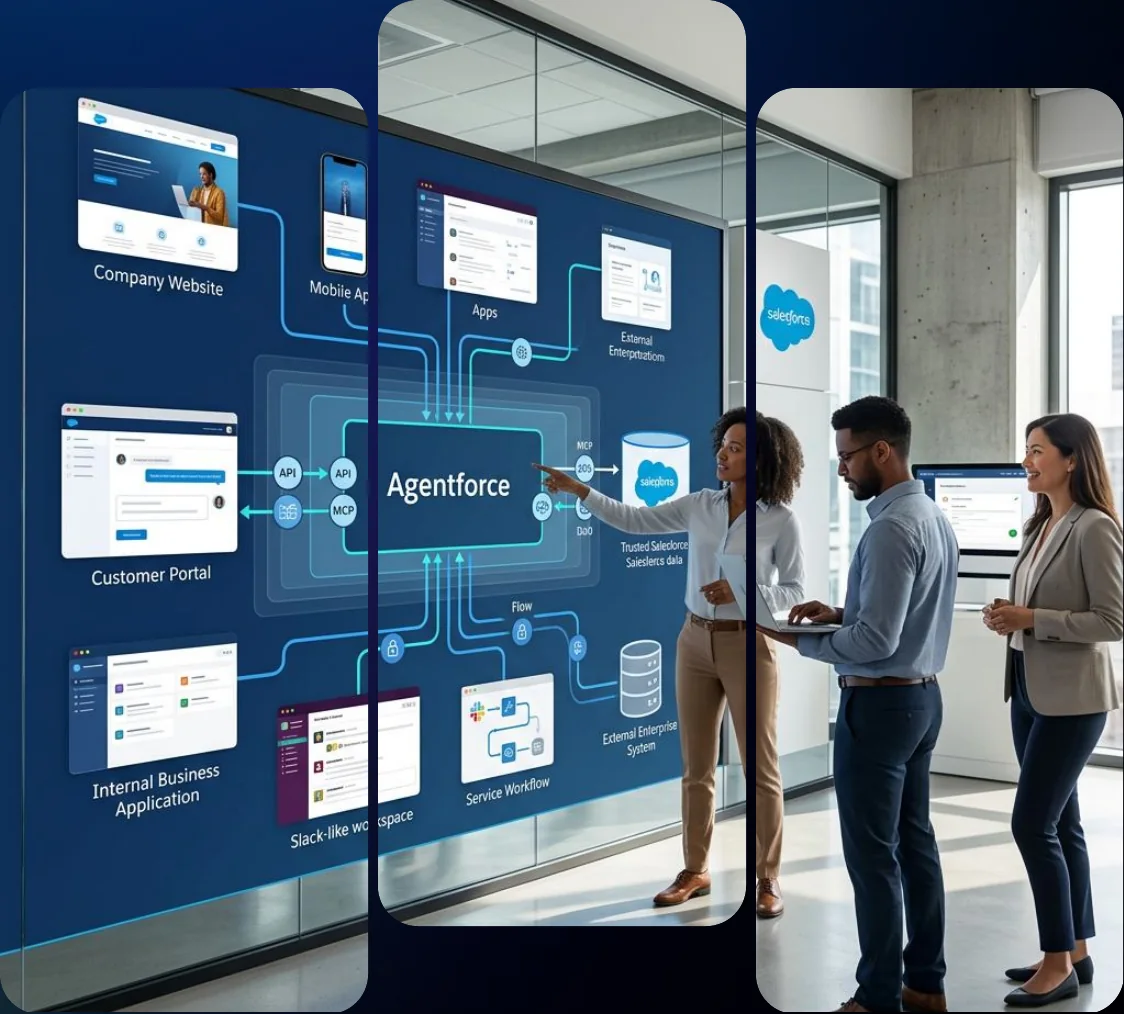
What Are Agentforce Headless Agents?
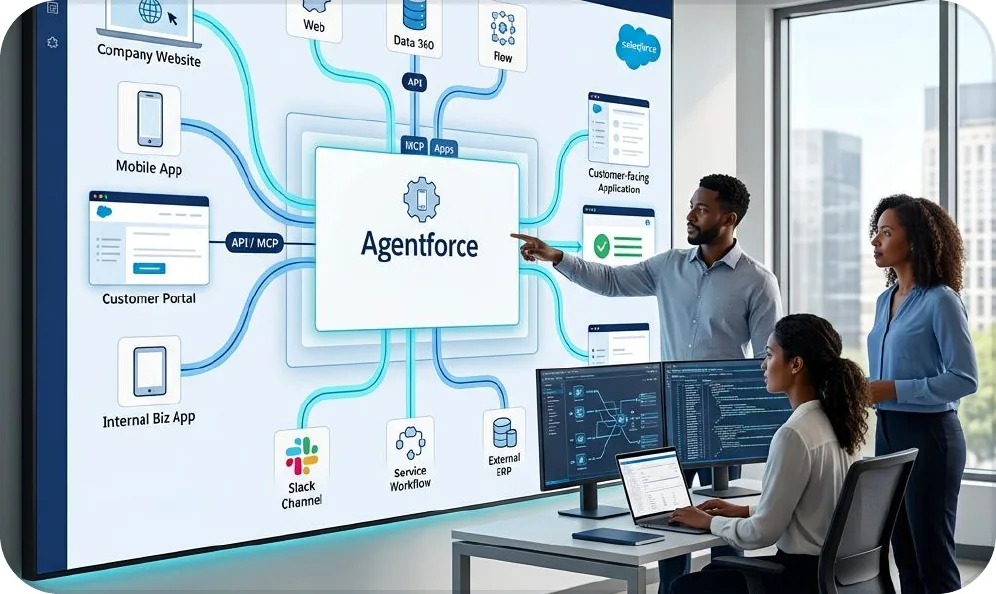
Agentforce Headless Agents are Agentforce agents that run without a user interface. A Flow, an Apex class or an outside system calls them through the Agentforce Agent API to read context, reason, take actions and return results. They support background and system-to-system work such as identifying data problems, triaging inbound requests and answering questions from websites or portals. These agents retain their topics, instructions and actions, while Salesforce permissions still apply. Headless does not mean unsupervised, so proper controls, testing and monitoring are essential. At VALiNTRY360, we act as your Agentforce headless agent implementation partner, helping select use cases, design agents, configure the Agent API and establish governance. Our work builds on our AI agent development solutions and Agentforce integration services.
Our Agentforce Headless Agents Services
We deliver headless agents as six connected services. You can start with an assessment, a single use case or a full rollout, and each service ends in a deliverable your team can review.
Headless Agent Readiness Assessment
We check whether a headless agent is the right tool for each process and whether your org and data can support it. You get a written recommendation on what to build as an agent, what to leave as a Flow and what to fix first.
- Review of candidate processes against Flow, Apex and agent options
- Permission, sharing and data quality check for the agent’s scope
- Ranked list of use cases by value, risk and effort
Agent Design and Build
We design the agent’s topics, instructions and actions, then build it in Agentforce Builder. Our team tests in a sandbox before the agent touches a production record.
- Topic and instruction design around one clear job
- Actions built on Flow, Apex or existing integrations
- Sandbox testing with realistic records and edge cases
Agent API Setup and Integration
We expose the agent to the systems that need it through the Agent API, and we handle the authentication and session design. Where the call comes from inside Salesforce, we use Flow or Apex instead.
- OAuth and app setup for outside callers
- Session handling and synchronous or streaming responses
- Error handling and retry rules for failed calls
Flow and Apex Orchestration
We embed agents in the automation you already run, so an agent can handle the judgment step inside a larger process. We keep rule-based logic in Flow and use the agent only where interpretation is needed.
- AI Agent Actions inside Flow
- Apex invocation for custom control
- Agent-to-agent handoffs where a job needs more than one agent
Governance and Security Controls
We decide what each agent can read, what it can change and when a person must approve. The result is a control model your security team can review before launch.
- Dedicated agent user with least-privilege access
- Approval steps for sensitive actions
- Logging and monitoring tied to named owners
Testing, Monitoring and Managed Support
We test before launch, watch behavior after launch and tune as your data changes. Our Agentforce managed services team supports your administrators after go-live.
- Test suites run before every change
- Usage, cost and error review each month
- Expand, adjust or retire recommendation for each agent
Four Ways to Call a Headless Agent
Headless agents run without a chat interface and can be triggered through different Salesforce integration methods. We choose the approach based on where the request starts, what data the agent needs and how the result will be used.
1. Salesforce Flow (AI Agent Action)
Salesforce Flow is ideal for automated workflows that need AI reasoning without custom code. We add the agent as an AI Agent Action, pass relevant record information and capture its response for the next step. This works well for data validation, lead qualification and case classification, using supported asynchronous execution paths.
2. Apex (Invocable Action)
Apex provides greater flexibility when headless agents need custom business logic or tighter application integration. We write and test Apex calls, pass instructions and session context, and handle responses and errors. This approach suits complex Salesforce workflows, custom applications and processes that require more control over agent interactions.
3. Agentforce Agent API (REST)
The Agentforce Agent API allows websites, customer portals and external platforms to communicate directly with headless agents. We configure authentication, manage sessions and support synchronous or streaming responses where available. This enables businesses to use Agentforce capabilities across different systems without requiring users to access the Salesforce interface.
4. Agent-to-Agent Orchestration
Agent-to-agent orchestration allows one Agentforce agent to delegate tasks to another specialized agent. We configure task routing, permissions, shared context and response handling so multiple agents can support complex workflows. Salesforce offers this capability through Multi-Agent Orchestration, currently documented as a beta feature, rather than a separate direct API.
Most implementations combine multiple approaches. A scheduled Flow might review records overnight, while a customer portal calls the same agent through the Agent API. Our guide to setting up agents on Agentforce explains the general implementation process.
Agentforce Headless Agents Use Cases
These are the use cases we prioritize because they are repeatable, measurable and low in risk when the agent starts in read-only mode. We tailor each one to your data and your policies.
Use Case
What the Agent Does
How We Implement It
Data Quality Review
Scans records on a schedule and flags duplicates, gaps and mismatches.
We start with read-only access, and send findings to a queue for a person to confirm.
Request Triage
Reads inbound requests, classifies them and routes them to the right team.
We map categories to your queues and keep a person on low-confidence cases.
Record Enrichment
Fills missing fields from approved sources and notes what changed.
We define which fields the agent may write and log every change.
Website and Portal Answers
Answers account or order questions for a front end you control.
We connect through the Agent API and limit answers to approved data.
Agent-to-Agent Tasks
Lets one agent hand a task to another, such as a service agent asking a billing agent.
We define the handoff, the data passed and who owns the result.
Back-Office Status Checks
Answers internal questions about orders, quotes or cases from a system you already use.
We connect the source system and test answers against real records.
Salesforce Headless 360 and Headless Agents
Salesforce announced Headless 360 on April 15, 2026, introducing a way for people and AI agents to access Salesforce capabilities through APIs, MCP tools and CLI commands without opening a browser. The announcement highlighted more than 60 new MCP tools, 30 preconfigured coding skills, and additional features for testing and monitoring agents. Headless 360 and Agentforce headless agents are related but serve different purposes. Headless 360 is the broader platform approach for connecting external AI tools and systems to Salesforce. Headless agents are agents you build and invoke through code or backend processes. Understanding this distinction helps organizations select the right Salesforce capabilities for their specific automation and integration needs.
Salesforce states that four controls govern every API call, MCP tool call and CLI command: identity, access, invocation scope and governance. Each agent acts as a specific user, with Salesforce sharing rules, field-level security and permission sets determining what it can access. Invocation scope limits which tools an agent can call, while existing validation rules, triggers and approval chains continue to apply. At VALiNTRY360, we design headless agents around these controls, test the permissions and actions they rely on, and help you prioritize which Headless 360 capabilities to enable first based on business, security and integration priorities. For MCP server setup and broader system connectivity, explore our Agentforce integration services.
How We Choose Your First Headless Agent
The first agent sets the tone for the whole program. A good one has a narrow job, clear inputs and a result you can check. A poor one covers many tasks, depends on messy data or changes records nobody reviews. We score each candidate against five criteria before we recommend a start.
Criterion
What We Look For
Why It Matters
Needs interpretation
Free text, mixed inputs or unclear categories
A fixed rule belongs in Flow, not in an agent
Clear input and output
A defined trigger and a result someone can verify
Vague jobs produce vague answers
Low blast radius
Read-only or reviewable changes
Mistakes stay small while you learn
Data readiness
Clean, current records in systems we can reach
The agent is only as accurate as what it reads
Measurable baseline
Existing time, error or volume numbers
Without a baseline, no one can prove the pilot worked
Data quality review and request triage usually score highest, so many projects start there. Website and portal answers follow once the Agent API connection is proven. Agents that change financial or customer records come last, after the controls have earned trust.
Challenges We Solve
Headless agents remove the screen, and they also remove the human who would normally notice a mistake. We plan for that from day one.
01Agents With No Clear Job
Teams build a general-purpose agent and ask it to handle anything. Answers drift and nobody can say what success looks like.
Our solution:
We give each agent one job, a short list of actions and a measurable outcome. If a task needs two jobs, we build two agents and connect them.
02Silent Failures
A chat agent fails in front of a user, who complains. A headless agent can fail at 2 a.m. and nobody sees it until the data is wrong.
Our solution:
We build logging, alerts and a daily exception review into every agent. Failed calls go to a named owner with the context attached.
03Over-Broad Access
An agent that runs as an administrator can change anything. One bad instruction becomes a data incident.
Our solution:
We create a dedicated agent user with the least access the job needs. Write access starts closed and opens only after testing supports it.
04Agents Where a Flow Would Do
An agent costs more per run than a Flow and behaves less predictably. Using one for a fixed rule wastes budget.
Our solution:
We keep deterministic steps in Flow and call the agent only for the part that needs interpretation. We show you the cost difference before you commit.
Headless Agents vs Flow, Apex and Standard Agents
Headless agents are one option among several. The right choice depends on whether the task follows fixed rules or needs interpretation.
Factor
Headless Agent
Flow or Apex
Standard Chat Agent
Started by
Code, schedule or outside system
Trigger, schedule or user
A person in a conversation
Handles unclear input
Yes, through reasoning
Poorly, rules must anticipate it
Yes, through reasoning
Predictability
Medium, needs testing
High
Medium, needs testing
Cost per run
Usage-based
Low
Usage-based
Best fit
Background and system-to-system work that needs judgment
Fixed rules and calculations
Conversations with customers or staff
We recommend a headless agent only when the task needs interpretation. For everything else, we keep the logic in Flow or Apex and tell you why.
How We Make Agentforce Headless Agents Reliable in Production
A headless agent can process requests without anyone watching, but every action needs a clear outcome. We design Agentforce Headless Agents to handle unexpected errors, return usable results and keep business workflows moving when something goes wrong. Our focus is on reliable execution, not simply getting an agent to respond.
01
Structured Responses for Connected Systems
External applications need results they can understand and act on. We define structured outputs that identify whether a task was completed, failed or requires human review. Each response includes the relevant result and next action, allowing connected systems to continue processing without interpreting an unclear AI-generated answer.
02
Safe Retries and Duplicate Prevention
Network interruptions and failed API calls can cause the same request to run more than once. We design retry controls that check whether an action has already succeeded before repeating it. This helps prevent duplicate records, repeated updates and conflicting actions when headless agents work across Salesforce and external applications.
03
Timeout Handling and Workflow Recovery
A headless agent should not leave a business process waiting indefinitely. We establish timeout rules, error handling and recovery paths based on the workflow. When a request cannot be completed, the system can record the failure, route it for review or use an approved fallback process. Longer-running tasks are designed around supported asynchronous processing options.
04
End-to-End Activity Tracking
We connect agent activity with the original request so administrators can investigate what happened. Our monitoring design captures relevant execution details, action outcomes, errors and processing times while respecting data access and retention policies. Your team can identify repeated failures, review incomplete tasks and understand which workflows need improvement.
What You Receive: A documented response contract, defined retry and fallback rules, exception-handling procedures, monitoring requirements and tested acceptance criteria. Our AI readiness services also help address data quality issues that could affect agent reliability.
Limits and Considerations We Plan Around
Some of what builders learn about the Agent API comes from early documentation and community guides, and details change between releases. We confirm each item below against current Salesforce documentation during the assessment.
Consideration
What to Know
How We Plan For It
Authentication
Outside callers need OAuth through an app registered in your org, and the setup type has changed across releases
We confirm the current app type and scopes before we design the integration
Agent type support
Early guidance said the Agent API did not support the default Agentforce agent type
We build on a supported custom agent and test the connection
Response modes
Calls can return synchronously or stream
We choose the mode by use case, and stream where users wait
Timeouts
Early guidance cited a 120-second timeout on calls
We keep actions short and design retries for long jobs
Usage billing
Agent API calls consume Flex Credits
We forecast usage by call volume before build
Testing cost
Running tests consumes credits
We test in a sandbox and plan test volume
Session context
The agent needs a session to remember a conversation
We design how sessions start, continue and end
Agentforce Headless Agents Security and Governance
A headless agent acts without a person watching, so the controls matter more, not less. The agent runs as a Salesforce user, and your existing permissions apply to what it can read and change. The rules around those permissions are yours to set, and we configure them with you.
01
Dedicated Agent User
Each agent gets its own user with a restricted profile and permission set. We never reuse a person’s account or an administrator account.
02
Least-Privilege Access
We start the agent with read-only access and add write access one field or object at a time. Every added permission is documented with an owner and a reason.
03
Human Approval for Sensitive Actions
Actions that commit money, change customer records or touch regulated data stay behind a person’s approval until test results support a change.
04
Testing Before and After Change
Salesforce provides a Testing Center, scoring evaluations and observability tools for agents. We run test suites before launch and after every change to topics, instructions or actions.
05
Monitoring and Audit
We define what your team will see: which agent acted, what it read, what it changed and what it returned. See our guide to human-in-the-loop AI sales automation.
06
Secure API Authentication and Credential Management
We secure connections between headless agents and external systems using OAuth authentication, approved integration credentials and controlled API access.
Salesforce Case Studies Behind Our Agentforce Work
Successful Agentforce Headless Agents depend on reliable Salesforce data, connected systems and automated workflows. These VALiNTRY360 projects demonstrate the integration and automation capabilities that provide a strong foundation for headless agent implementations.
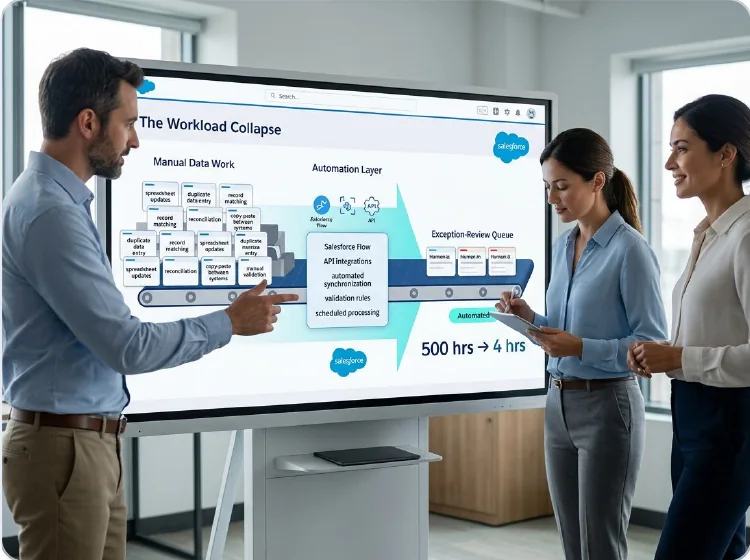
Real California Milk: Reduced Manual Data Work From 500 Hours to 4
VALiNTRY360 migrated Real California Milk from SugarCRM to Salesforce Sales Cloud, implementing automated data reconciliation, scheduled imports and integrations with MailChimp and Zoom. Custom automation reduced annual manual data maintenance from 500 hours to just 4 hours, while improving data accuracy and reporting. The project demonstrates how connected systems and reliable data automation support scalable Salesforce operations.
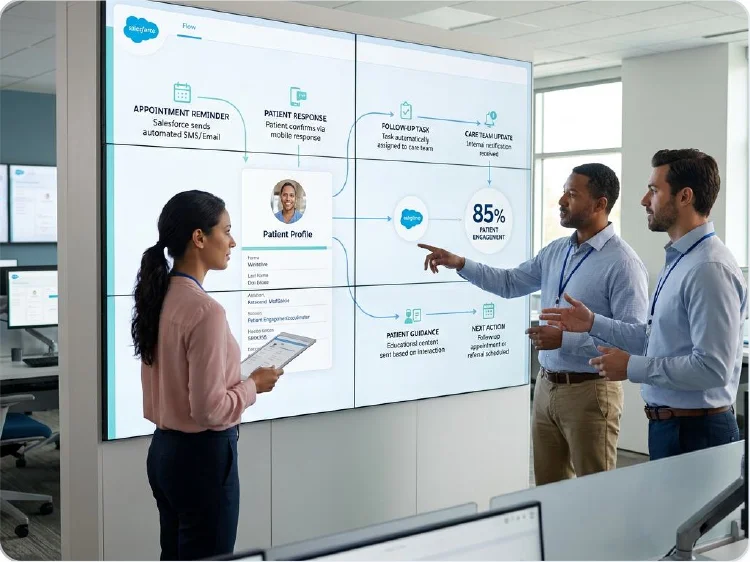
TrialSpark: 77% Reduction in Support Ticket Resolution Time
VALiNTRY360 integrated Salesforce Service Cloud, Marketing Cloud and external applications to improve clinical trial operations. Automated case routing, Salesforce Flow escalations and connected patient workflows reduced support ticket resolution time by 77%, achieved 85% patient engagement in the first month and saved 20 hours per participant enrollment. This project demonstrates the cross-system integration, workflow orchestration and controlled escalation capabilities that support headless agent implementations.
What Do Agentforce Headless Agents Cost?
Cost has several layers, and agent usage is only one of them. Salesforce pricing and editions change, so we confirm the terms in your agreement before we estimate anything.
Cost Driver
Who Owns It
How We Manage It
Agentforce licenses and credits
Salesforce
Confirm your contract terms and included credits
Agent usage
Salesforce
Forecast by call volume and actions per call
Data 360 and integrations
Salesforce and third parties
Scope connectors and data volume before build
VALiNTRY360 services
VALiNTRY360
Fixed phases with defined deliverables and change control
Agentforce Headless Agents
Headless Agentforce Agents, Engineered by Certified Experts
Not every AI agent needs a chat window. Headless agents run inside your processes, triggered by APIs, events, and Flows. VALiNTRY360's team holds Agentforce Specialist, AI Associate, Data 360 Consultant, and Platform Developer certifications, so we design headless agents with clear actions, secure integrations, and monitoring that keeps them reliable at scale. Work that once waited in queues gets handled automatically, from a Salesforce-Branded Partner since 2018.
Salesforce Credential Deck
4 Core Specializations

- CERTIFIEDPlatform Developer
Why Choose VALiNTRY360 for Agentforce Headless Agents?
Headless agents sit on Salesforce foundations we work in every day. Most rollout risk sits in the surrounding data, permissions and integrations, and that is where we spend our time.
Our team works across Agentforce, Flow, Apex, MuleSoft and Data 360, so you do not need separate vendors for the integration, the automation and the agent layer. One accountable team means fewer handoffs and a single owner when something needs to change.
01
Right tool first
We keep fixed rules in Flow and use agents only where interpretation adds value.
02
Entry points designed
We choose between Flow, Apex and the Agent API by use case.
03
Governance built in
We set least-privilege access and approval steps before the pilot begins.
04
Limits checked
We confirm current Agent API and platform limits before we design around them.
05
Honest cost modeling
We forecast usage by call volume and assign an owner for monthly review.
06
Handover and support
We document the setup for your team and stay available through managed support.
100+ Certified Specialists Behind Your Agentforce Success
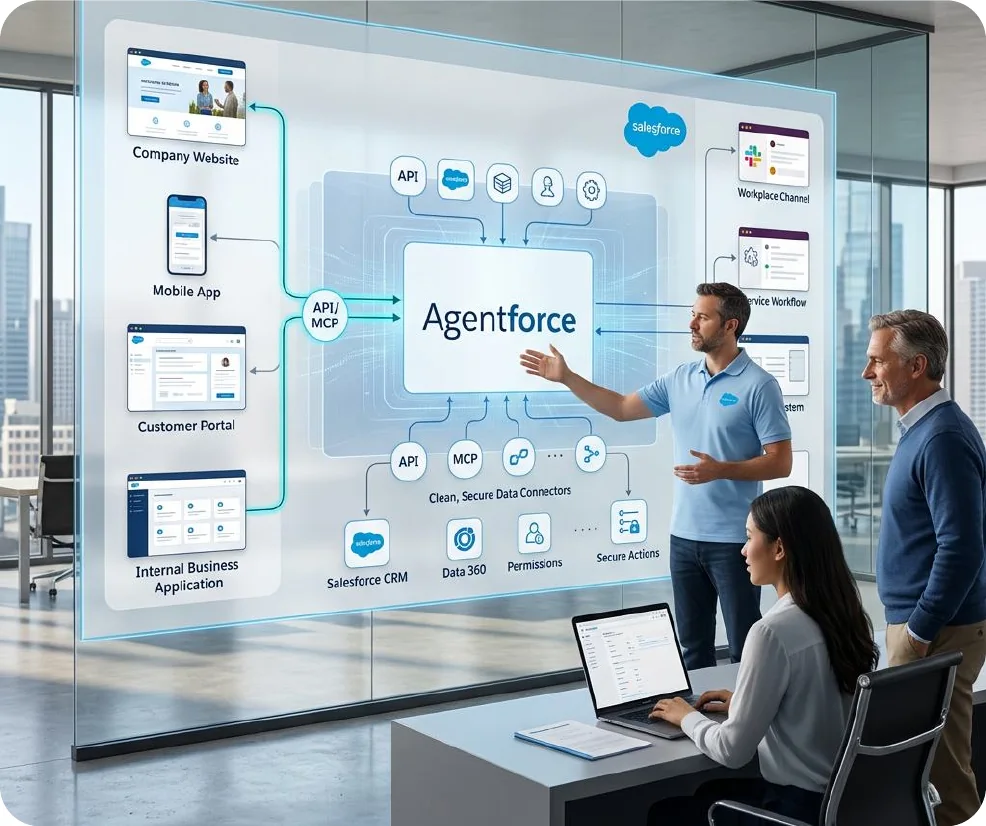
At VALiNTRY360, our team of 100+ certified specialists brings Salesforce expertise and technical experience to every project. From Agentforce Headless Agents development and API integration to Salesforce Flow, Apex, MuleSoft and Data 360, our experts help businesses build secure, reliable and scalable AI solutions. We combine technical knowledge with practical business experience to automate complex workflows, improve operational efficiency and deliver measurable results. Whether you are deploying your first headless agent or expanding enterprise-wide AI automation, our specialists provide guidance, implementation expertise and ongoing support.
Agentforce Headless Agents FAQ by VALiNTRY 360
Agentforce Headless Agents are Agentforce agents that run without a user interface. A Flow, an Apex class or an outside system calls them, and they reason over context, take actions and return a result. They suit background and system-to-system work.
Headless 360 is Salesforce's platform approach, announced April 15, 2026, that exposes capabilities as APIs, MCP tools and CLI commands. A headless agent is an agent you build that runs without a screen. Headless 360 is the platform, and headless agents are one thing you build on it.
In Flow, you add an AI Agent Action and pass the agent, the user message and an optional session ID. In Apex, you call the invocable method for generating an agent response, which gives you more control. We choose between them by use case and test both.
The Agent API is a REST interface that lets outside systems call an Agentforce agent. Callers authenticate, start a session, send messages and receive responses, either all at once or streamed. We confirm current authentication and limits in your org before we build.
The best use cases are repeatable and measurable: data quality review, request triage, record enrichment, website or portal answers and agent-to-agent tasks. We start in read-only mode so you can check the results before the agent changes anything.
Use Flow when the logic follows fixed rules, such as routing by region or calculating a discount. Use a headless agent when the input is unclear and the step needs interpretation, such as reading free text. A Flow is cheaper and more predictable per run.
Cost includes licenses, agent usage, Data 360 and integrations, and implementation services. At US list price, a standard action uses 20 Flex Credits, about $0.10. Volume drives the bill, so we forecast by call count and confirm your contract terms first.
They are as secure as the access you give them. The agent runs as a Salesforce user, and your sharing rules and permission sets apply. We use a dedicated agent user, least-privilege access, approval for sensitive actions and logging, and we test before launch.
The timeline depends on the number of systems, data quality, security review and testing. We scope one use case after the assessment, then set a dated schedule that reflects your environment instead of quoting a fixed number up front.
An administrator or developer can build a basic agent, and some teams manage a small pilot internally. A partner helps when the project also needs integration design, authentication, permission design, testing and cost forecasting. Those tasks decide whether the pilot reaches production.
Yes. Headless agents can run through scheduled Salesforce Flows or event-driven automation without requiring users to start a conversation. We configure triggers, execution conditions and monitoring rules to support recurring tasks such as data reviews and request classification.
Yes. Headless agents can update Salesforce records through configured actions, provided the necessary permissions are available. We define which objects and fields an agent can modify, establish approval requirements and test changes before enabling automated updates.
The Agentforce Agent API supports session management to maintain context across related interactions. We configure session creation, message handling and termination so connected applications can continue conversations while controlling how information is passed between requests.
We configure error handling, monitoring alerts and recovery procedures to identify failed or incomplete tasks. Depending on the workflow, requests can be retried safely, recorded for investigation or routed to an administrator for review before processing continues.
We measure business impact using task completion rates, processing time, error reduction, manual effort saved and agent usage costs. VALiNTRY360 compares these metrics against existing workflows to evaluate efficiency, identify improvement opportunities and guide future automation investments.