

- Salesforce Consulting Services
A real estate developer can route every new inquiry correctly and still run the rest of the customer lifecycle through disconnected systems. The CRM may know that a buyer visited a project while the inventory sheet shows an outdated unit status. A booking may be confirmed in ERP while the relationship manager sees an open opportunity, or a payment milestone may be due while service has no view of the demand note. Once those gaps appear, lead management is no longer the main Salesforce problem.
The technical issue is record ownership across a long property lifecycle. Projects, units, price books, channel partners, site visits, reservations, bookings, payment schedules, documents, construction milestones, handover dates, cases, and customer communications change at different speeds. Some belong in Salesforce; others belong in ERP, document, payment, construction, or analytics systems. A developer needs rules for system ownership, permitted edits, event timing, and customer communication.
That is where Salesforce consulting for real estate moves beyond basic lead routing. The consulting work defines the operating model behind the CRM: how a unit becomes available or blocked, how a booking changes inventory, how broker attribution is protected, how payments affect customer status, how a site visit becomes a measurable sales event, how post-sale cases reach the right team, and how leadership sees one portfolio view without asking teams to reconcile spreadsheets first. Salesforce can support that model, but the value comes from designing the records, interfaces, permissions, automation, and ownership rules around the way a developer actually sells and services property.
TL;DR
Decision area | What developers should understand |
Main concern | A CRM limited to lead capture leaves unit inventory, booking status, broker attribution, payments, documents, possession, and service work in separate operating paths. Sales activity can look healthy while the transaction record is already drifting. |
Core shift | Salesforce CRM for real estate developers should model the property lifecycle after the inquiry, including projects, units, visits, reservations, bookings, customer obligations, service cases, and handovers. |
Data ownership | Salesforce should not become the owner of every property record. Consulting should define which system owns inventory, finance, customer identity, documents, construction progress, and service history, then define how those states move. |
Integration priority | ERP, payment, document, portal, marketing, telephony, and property systems need explicit data contracts. Field ownership, timing, retries, exception handling, and audit history matter as much as the connector itself. |
Customer experience | The most important interactions often happen after the lead is qualified: site visits, pricing discussions, booking confirmation, demand notes, construction updates, possession, defects, and warranty requests. |
Practical approach | Start with the developer operating model, map the customer and unit lifecycle, design system ownership, build transaction controls, test the handoffs, and measure adoption across sales, finance, customer service, and management reporting. |
Lead Management is the Narrowest Slice of the Developer Operating Model
Lead capture matters because portals, websites, events, referrals, broker networks, walk-ins, and paid campaigns can create a large inquiry volume. Yet a developer earns revenue only when a qualified buyer moves through a controlled property transaction. The CRM needs to connect the person to a project, budget band, location preference, unit type, site visit, quotation, reservation, booking, payment status, documentation state, and service history. If those records sit outside Salesforce with no dependable connection, sales users spend much of their day asking other teams for the current answer.
The technology pressure is visible in developer research. Landmark Information Group reported in its 2025 PropTech research for developers that 63% of respondents wanted better integration capabilities and 55% wanted process automation, while 30% identified data integration as a technology constraint. Those findings point to the operating problem behind CRM expansion: developers need systems to exchange current property and customer states, not another isolated screen for sales activity.
A useful Salesforce implementation for real estate therefore begins by mapping the full developer workflow. The existing Salesforce consulting for real estate practice can be used as a reference point for project-level reporting, property data, buyer communication, listings, transactions, and real estate-specific workflows. The important design question is where Salesforce should coordinate work and where another platform should remain authoritative.
The Unit Becomes a Controlled Business Record After the First Inquiry
For a developer, the unit is more than a product SKU. It has a physical identity, legal attributes, commercial status, pricing history, booking state, construction state, payment relationship, and eventual owner. Real estate inventory management becomes risky when sales teams depend on a spreadsheet or a nightly export that can lag behind actual reservations and releases.
Record or state | Typical owner | What Salesforce needs to know | Failure when ownership is unclear |
Project, tower, phase | Development or master data team | Approved names, hierarchy, status, launch dates, market | Duplicate project structures and inconsistent reporting |
Unit | ERP or governed property master | Unit ID, type, floor, area, facing, current commercial state | Two teams discuss the same unit with different availability |
Price and offer | Pricing or finance | Effective price, approved scheme, validity, authority level | Old quotations remain active after a price revision |
Reservation or hold | Booking operation | Unit, buyer, start time, expiry time, source, owner | Units stay blocked or are offered to several buyers |
Booking | ERP or transaction system | Booking ID, date, buyer, unit, value, cancellation state | CRM opportunity and finance transaction disagree |
Payment position | ERP or finance | Due amount, received amount, ageing, milestone, exception | Relationship teams promise actions without current finance context |
Handover state | Project or customer service operation | Readiness, inspection, document clearance, possession date | Customers receive conflicting possession information |
The market context makes inventory control more important during active launch cycles. In the CREDAI and CRE Matrix Developer Sentiment Survey for CY 2026, 83% of surveyed developers expected their own unsold inventory to sell out within two years, while 42% planned to launch more than 1 million square feet in the following year. A developer managing large launch pipelines needs a current unit state that sales, finance, channel teams, and leadership can trust at the same time.
Inventory Logic Needs Rules for Holds, Pricing, and Release
A hold needs an owner and an expiry event
A unit reservation should carry the buyer, source, project, unit, salesperson or broker, start time, expected payment, and expiry rule. When the hold expires, Salesforce should either release the unit through an approved transaction path or create an exception for review. Silent holds are expensive because they reduce apparent availability while producing no revenue movement.
Pricing needs effective dates and approval boundaries
Price books in Salesforce can support project and unit pricing, but a developer may calculate base price, floor-rise charges, parking, club fees, statutory items, maintenance deposits, incentives, and campaign-specific discounts elsewhere. Consulting should define which components Salesforce displays, which values sales can edit, which require approval, and which final commercial values must come from finance. A quotation should remain traceable to the price version and scheme used when the buyer received it.
Cancellation needs to reverse more than one status
A cancelled booking can affect inventory, pipeline, broker credit, payment schedules, documents, customer communications, and management forecasts. Property sales automation should reverse or reclassify each dependent state deliberately. The correct result is a unit that becomes available under a governed rule while the cancelled transaction remains historically visible for analysis and dispute handling.
ERP and Salesforce Need One Operating Contract
Real estate developers often keep finance, inventory, billing, receipts, and statutory transaction data in ERP platforms. Salesforce may own inquiry history, buyer preferences, relationship activity, opportunity stages, service cases, and communications. The boundary works only when both systems have a written contract for fields and events. A developer considering Salesforce ERP integration for finance and inventory workflows should define business ownership before deciding whether data moves through APIs, middleware, events, scheduled jobs, or another method.
Business event | Source system | Salesforce action | Control required |
New approved unit | Property master or ERP | Create or update unit visibility | Stable external ID and project hierarchy |
Price revision | Pricing or ERP | Refresh current sellable price | Effective date and old-version retention |
Reservation created | Salesforce or booking layer | Block unit for approved period | Conflict check before confirmation |
Booking confirmed | ERP | Convert reservation to booked state | Booking ID and reconciliation response |
Payment received | ERP or payment gateway | Update milestone and customer context | Amount, receipt ID, date, reversal handling |
Booking cancelled | ERP | Reopen unit and update opportunity | Controlled rollback of dependent workflows |
Possession cleared | ERP, project system, or service platform | Start handover communication and tasks | Clearance checks and timestamped approval |
The connector itself solves very little if a developer has not agreed on these rules. A retry can repeat a bad transaction. A fast API can spread an outdated price faster. A two-way sync can create a field-editing contest between finance and sales. Salesforce real estate integration work should therefore document data direction, validation, sequencing, retry behavior, duplicate protection, reconciliation, and the team that owns each exception queue.
Channel Partners Need Attribution Rules that Survive the Whole Deal
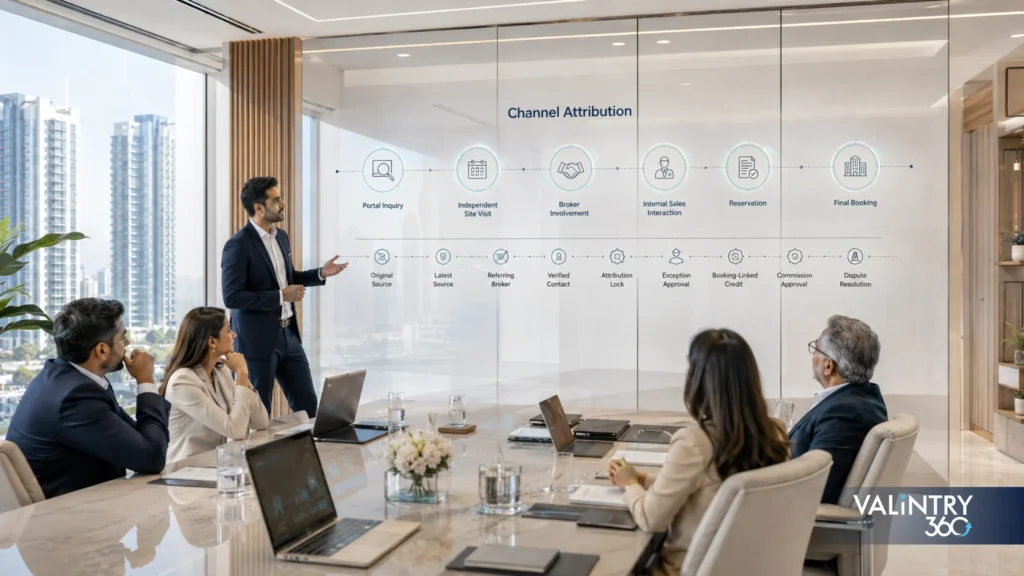
Real estate channel partner management can become politically sensitive because the same buyer may enter through a portal, visit a project independently, speak with an internal sales representative, and later return through a broker. A simple Lead Source field cannot settle every claim. Consulting should turn the developer’s commercial policy into traceable CRM rules.
- Capture the original source, latest source, referring broker, registering event, and first verified contact as separate facts instead of overwriting one field.
- Store broker registration validity, project eligibility, RERA or regulatory identifiers where required, relationship manager, territory, and current status on the partner record.
- Define what creates an attribution lock, how long it lasts, which event can reopen attribution, and who can approve an exception.
- Tie broker credit to a booking or another approved commercial event instead of a lead record alone.
- Record commission scheme, expected amount, approval status, and payment reference without allowing sales users to edit finance-controlled outcomes.
- Give channel managers reports for registrations, site visits, reservations, bookings, cancellations, conversion, ageing, and pending disputes by partner.
- Keep a documented exception path for duplicate registrations, cross-project movement, direct-to-broker changes, and corporate accounts.
This model gives sales and channel teams evidence when attribution is questioned. It also reduces the temptation to maintain a separate broker spreadsheet that drifts away from customer and booking records.
Site Visits should Behave Like Operational Events
A site visit looks simple on a calendar. In a developer CRM it can connect logistics, inventory interest, sales activity, customer preference, broker involvement, follow-up, and conversion analysis. Salesforce for real estate developers should record the scheduled project, attendees, relationship owner, partner source, visit outcome, units discussed, objections, next action, and any commercial document produced after the visit.
Scenario: the buyer changes projects
A buyer who first visits Project A and later prefers Project B should keep one customer identity while creating separate project interest records. This prevents a new lead from being created for every project and gives management a clearer view of cross-project movement.
Scenario: the preferred unit is already held
The relationship manager should see the current sellable state and suitable alternatives before the meeting ends. The system can record the original preference, alternatives shown, and the reason for the change without pretending the first unit is still available.
Scenario: a broker attends the visit
The visit should record the broker relationship separately from the employee who conducted the appointment. That protects attribution history and helps channel teams compare partner registration activity with actual site engagement.
Scenario: the buyer leaves without a quotation
The visit outcome should still produce a follow-up state with a reason, target date, and owner. Managers can then distinguish genuine product mismatch, financing concerns, location objections, delayed decisions, and poor follow-up instead of treating every non-booking visit as the same failure.
Booking to Possession is a Chain of Controlled Handoffs
Real estate booking management becomes a cross-functional process once the buyer commits. Sales may remain the relationship owner, but booking operations, finance, legal, project teams, documentation teams, and customer service each take responsibility for different states. Consulting should map the handoff so a customer does not have to reconstruct the internal organization every time they ask a question.
- Booking confirmation: capture the final unit, commercial terms, booking reference, source, relationship owner, and buyer identity after the transaction system confirms the booking.
- Document collection: track required documents, received documents, missing items, verification state, and expiry where relevant. The CRM should show status without becoming an uncontrolled document repository.
- Payment schedule: display due milestones, receipts, overdue amounts, waiver or exception state, and the finance contact responsible for unresolved items.
- Agreement and registration: track appointment state, document readiness, registration milestone, and blockers so the relationship team can give the customer a current answer.
- Construction communication: connect approved project milestones to customer communication rules so updates are based on governed project status rather than ad hoc messages.
- Pre-possession checks: manage clearance, inspection, snag or defect items, final documentation, customer appointment, and internal readiness.
- Possession and service transition: create the post-sale customer record, warranty or defect context, ownership history, and service access needed after handover.
The importance of the middle and late stages shows up in customer research. KPMG’s India CX Report 2025 for residential real estate found that 46% of customers considered the registration-to-possession experience the most impactful stage in shaping their overall perception of the brand. That finding is a strong reason to design a Salesforce CRM implementation for real estate around booking, payment, documentation, progress communication, and possession rather than stopping at opportunity conversion.
A developer also needs a common information model behind these handoffs. The Salesforce data strategy and architecture framework is relevant when project, unit, customer, ERP, portal, and service records need shared definitions across several platforms. A field such as Possession Ready should have one business meaning, one owner, and one reliable source before it is used to trigger customer-facing automation.
Customer Communication should Follow Project and Transaction State
A developer usually sends more communication after booking than before it. Customers ask about receipts, demand notes, construction progress, document appointments, possession readiness, defects, maintenance, and policy questions. If those messages are generated from isolated lists, the developer risks sending an update that does not match the customer’s actual unit, payment state, or stage.
Communication rules should therefore start from approved business events. A confirmed booking can start a document sequence; an ERP-confirmed payment can close a reminder; an approved construction milestone can release a project update; and possession clearance can create customer tasks. Each message should retain the triggering record, customer, project, unit, channel, and time so staff can explain why it was sent.
Customer portals can remove repetitive status requests from email and messaging threads when the data behind them is reliable. A developer can use Salesforce Experience Cloud services for customer and partner portals to expose approved project updates, documents, payment information, service requests, appointments, and knowledge content according to permission rules. Portal design should follow the same source-of-truth model as the internal CRM, because a self-service screen that displays stale status creates another support channel instead of reducing one.
Post-sale Service is Where CRM Value Gets Tested
A handover does not end the customer relationship. Defect reporting, warranty work, maintenance questions, possession documentation, facility coordination, resale support, and community queries can continue long after the opportunity closes. Real estate post-sales CRM should preserve the unit, owner, project, warranty context, prior cases, communication history, and any contractor or internal team responsible for resolution.
The gap between sales satisfaction and post-move experience can be large. ECI Software Solutions’ 2025 State of Customer Experience report for homebuilders draws on more than 350,000 homebuyer survey responses across 625 builder divisions. It reports a 92.8% satisfaction score during the sales phase that falls to 75.8% during warranty, while willingness to recommend drops from 97% at purchase to 71% after move-in. Those numbers make post-sale case design a commercial issue, not an administrative afterthought.
A developer using Salesforce Service Cloud consulting for case management can define case categories, routing, escalation, service targets, contractor handoffs, appointment scheduling, knowledge articles, customer notifications, and management views around the actual property service process. The CRM should also capture repeat defect patterns by project, tower, unit type, contractor, or issue class so leaders can see whether a service queue points to a broader operational problem.
A Portal Works Only when Self-service has Reliable Source Data
Before exposing booking or service information to customers, a developer should test the portal against the same controls used by internal teams.
Customer-facing data checks:
- Does the displayed unit status come from the authoritative property record?
- Are payment balances and receipts refreshed from finance with a known timestamp?
- Can customers see only documents tied to their own booking or authorized household?
- Are construction updates approved for publication before they become visible?
- Does a service request create a case with the correct project, unit, category, and priority?
- Can the portal show appointment slots without allowing conflicting bookings?
- Are messages, attachments, and case updates retained according to policy?
- Can the support team see what the customer saw when investigating a dispute?
A portal should reduce uncertainty. That requires current data, clear wording, dependable permissions, and an internal owner for every status exposed to the buyer.
Portfolio Reporting Needs Definitions that Survive Across Projects
Developers often have strong project-level reporting and weak portfolio-level comparability. One project may count a booking when the application is signed. Another may count it after the initial payment clears. One sales team may record a site visit when the appointment is booked, while another records it after physical attendance. Dashboards cannot correct those definition differences on their own.
Metric | Required definition | Useful breakdowns | Common distortion |
Sellable inventory | Units available under current commercial rules | Project, tower, type, price band, age | Includes blocked or approval-pending units |
Visit-to-booking rate | Confirmed bookings divided by completed site visits | Project, source, broker, salesperson, unit type | Scheduled visits counted as completed |
Booking cancellation rate | Cancelled bookings divided by confirmed bookings | Project, source, cancellation reason, payment stage | Cancelled records deleted from CRM |
Collection exposure | Amount due and unpaid by approved ageing rule | Project, milestone, customer, ageing band | Salesforce balance differs from ERP |
Service response | Time from case creation to first qualified response | Project, issue type, channel, priority | Automated acknowledgement counted as resolution |
Handover readiness | Units that cleared the approved possession checklist | Project, tower, planned month | Readiness based on one team’s manual status |
Portfolio reporting becomes useful when the definitions are agreed before dashboards are built. The CRM can then combine pipeline, inventory, booking, collection context, service workload, and customer history without forcing leadership to interpret a different metric language for every development.
Salesforce Consulting Turns Operating Rules Into Platform Rules
Architecture decides what belongs in Salesforce
A real estate developer can overload Salesforce by copying every field from ERP, project management, finance, and document systems into the CRM. The better architecture keeps the records users need to act while allowing specialist systems to retain their own responsibilities. Consultants should document object boundaries, external IDs, record volumes, security, history needs, API limits, integration timing, and archive rules before configuration expands.
Governance protects the definitions after launch
Project launches create pressure for quick fields, local automations, temporary reports, and one-off exceptions. Those shortcuts can become permanent metadata. A governance model should define who can create common fields, who approves project-specific differences, how duplicate automations are prevented, how integration changes are tested, and when unused configuration is retired.
Adoption has to include operations teams
Salesforce consulting for property developers cannot be judged only by sales-user logins. Booking operations, finance liaisons, channel managers, customer service teams, project coordinators, and leadership may all depend on the platform. Training should follow actual tasks: releasing a unit, verifying a payment status, resolving a broker dispute, updating a possession case, approving a customer communication, or reconciling a booking exception.
The platform needs an operating backlog after go-live
Real estate operations change with every new project, pricing scheme, channel policy, payment rule, and service process. Deloitte’s 2026 commercial real estate outlook reported that 81% of surveyed respondents identified data and technology as an area for focused spending. For developers, that spending produces better results when Salesforce changes are managed as an ongoing operating backlog instead of a sequence of disconnected requests.
The Salesforce managed support model can fit teams that need recurring administration, reporting changes, integration checks, automation maintenance, release testing, and user support after implementation. Internal ownership still matters. The developer should keep business owners for inventory, booking, finance context, channel policy, service, and reporting even when an external team handles technical work.
A 100-Day Expansion Plan Beyond Lead Management
Days 1 to 20: map the operating truth
Inventory systems, project structures, unit masters, lead sources, broker records, booking stages, payment interfaces, document stores, service channels, reports, and user roles. Identify where teams copy data, wait for confirmation, or maintain parallel spreadsheets.
Days 21 to 45: design the property and customer model
Define the project, unit, customer, partner, visit, reservation, booking, payment, document, handover, and case relationships. Decide which system owns each record, which identifiers cross platforms, and which exceptions require approval.
Days 46 to 75: build and test transaction handoffs
Configure the approved Salesforce model and test full journeys such as broker lead, project transfer, expired hold, changed price, booking, partial payment, cancellation, document delay, possession clearance, and service request. Reconcile each journey against authoritative systems.
Days 76 to 100: launch with measurable operating controls
Train each user group on real work. Track integration errors, stale unit states, booking mismatches, attribution gaps, overdue cases, report exceptions, and user workarounds. Move unresolved issues into a prioritized backlog with named business owners.
What Success Looks Like Six Months Later?

A successful Salesforce real estate CRM should make normal operations easier to verify. A salesperson can see whether a unit is available without messaging the inventory team. A channel manager can trace why a broker received credit. A relationship manager can see payment context before calling a booked customer. A service agent can open the unit and understand earlier communication. Leadership can compare projects with common definitions instead of normalizing spreadsheets after the reporting deadline.
A current M3M India Salesforce customer case shows what broader lifecycle use can look like in practice. Salesforce reports that M3M connected sales, service, communication, and ERP-related booking workflows in one customer view, with a 200% improvement in lead response times, 15% to 25% improvement in lead-to-booking conversion, 96% of service requests answered within defined turnaround times, and more than 80% of customer queries resolved within 24 hours.
The system should also expose problems sooner. Stale integration records, expired holds, payment mismatches, duplicate customer identities, unresolved service cases, and recurring project defects should appear as managed exceptions with owners. That is a stronger outcome than simply increasing the number of activities logged in CRM.
The broader industry direction supports this shift. Developers are already asking for better data connection and workflow automation, and real estate executives continue to increase technology budgets. Salesforce consulting for real estate creates value when those investments are tied to the property transaction, customer lifecycle, and operating controls that sit behind revenue and service quality.
Conclusion
Real estate developers outgrow lead-only CRM when the hardest questions move downstream. Which unit is sellable? Which price is valid? Who owns the broker relationship? Has the booking cleared? Which document is missing? Is possession approved? A developer that cannot answer those questions from dependable system states keeps paying for coordination work around the CRM.
Salesforce can connect customer context with property transactions when the design respects system ownership. ERP, payment, construction, document, and service platforms may continue to own specialist data. Salesforce can present current context, coordinate approved actions, record accountability, and show where the customer and property sit in the lifecycle.
Consulting defines that model before configuration spreads. Project and unit data, attribution, booking events, finance context, customer communication, possession, and service need governed workflows that teams can explain and leaders can measure. That is why Salesforce CRM for real estate developers has a larger job than managing leads.
The first release should prove the architecture with a manageable dependency set. Launching 6 clouds, several outside systems, a new identity model, consent rules, and agent actions at once creates too many failure paths. A stronger first phase follows one or two important business threads through the required systems, then expands after ownership and monitoring work in production.
A useful sequence starts with customer identity and the shared data contract, then proves one revenue or service thread with event handling, release controls, and monitoring. Each later phase should name the new dependency it introduces and the regression tests that cover it.
Salesforce multi-cloud strategy also needs an exit rule for complexity. Some data can stay in its source system, some automation should stay local, and some reporting belongs in a warehouse. Cross-cloud dependencies should earn their operational cost through a clear business outcome.
Conclusion
Managing several Salesforce clouds changes the consulting job because the important work happens between product boundaries. Shared data needs authority rules. Cross-cloud automation needs a dependency map. Integration traffic needs a failure policy. Security needs transaction-path review. Releases need regression across downstream consumers. Governance needs business ownership that survives beyond the project.
Salesforce multi-cloud consulting works best when these decisions are made before individual teams start building. The result is a Salesforce multi-cloud architecture that can explain where data comes from, how it moves, who can change it, what triggers downstream behavior, and how the business recovers when part of the chain fails.
The goal for a Salesforce multi-cloud implementation is consistent behavior across sales, service, marketing, data, commerce, portals, field operations, and AI use cases. Documented contracts and repeatable tests keep each new cloud addition tied to known dependencies and named owners.
Frequently Asked Questions
- Why do real estate developers need Salesforce beyond lead management?
Developers manage a long lifecycle after inquiry. Salesforce can connect buyers with projects, units, site visits, reservations, bookings, payment context, documents, possession, service cases, and communications while specialist systems continue to own finance, construction, or formal property records.
- What should Salesforce CRM for real estate developers track?
A practical model can track projects, phases, towers, units, buyers, brokers, visits, quotations, holds, bookings, payment context, document status, appointments, possession milestones, cases, and communication history. The exact model depends on which systems already own inventory, finance, construction, and documents.
- Should Salesforce own real estate inventory?
Sometimes. A smaller developer may manage inventory in Salesforce, while a larger developer may keep the authoritative unit state in ERP or another property platform. One system should own availability and booking status, with Salesforce receiving a current state for sales and customer work.
- How does Salesforce ERP integration for real estate work?
The integration usually exchanges approved customer, unit, booking, payment, cancellation, and possession events. The design should specify source ownership, external IDs, field mapping, timing, retries, validation, reconciliation, and exception handling. Two-way editing should be limited when ERP has formal financial authority.
- Can Salesforce manage real estate bookings and reservations?
Yes. Salesforce can manage reservation requests, hold periods, buyer and unit links, approvals, expiry events, quotations, and booking handoffs. Final booking authority may remain in ERP. Holds should expire under a defined rule, and confirmed bookings should update dependent states in sequence.
- How can Salesforce help with channel partner management?
Salesforce can store broker profiles, project eligibility, registrations, buyer attribution, visits, bookings, commission context, disputes, and partner performance. Clear rules should distinguish original source, current source, broker registration, employee ownership, and the commercial event that earns partner credit.
- Can Salesforce track site visits for property buyers?
Yes. A site-visit record can capture project, attendees, salesperson, broker, units discussed, buyer preferences, outcome, objections, quotation status, and next action. Developers can then compare completed visits and conversion by project, source, partner, salesperson, and unit type.
- How does Salesforce support payment follow-up without replacing ERP?
Salesforce can display payment milestones, due dates, receipt status, ageing, and exceptions supplied by ERP while finance retains ledger control. Relationship teams gain current context for customer conversations, and payment-triggered workflows can use confirmed finance events with the ERP transaction reference.
- Can Salesforce support customer portals for developers?
Yes. Experience Cloud can provide authenticated access to approved project updates, payment context, documents, appointments, service cases, knowledge content, and selected profile information. The portal should expose only data with a trusted source, current timestamp, and appropriate customer permissions.
- What role does Service Cloud play after property booking?
Service Cloud can manage possession coordination, defects, warranty items, maintenance-related requests, document queries, escalations, and service communications. Cases can connect to the customer, project, unit, booking, and prior history so agents can resolve work with the right property context.
- What is the difference between a real estate CRM and property sales automation?
A real estate CRM organizes customer, property, partner, transaction, and service context. Property sales automation uses that context to route work, trigger approvals, expire holds, schedule follow-ups, update stages, and create exceptions. Automation depends on stable data ownership and documented business rules.
- How should developers handle documents in Salesforce?
Salesforce can track document requirements, receipt status, verification, links, approval, and missing-item tasks. Large files or formal legal repositories may remain in document systems. The CRM should show whether required material exists while preserving access rules, retention duties, and audit history.
- What reports should a developer build beyond lead conversion?
Useful reports include sellable inventory, visit-to-booking rate, reservation expiry, cancellations, broker conversion, collection exposure, document backlog, possession readiness, case response, defect patterns, and portfolio performance. Each metric needs one written definition across projects before it is used for management reporting.
- How long does Salesforce implementation for real estate take?
Duration depends on project count, data quality, integrations, custom objects, security, ERP dependencies, portal scope, automation, migration, testing, and user groups. A focused extension can take a few months, while a multi-project program with several connected systems can take longer.
- How should developers measure Salesforce consulting success?
Measure operating outcomes such as stale inventory exceptions, reservation conflicts, booking reconciliation, partner attribution disputes, payment-context accuracy, document backlog, service response, portal adoption, report preparation time, user workarounds, and data-quality issues. Lead conversion should sit beside transaction and post-sale measures.
Related Posts
- Salesforce Consulting Services
Salesforce Architecture for SaaS Companies From $10M to…
Experience Cloud, CPQ, and a clean Sales Cloud data model can carry a SaaS company a long way. But the setup that worked when your team was smaller starts to strain once pricing models expand, renewals pile up, product usage…
- Salesforce Consulting Services
Why Salesforce Integrations Fail – and How to…
Introduction: When an Integration Stays Online but the Business Process Breaks A Salesforce integration can pass every technical check and still fail the business that depends on it. The connection authenticates and the API returns success, while records still arrive…
- Salesforce Consulting Services
Why Salesforce Reports Can’t Be Trusted
A VP of Sales opens the pipeline dashboard on Monday and sees $4.2M. RevOps runs the saved pipeline report an hour later and gets $3.8M. Finance walks into the forecast meeting carrying $3.1M.All 3 numbers came out of the same…