

- Cybersecurity
In Short
The 2026 Salesforce security roadmap is not a single update. It is a phased enforcement campaign with three separate deadlines. The one most organizations aren’t prepared for hits privileged users first. If you haven’t started implementing MFA changes for your privileged users, the window is closing.
Most of what you have heard about Salesforce MFA in 2026 is directionally right but operationally incomplete. Yes, MFA is being enforced. Admins are affected. Even so, compressing everything into a single “July 2026” event misses the detail that causes real problems: the enforcement dates are staggered, the requirements differ by user type, and SSO doesn’t get you off the hook the way most teams assume it does.
Worth noting: Salesforce is pushing this change outside of its regular release schedule. This is the first time it has done that, and as a result, it signals this isn’t a routine update to process on your own timeline.
Here is what is actually changing, who is affected first, and where we see organizations get caught out.
This Is Not a New Login Prompt. It Is a New Standard.
The framing that matters here is this: Salesforce is moving from “MFA exists on this org” to “MFA must be strong enough for the user’s level of access.” In practice, that shift carries very different implications depending on which users you are thinking about. Understanding it is the foundation of any solid Salesforce security posture going into the second half of 2026.
Standard Users: Manageable, but Not Optional
For most employee users, the change is relatively contained. Authenticator apps and push notifications remain acceptable MFA methods for this group. Enforcement begins in sandboxes on June 22 and in production on July 20. As long as those users have MFA enrolled and their contact information is current, the transition is manageable.
Privileged Users: A Higher Bar and an Earlier Deadline
For privileged users, the bar is higher and the deadline is earlier. System Administrators and anyone holding permissions like Modify All Data, View All Data, Customize Application, or Author Apex must use phishing-resistant MFA in production starting July 1. Authenticator apps don’t meet that bar. Accepted methods are built-in authenticators like Windows Hello or Touch ID, and physical security keys like YubiKey.
That distinction matters because most orgs have administrators who have been using an authenticator app for years and assume they are compliant. After July 1, however, they aren’t. At least not for privileged access.
This is where the compressed messaging creates operational risk. The actual enforcement schedule looks like this:
Enforcement Event |
Sandbox |
Production |
|---|---|---|
|
Phishing-resistant MFA (privileged users) |
June 22, 2026 |
July 1, 2026 |
|
MFA for all employee users |
June 22, 2026 |
July 20, 2026 |
|
Step-up auth for report actions |
Already active |
June 10, 2026 |
The report actions deadline is already behind us for many orgs. If users are being challenged mid-session when trying to export reports, that isn’t a bug. It is the step-up authentication enforcement working as intended. Whether your users know what is happening, and whether they have the right methods enrolled to complete that challenge, is the real question.
Beyond that, the July 1 deadline for privileged users is the most acute near-term risk. It arrives nearly three weeks before the general MFA deadline, and it carries a harder technical requirement.
Why SSO Is Not a Free Pass
This is the part most SSO-reliant organizations are getting wrong.
The Assumption That Creates the Risk
If your users log in through an identity provider like Okta, Azure AD, or Microsoft Entra, you may assume that SSO handles authentication and Salesforce simply trusts the result. Part of that assumption comes from how Salesforce as an identity provider participant has historically worked: the IdP authenticates, Salesforce accepts the token. That was largely true under the old model. Under the new one, however, it isn’t reliably true.
Specifically, Salesforce is now checking whether the authentication method behind the SSO login meets the phishing-resistant standard. It isn’t simply checking whether SSO was used. If your identity provider can’t pass a signal to Salesforce confirming that phishing-resistant MFA was used, Salesforce may push those users back into native in-app verification. That applies even if they already authenticated through SSO earlier in the session.
What This Means for Privileged Users
For privileged users, this point is particularly sharp. An administrator who authenticates through Okta using a standard push notification hasn’t met Salesforce’s phishing-resistant requirement, regardless of the SSO layer in between. In practice, that org will need to configure the IdP to enforce phishing-resistant methods and pass the appropriate assurance signal. Otherwise, those admins will face additional verification challenges inside Salesforce.
The practical audit question is whether your identity provider can pass authentication assurance signals to Salesforce and whether it’s currently configured to do so. Most organizations using enterprise IdPs have the capability. However, very few have actually turned it on.
The Failure Point Nobody Talks About: Step-Up Authentication
Login enforcement gets most of the attention. Step-up authentication for report and export actions, however, is the detail that catches teams off guard.
How Step-Up Authentication Works
Even after a user authenticates at login, Salesforce may require an additional verification challenge when they attempt to run or export a report. This applies even if they completed MFA at the start of their session. In other words, the step-up is triggered by the sensitivity of the action, not by how long ago the user logged in.
For teams where report exports are part of a regular operational workflow, that creates a workflow disruption problem, not just an IT problem. Finance teams pulling weekly pipeline reports, operations staff running data exports, managers accessing performance dashboards: all of these users need an enrolled MFA method that works for step-up challenges. If those methods aren’t enrolled or current, users get blocked mid-task.
Why This Catches Teams Off Guard
The fix isn’t complicated, but it requires proactive enrollment and testing before enforcement hits. That said, the failure mode is discovering the step-up requirement on the day a critical report needs to run. At that point, options are limited.
What Phishing-Resistant Actually Means
It is worth being precise here because “phishing-resistant” gets used loosely. The gap between what people assume it means and what it actually requires is where enforcement problems start.
Why Standard MFA Falls Short
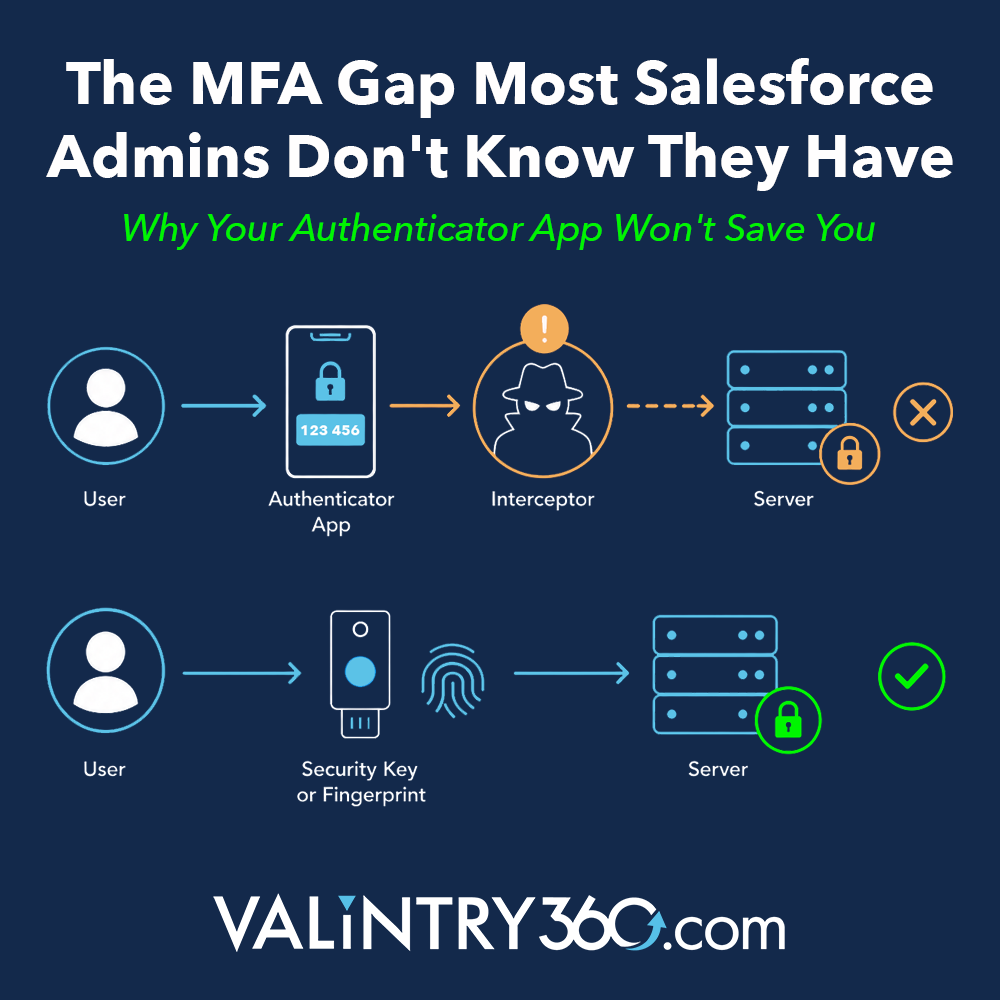
Authenticator apps, SMS codes, and push notifications can be defeated by a sophisticated attack. The specific vectors Salesforce is working to close include MFA fatigue attacks, where an attacker spams push notification approvals until a tired user accepts one. There are also adversary-in-the-middle attacks, where a one-time code is intercepted and replayed in real time. OAuth token abuse is another risk, where a compromised session token bypasses authentication entirely. These aren’t edge cases. Salesforce phishing campaigns targeting privileged credentials have been well-documented by the platform’s own security team. According to Salesforce’s own security guidance, these are the primary techniques behind the most damaging credential-based breaches on the platform. In short, data security in Salesforce is only as strong as the weakest authentication method in use.
How Phishing-Resistant Methods Work Differently
Phishing-resistant methods are architecturally different. Built-in authenticators like Windows Hello and Touch ID use device-bound cryptographic credentials. Because there is no code to intercept and no approval to manipulate, these methods are structurally resistant to the attacks above. Similarly, physical security keys like YubiKey operate on the same principle: the credential is hardware-bound and requires physical presence.
For Salesforce’s purposes, phishing-resistant means the authentication method must meet the FIDO2/WebAuthn standard. Anything short of that doesn’t satisfy the Salesforce MFA requirement for privileged users after July 1, regardless of how strong it feels in practice.
What to Audit Before the Deadlines Hit
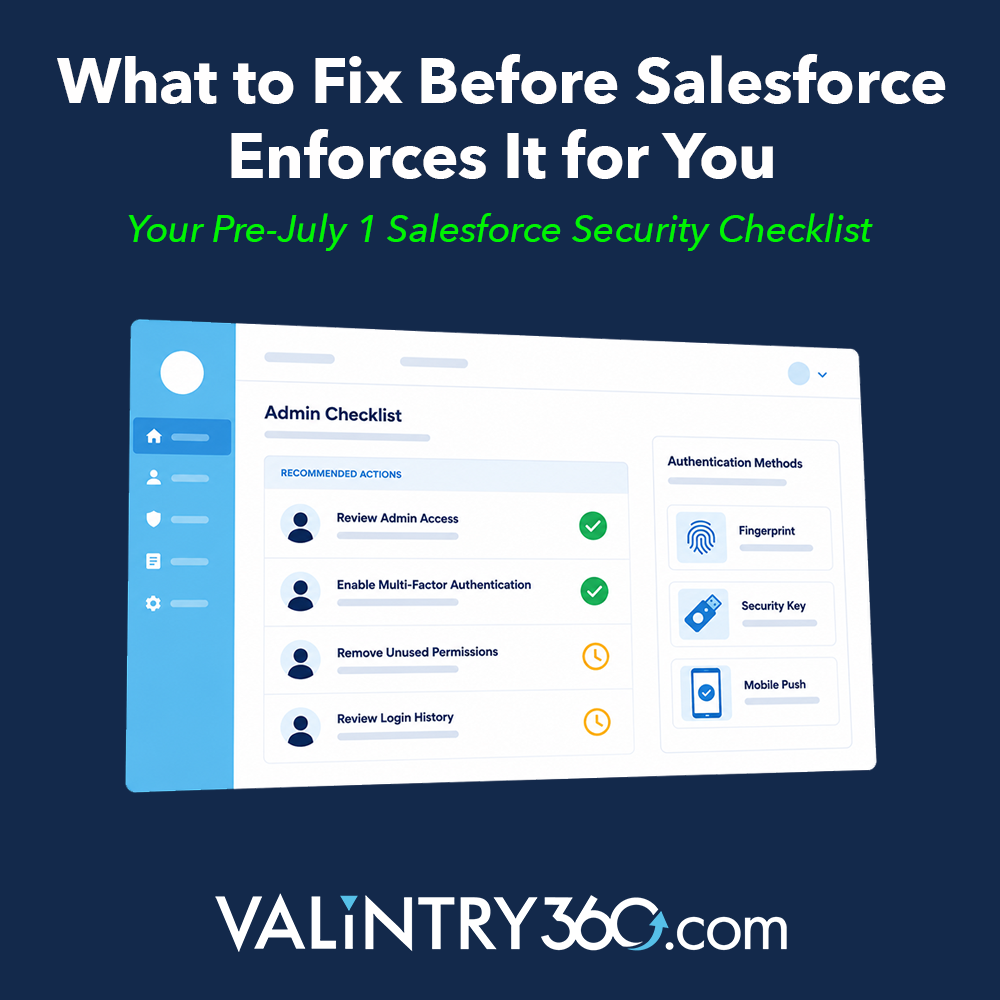
Here is the practical checklist. None of these steps are technically complex. Even so, each one takes time to execute correctly, and the July 1 deadline is close. Treat this as your working guide to enforce security across your Salesforce org before the deadlines hit.
Access and Enrollment
- Identify all privileged users. Pull the list of users with System Administrator profiles and any users holding Modify All Data, View All Data, Customize Application, or Author Apex permissions. This is your July 1 population.
- Confirm phishing-resistant enrollment. For every user on that list, verify they have a FIDO2-compliant method enrolled: Windows Hello, Touch ID, or a physical security key. Authenticator apps don’t count for this group.
- Test in sandbox before June 22. Sandbox enforcement begins June 22. Use that window to validate that your privileged users can authenticate with phishing-resistant methods before production enforcement goes live on July 1. In other words, don’t let July 1 be your first test.
Configuration and Integration
- Audit your SSO configuration. If you use Okta, Azure AD, or another external identity provider, confirm whether it enforces phishing-resistant authentication for privileged user sessions and whether it can pass authentication assurance signals to Salesforce. This is an IdP configuration task, not just a Salesforce task.
- Check step-up authentication readiness. Identify which users regularly run or export reports. Confirm they have enrolled MFA methods that work for step-up challenges and that phone numbers and email addresses on file are current. For orgs running Salesforce Shield or Event Monitoring: if you haven’t configured your own Transaction Security Policy before the enforcement date, Salesforce will auto-enable a default policy. That default may not align with your operational workflows, so get ahead of it.
- Check Mobile SDK versions if admins use the Salesforce mobile app. Mobile SDK versions 13.2.0 and earlier use a default authentication mode that can’t support phishing-resistant MFA. Admins on those versions will be blocked at login unless the org has pre-configured advanced authentication in My Domain settings. Verify your SDK version before July
Communication and Data Hygiene
- Brief your team before the deadline. The users most likely to be disrupted are the ones who don’t know what is coming. A short internal communication before July 1 is easier to manage than a help desk spike on July 2.
Common Failure Points We See in the Field
Based on what we see across Salesforce implementations, these are the patterns that create problems at enforcement time. Notably, most of them aren’t technical failures. They’re planning and communication failures.
Authentication Gaps
- Admins using authenticator apps who assume they are compliant. This is the most common gap. Authenticator apps satisfy general MFA requirements. However, they don’t satisfy phishing-resistant MFA for privileged users. The distinction isn’t obvious without a careful read of the enforcement documentation.
- SSO organizations that haven’t updated their IdP configuration. The SSO layer is present, so teams assume the requirement is met. In reality, the requirement isn’t about whether SSO is in use. It is about whether phishing-resistant authentication was performed and whether that signal is being passed to Salesforce.
Governance and Access Gaps
- Shared administrative accounts that nobody has addressed. Organizations still running shared admin logins face a compounding problem. Phishing-resistant MFA is device-bound and credential-bound to an individual. It doesn’t map cleanly to a shared account that multiple people access. If your org has shared admin credentials in use, this enforcement is the forcing function to move to named-user administrative access. Delaying that move makes the July 1 situation significantly messier.
- Overprivileged users who don’t actually need elevated access. Over time, permissions tend to accumulate. Temporary admin access becomes permanent, and permission sets get layered repeatedly. This enforcement is a practical opportunity to audit who genuinely needs privileged access and to remove it from those who do not. A smaller July 1 population means a smaller surface area for access problems.
Operational and Data Gaps
- Step-up authentication surprises for operational users. Finance, operations, and reporting teams who aren’t in IT’s direct line of sight often discover the step-up authentication enforcement when they can’t complete a time-sensitive task. Proactive outreach to those teams ahead of the deadline prevents the disruption.
Stale contact information for fallback verification. Users who changed phone numbers or email addresses and never updated their Salesforce profile will hit verification failures. That’s a simple data hygiene issue, but it creates disproportionate disruption if it goes unaddressed. - No sandbox testing window used. The June 22 sandbox enforcement date exists precisely to give organizations a testing window before production goes live. Teams that skip sandbox validation and go straight to July 1 production enforcement lose their safety net.
Common Failure Points We See in the Field
Ultimately, Salesforce security in 2026 isn’t a single event you can address with a single action. It is a phased enforcement campaign with different requirements for different user types and different deadlines for each phase. The privileged user deadline on July 1 is real, close, and requires a harder technical change than general MFA enrollment. Getting your Salesforce security posture right before that date is not optional.
Organizations that handle this cleanly share a few common traits. Privileged users are identified early. Phishing-resistant enrollment is confirmed in sandbox before June 22. SSO configuration is audited before anyone assumes it handles the requirement automatically. In contrast, organizations that get caught are treating this like a general MFA reminder rather than a targeted enforcement event with real access consequences.
If your team has the bandwidth and internal expertise to work through this checklist, use it. If you need an outside perspective on your org’s configuration before the deadlines hit, that’s exactly the kind of work we do. Our team works through situations like this regularly and can tell you quickly where your org stands. Learn more about how we support ongoing org health.
Related Posts
- Cybersecurity
6 Cybersecurity Lessons from the Universal Health Cyber…
In late September 2020, computer systems at Universal Health Services Inc., (UHS) one of the nation’s largest hospital chains, were taken offline after a malicious ransomware attack crippled the company’s computers and led it to cancel surgeries and divert some ambulances. In…