
- Agentforce
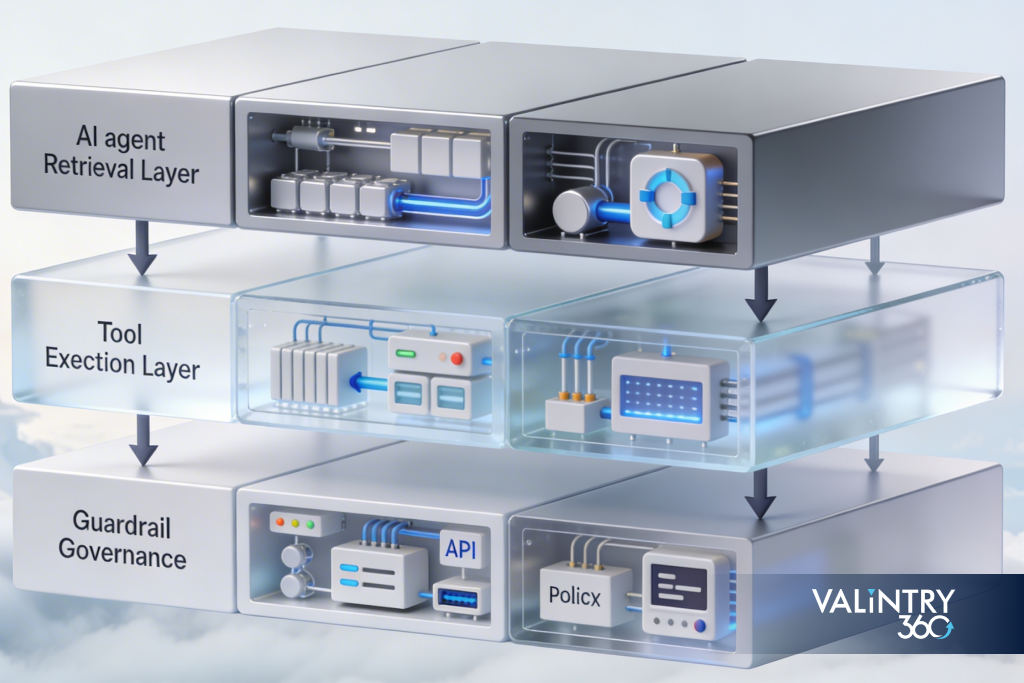
In a post-2024 world where organisations expect faster revenue workflows, safer automation, and lower operating costs, the adoption of agentic AI platforms such as Agentforce from Salesforce is now table stakes for forward-looking businesses. This guide is written for business leaders, RevOps and IT decision-makers in the Salesforce ecosystem who are either evaluating or already deploying Agent AI / Agentforce. You’ll walk away with concrete design patterns — around retrieval (grounding), tool usage (actions) and guardrails (policy/compliance) — customised for Salesforce programmes. You’ll also gain a readiness checklist and a way to de-risk the decision to partner with an expert implementer.
Overview
Retrieval / Grounding Patterns for Agentforce
Why retrieval matters
When you deploy an AI-agent platform such as Agentforce, the difference between valuable productivity gains and risky hallucinations often hinges on your grounding strategy. Agents must reliably retrieve business-critical data from sources such as Salesforce Data Cloud, CRM objects, document stores, and external systems — with accuracy, recency and correct permissions. Without this, you risk stale or incorrect outputs.
Pattern: Grounded Retrieval with Data Cloud
Trigger: A user asks the agent: “What’s the status of this opportunity and next best action?”
Inputs:
- Opportunity ID referencing an object in Salesforce
- Related records: Contact, Account, past Activities, Engagement Scores
- External unstructured data: Support articles, contract documents, partner notes
Retrieval step:
- Query Data Cloud or the Salesforce object layer for the latest opportunity and contact data
- Use embedding or semantic index for documents (service articles, contract terms)
- Filter by row-level security and permission sets (so the agent only sees what the user can access)
Policy check before reasoning:
- Is there PII/PHI in the document? Has consent been captured?
- Timestamp freshness: if data older than 7 days, flag for human review
Reasoning / Generation: Agent uses retrieval-augmented generation (RAG) to craft the recommendation
Output: A bullet-list of next-best actions, plus the confidence score and links to relevant source records
Success criteria:
- Accuracy rate > 90 % (verified by periodic audits)
- Time-to-first-action reduced by 30–50 %
- < 5 % of recommendations escalated incorrectly
Pattern: Freshness & Permissions Layer
- Maintain a sliding window of data freshness. For time-sensitive data (e.g., pricing changes, inventory), define maximum age (e.g., 24 h).
- Use Salesforce Shield or permission sets to enforce row-level filtering: the agent only retrieves what the human user would have access to.
- Document sources must be catalogued with metadata (created date, owner, classification) so the agent can check for staleness.
- Build alerts when the retrieval hit-ratio drops below threshold (e.g., documents not found, index latency high).
Common pitfalls & how to avoid them
- Pitfall: Agent uses stale doc and makes an incorrect suggestion.
Fix: Enforce “source age” check; if data older than X, escalate to human. - Pitfall: Agent retrieves data user is not authorised to see.
Fix: Integrate Salesforce security model into retrieval layer; enforce “least-privilege” design. - Pitfall: Too many false negatives because document index is small.
Fix: Build incremental ingestion pipeline; monitor content coverage and retrieval latency.
Tool-Use Orchestration in Agentforce
Once retrieval gives the agent the right context, the next stage is action. In the Salesforce ecosystem, that frequently means calling flows, Apex, platform events, external APIs or ISV tools — all orchestrated by the agent.
Pattern: Flow + External Action
Use case: A sales assistant agent auto-qualifies an opportunity and, if criteria met, triggers a quote approval flow.
Trigger: Opportunity stage moves to “Proposal” and the agent identifies missing fields or risks.
Inputs:
- Opportunity record, revenue forecast, credit score from external API, partner status from ISV tool
Policy check: - Credit score must meet threshold or human-approve
- External API call must include consent and log transaction
Action sequence:
- Agent populates missing fields via Salesforce Flow
- If credit < threshold, agent sends notification to sales manager; else triggers quote approval Apex method
- Post-action, agent updates opportunity record with “Automated by Agentforce” flag and logs event
Fallback logic:
- If Flow execution fails, agent logs error, re-queues retry after X minutes, and notifies human via Chatter or Slack
Success criteria:
- Cycle-time (proposal to approval) reduced by 40–60 %
- Error rate in automation < 2 %
- Human intervention only when policy threshold triggered
Pattern: Retry, Fallback & Monitoring
- Design tool-calls with idempotency and retry logic (e.g., “if external API timeout, wait 2min, retry 3 times”).
- Build fallback path: when automation cannot complete, agent gracefully hands off to a human-agent with context summary.
- Monitor latency budgets (e.g., each action must complete in < 5 s) and error budgets (e.g., < 1 % action failures/month).
- Log all calls and responses in a dedicated audit object in Salesforce to enable traceability.
Common pitfalls & how to avoid them
- Pitfall: Agent makes a change without human awareness, causing unintended billing or credit issue.
Fix: Define “actions with business impact” as escalated to human-in-loop; include confirmation step. - Pitfall: External API failures cause cascading stops.
Fix: Use circuit-breaker logic: if API fails X times, disable auto-action until human review. - Pitfall: Automation lacks visibility for operations teams.
Fix: Build dashboards for monitoring agent actions, success/failure trends, latency metrics.
Guardrails & Compliance for Agent AI in Salesforce
With autonomy comes risk: the agent must operate within guardrails of governance, security and auditability. A robust guardrail model safeguards brand, data and compliance.
Pattern: Guardrails for PII/PHI & Row-Level Security
- Classify all data the agent may surface: PII, PHI, financial, contractual.
- Enforce least-privilege: agents only access fields/users/layers appropriate for role.
- Use prompt-template policy: if user asks agent to “Export all customer data”, prompt triggers escalation rather than direct execution.
- Use red-teaming and prompts-as-policy: create negative test scenarios (“What if the agent reveals SSN?”) and verify agent blocks them.
- Maintain audit logs for every agent reasoning, action and decision; store in secure object, tie to change-control record.
Pattern: Human-in-the-Loop & Incident Playbook
- Define classes of decisions: auto-action allowed, human approval required, forbidden action.
- Flag “high-impact” actions (e.g., legal commitments, large discounts, contract termination) for human review.
- Develop incident playbook: if agent mis-behaves, human can “pause” the agent, trigger an investigation, roll back changes.
- Regulated industries: implement policy-as-code (for example via Salesforce Shield) so that agent decisions are traceable, auditable, and support strategic governance.
Common pitfalls & how to avoid them
- Pitfall: Agent accidentally exposes private customer data.
Fix: Use classification metadata + mask or prevent output from fields with “PII” tag. - Pitfall: No audit trail, making investigation impossible.
Fix: Log every agent decision, retrieval, tool invocation and output. - Pitfall: Over-trust in agent => no human oversight for high-risk decisions.
Fix: Explicitly build human-in-loop thresholds; default to conservative model.
Deployment Patterns & KPIs for Scaling Agents
Having built grounding, actions and guardrails, the next step is deploying and scaling. You want a structured path from pilot to enterprise-wide adoption and measurable KPIs.
Stage: Pilot → Scale
Pilot phase checklist:
- Define one business process (for example, Tier-1 service deflection)
- Grounding, tool use, guardrails implemented end-to-end
- Define metrics (TTR, deflection rate, error rate)
- Run for 4–8 weeks, review performance.
Scale phase:
- Expand to multiple processes/functions (sales, marketing, field ops)
- Consolidate agent governance centre of excellence (COE)
- Implement change-management: user training, trust building, feedback loops
- Set SLA/latency budgets (e.g., agent response within 2 s, action execution within 5 s)
- Define error budget (e.g., agent action failures < 0.5 %). If budget exceeded, revert to human-only mode until root cause solves.
Core KPIs to track
- Deflection rate: proportion of service cases resolved by agent without human intervention (target 20–40 %).
- Handle-time reduction: average time saved per task (target 30–60 %).
- Cycle-time shrinkage: time from trigger to resolution (target 40–70 %).
- Operational cost savings: e.g., each agent replacement = cost of 0.5 FTE annually; scale accordingly.
- Governance and compliance metrics: number of policy violations, audit findings, escalations.
- Adoption/Trust: user satisfaction, percentage of users who ratify agent output without modification.
Deployment decision-tree
- Is your process highly structured, high volume, repeatable? → Good candidate.
- Do you have clean, accessible data for retrieval? → If yes → go ahead; if no → invest in data readiness first.
- Are there clear actions the agent can autonomously take? → If yes → proceed; if no → consider standard automation.
- Do you have governance, security and audit model in place? → If yes → pilot; if no → build guardrails first.
Common pitfalls & how to avoid them
- Pitfall: Scaling too fast before governance & data readiness leads to failures.
Fix: Use pilot-scale-govern model; only after success scale. - Pitfall: Focusing on technology over change-management.
Fix: Invest in user training, trust building, communication about how agents work and when humans still intervene. - Pitfall: Ignoring latency or error budgets.
Fix: Define SLAs early; monitor dashboards; treat agent as production service.
This phased approach minimizes disruption and builds internal confidence—critical for AI adoption at scale.
Business Value & ROI: When to Use Agentforce vs Standard Automation

Mapping value
Use-case buckets across Salesforce organisations:
- Sales Assist: agents that qualify leads, update opportunities, suggest next-best action. Potential value: 20–30% increase in pipeline conversion, 15–25% reduction in sales cycle time.
- Service Deflection: Tier-1 case auto-resolution or knowledge-base retrieval. Value: 10–30% case deflection, 30–50% handle-time reduction.
- Field Ops / Marketing Ops: autonomous outreach, campaign optimisation, content compliance review. Value: 25–40% cost reduction in repetitive ops, faster campaign time-to-market.
Assumptions: Data is accessible, team resources ready, governance in place.
Decision framework: Agentforce vs standard automation
- Use standard automation (flows, process builder, RPA) when: process is simple, decision logic fixed, low volume, low complexity.
- Use Agentforce (Agent AI) when: process spans multiple systems, retrieves unstructured data, requires natural language reasoning or multi-step decisions, high volume, strategic value.
- If you’re unsure: Pilot Agentforce for one process; run side-by-side with standard automation and compare metrics.
Soft FOMO-angle
Teams that partner with experienced implementers often reach ROI sooner (by 3–6 months) than those building in isolation. The risk of doing nothing is missing the operational leap others in the industry are already making.
Conclusion
For business leaders in the Salesforce ecosystem, embracing Agent AI / Agentforce opens a path to faster workflows, lower costs and safer automation — but only if done with disciplined design: retrieval/grounding, tool-use orchestration and robust guardrails. The business case is compelling; the risk of a mis-step is real. With proper governance and careful deployment, you can realise measurable value and reduce operational risk. If you’d like a sanity check or second set of eyes on your design, VALiNTRY360 — Salesforce Consulting and Solutions can help you pressure-test patterns and accelerate time-to-value.
Related Posts
- Agentforce
Agentforce vs Salesforce Flow: Which Should You Use…
Your Salesforce org may already depend on Flow for record updates, approval routing, notifications, scheduled jobs, guided screens, and other repeatable processes. Each path is configured in advance, so the system follows the same rules whenever the same conditions appear.Agentforce…
- Agentforce
Agentforce Readiness Checklist: Is Your Salesforce Org Ready?
Agentforce reads whatever your Salesforce org already contains, and it acts through the automation you've already built. That inheritance is the whole readiness problem, in one sentence.An agent inherits your duplicate contact records, your too-wide permission sets, and that Flow…
- Agentforce
Agentforce Implementation Cost in 2026
Salesforce publishes a price for a credit, a conversation, a user license, and a resolved case. Those numbers price the meter.Your project is everything that happens before the meter starts running: defining the process, cleaning the records the agent will…